Subtitle readers on the sofa
If you regularly read text while playing together, check how subtitles look from your own seat. The German consumer advice centre points out that lighting and viewing angles in the room matter, as well as screen size.


For couch co-op, the screen size should suit your viewing distance, and subtitles and picture quality should be easy to see even from the furthest seat on the sofa. Then check input lag in Game Mode and make sure the frame rate and connections match your console and game. A high stated refresh rate alone doesn’t prove there’s an advantage. The German consumer advice centre recommends taking viewing distance, lighting and viewing angles into account when choosing a screen size; RTINGS measures input lag under different signal conditions.
If you regularly read text while playing together, check how subtitles look from your own seat. The German consumer advice centre points out that lighting and viewing angles in the room matter, as well as screen size.
If other players are sitting well off to the side, it’s important to see how the picture changes away from the centre. RTINGS identifies viewing angle as a relevant factor for wider seating arrangements.
For fast-paced platform games, what matters is the delay in the Game Mode you’ll actually use. RTINGS measures input lag across different combinations of resolution and frame rate.
OLED and Mini-LED/LCD aren’t interchangeable solutions for every situation. Check the specific model in your own room and from the seats you’ll actually use. The German consumer advice centre lists viewing distance and lighting as important factors when choosing a size; RTINGS assesses viewing angle and input lag separately.
Worth considering if: several people sit at an angle to the screen and, alongside responsive gaming, you particularly value contrast. Assess the specific model from each seat.
Things to weigh up: If you play for long sessions and often have fixed elements on screen, consider how you use the TV and follow the manufacturer’s care advice. Accelerated endurance tests can’t reliably predict what will happen with your own TV.
Worth considering if: the room is bright or long gaming sessions with fixed elements on screen are part of how you play. Check reflections, Game Mode and off-centre viewing on the specific model.
Things to weigh up: LCD models vary in viewing angle. The Mini-LED name alone doesn’t guarantee easy-to-read subtitles or a clear view from the edge of the sofa.
| What matters to you | What to check when buying | Who it matters most to |
|---|---|---|
| Subtitles and in-game text | Measure the viewing distance and available space; check the subtitles in the actual game from the furthest seat. | If I want to read the in-game text from the furthest seat on the sofa, I’ll check it in the game I actually play. Around 31 % of consumers say readable in-game text is their main concern. |
| Viewing from the edge of the sofa | Watch a bright and a dark game scene, including subtitles, from the outer seats; consult viewing-angle tests for the specific model. | If other players are sitting to the side, I want to see whether the picture and text are still clear from there. Around 25 % of consumers say off-centre viewing is their main concern. |
| Responsiveness while gaming | Check input lag in Game Mode at a suitable resolution and frame rate; make sure the console, HDMI input and game output are compatible. | For platform games, I want my inputs to register without unnecessary TV processing, and I’ll only consider frame-rate features that are compatible. Around 25 % of consumers say the most direct input response possible is their main concern. |
| Cost and features | Compare the EU energy label and product data sheet; check the dimensions, connections and features you actually need. | If I want to keep purchase and electricity costs in check, I’ll compare energy use and won’t let features I won’t use sway my decision. Around 19 % of consumers say keeping costs under control is their main concern. |
The right size depends in part on viewing distance and where the TV is positioned; the game itself determines the subtitle size. A 4K label doesn’t tell you how easy the text will be to read from your seat.
Measure the seating positions and, if possible, test the in-game text with the same console and game.
Colour, brightness and contrast can change when you view the screen from the side. Players sitting at the edge won’t necessarily see the same picture as those in the middle.
Include the furthest seat in your checks and read viewing-angle tests for the specific model.
TV-related delay depends on the signal and picture mode you’re using. A high refresh rate doesn’t, on its own, prove that input lag will be lower.
Compare input-lag measurements in Game Mode at the resolution and frame rate your console actually outputs.
Screen size and features can affect electricity use. Delivery and installation should also suit the specific offer and where you plan to put the TV.
Compare the EU energy label and product data sheet, and check the delivery and installation terms before buying.
The OLED55C57LA is a specific OLED option to consider if you want to compare gaming features and visibility from several seats.
The GQ55QN85DBTXZG is a specific Neo QLED/Mini-LED model to compare with OLED TVs.
The 55C7K is a specific QD-Mini-LED option for checking screen size, features and off-centre viewing on the model itself.
The Z95B series is another OLED option to consider if sound and other TV uses matter as well as gaming.
The following Joybuy products are Mini-LED/LCD TVs to compare for screen size and gaming features for couch co-op. Check subtitles in the specific game and from the seats you’ll actually use.
 No image available
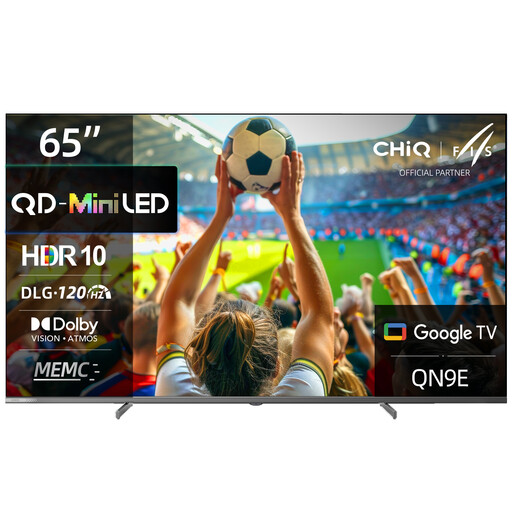
The 65-inch screen is one size option to weigh up against your viewing distance and available space.
Listed features include 4K UHD, DLG 120 Hz, MEMC, Dolby Vision, Dolby Atmos and Google TV (Android 14).
 No image available
The stated 55-inch size lets you compare the TV with your viewing distance and sofa seating positions; it doesn’t, on its own, guarantee readable subtitles.
Listed features include 4K, 144 Hz, VRR and HDMI 2.1.
 No image available
The 55-inch screen gives you a specific starting point for checking the TV against your viewing distance and shared seating positions.
Listed features include 4K UHD, 144 Hz, VRR, ALLM and HomeOS U9.
For installation, you’ll need a stable, level surface or a suitable wall mount.
 No image available
The 43-inch screen is a more compact option to weigh up against your available space and viewing distance.
The product name lists Mini-LED and 144 Hz VRR.
For wall mounting, choose a bracket suitable for the TV’s weight; the product description recommends professional installation.
 No image available
With a 75-inch screen, it’s particularly important to check your viewing distance and available space in advance; the size alone doesn’t guarantee easy-to-read subtitles.
Listed features include 4K HDR, 144 Hz VRR, HDMI 2.1, Google TV and AMD FreeSync Premium Pro.
The product description notes the TV’s heavy weight and says it must be mounted securely or placed on a stable surface.
No, the screen size alone isn’t enough to tell. Measure the distance to each seat and check the text in the specific game from the furthest seat and the one furthest to the side. General viewing-distance guidance can’t replace this test.
No. What matters is the signal your console and game actually output, and how the TV performs in Game Mode. A TV’s 144 Hz rating doesn’t guarantee an advantage in every platform game.
To use TV Mode with the standard Nintendo Switch, you’ll need the dock, the power supply and an HDMI cable. Then select the correct HDMI input. The Nintendo Switch Lite doesn’t support TV Mode.
Static areas displayed repeatedly for long periods may be at risk of permanent image retention. Accelerated endurance tests can’t reliably predict what will happen with your own varied gaming habits, so consider how you use the TV and follow the manufacturer’s care advice.
If there’s a fault, contact the seller. The German consumer advice centre says that the statutory warranty period is generally two years. This is separate from a voluntary guarantee. Online purchases also generally come with a 14-day right to cancel; when the period starts and whether any exceptions apply depend on the specific circumstances.