Who is a gaming TV for in a shared house?

Competitive play with quick inputs

When you’re playing against each other, what matters is the delay between an input and the visible response in the game mode you’re actually using. Look at measurements for the exact model and signal, not just the advertised pixel response time.

A shared house with several viewing spots

If people will be sitting to either side of the centre, make sure the screen size, seating distances and viewing angles suit the room. Remember to plan for your console and PC connections, too.

A shared TV for the whole house

If the TV will also be on between matches, ambient light, long periods displaying unchanged images and energy consumption may all affect your choice. Agree on where to put it and how loud to play with your housemates, too.

What should you look for when choosing one?

Compact OLED TV

A good fit if: space is limited or players will be sitting off-centre. LG and Philips each list a 42-inch OLED model with gaming features.

Trade-off: The risk of burn-in is still worth considering if images stay unchanged for long periods. LG says it can’t be ruled out completely, even with protective measures.

LCD or Mini-LED TV

A good fit if: a larger picture in the communal space or use in bright surroundings is your priority. The models listed differ in size, display technology and connections.

Trade-off: Manufacturers’ claims about refresh rate or VRR don’t replace a direct comparison of latency and viewing angles. Check the features of the specific model.

Buying criterion What to look for Who should care?
Input lag Check measurements for the exact model, input signal and Game Mode settings. A higher refresh rate doesn’t automatically mean a game outputs more frames per second. If you need precise inputs in competitive play, you’ll want to avoid unnecessary delays in the signal chain. Around 31% of consumers put low input lag first.
Screen size and viewing angles Consider seating distances, off-centre spots, room lighting and available space together. The Verbraucherzentrale recommends matching screen size to viewing distance. If several people will be watching from different spots, the screen should be a suitable size for the group and easy to see from the side. Around 25% of consumers prioritise a good view for everyone.
Connections Check which HDMI inputs support the features your devices need. According to IMTEST, the HDMI 2.1 label alone doesn’t guarantee every gaming feature. If you switch between a console and PC, you’ll want to connect both without constantly swapping cables. Around 19% of consumers prioritise connections for multiple sources.
Suitability for shared living Agree on where to put the TV and how loud to play with your housemates, and check local rules and your house rules. When it comes to noise affecting neighbours, the Umweltbundesamt refers to rules set by federal states, local authorities and house rules. If you play in a shared space, you’ll want the sound and setup to work for everyone in the house. Around 13% of consumers give this consideration the highest priority.
Long-term use With OLED, consider long periods displaying unchanged images and the remaining risk of burn-in. For energy consumption, check the EU energy label for the specific device. If the TV is used regularly, energy consumption and how you handle long-running on-screen images matter alongside gaming. Around 12% of consumers prioritise long-term use and ongoing costs.

Which buying decisions can be misleading?

  • Assuming refresh rate or pixel response time means low input lag

    On their own, these figures don’t describe the delay between an input and the visible response in the game mode you’re using.

    Check measurements for the exact model, the signal you plan to use and your chosen game settings.

  • Assuming HDMI 2.1 means every input has the same features

    Gaming features may not be available on every HDMI socket. For the Sony K-55XR5, the manufacturer lists VRR for HDMI 3 and 4.

    Connect your consoles and PCs to inputs that support the features they need.

    If you haven’t planned your socket usage, you may need to swap cables or rethink how everything is connected.

  • Looking only at screen size

    Viewing distance, off-centre seating and lighting all affect how well a TV works in a shared space. COMPUTER BILD criticised the viewing-angle stability of the Hisense 55UR8DS and 55U7DS Pro models it tested.

    Decide where people will sit and where the TV will go, then check the viewing angles of the exact model.

  • Assuming a voluntary warranty fully protects against OLED burn-in

    According to LG, burn-in can’t be ruled out completely on OLED TVs, even with protective measures. Statutory consumer rights and a voluntary manufacturer’s warranty are different forms of protection.

    Avoid leaving unchanged images on screen for longer than necessary, and check the warranty terms for the specific model.

Which brands and model ranges are worth considering?

LG

The OLED42C5ELB is a 42-inch OLED model, and LG advertises gaming at up to 4K at 144 Hz. This isn’t an independent measurement of input lag.

  • Worth considering as a compact OLED option for a shared house with limited space.
  • LG says burn-in can’t be ruled out completely, even with protective measures.

Philips

For the 42OLED810/12, Philips lists a 42-inch OLED display, Ambilight and VRR up to 144 Hz.

  • A compact model option with backlighting.
  • Ambilight and the stated VRR maximum don’t prove low input lag. Check this separately for the signal you’ll use.

Sony

The K-55XR5 is a 55-inch Mini-LED model with a 120 Hz panel. Sony lists four HDMI inputs and VRR for HDMI 3 and 4.

  • The details of which sockets support which features help when planning for multiple sources.
  • The manufacturer’s specifications aren’t an independent assessment of latency or viewing angles.

Samsung

The GQ65QN90FATXZG is a 65-inch Mini-LED TV, and Samsung advertises up to 165 Hz at 4K.

  • A relevant larger-screen option for a communal space that’s been planned to accommodate it.
  • The advertised refresh rate doesn’t prove the frame rate of a specific fighting game or its input lag.

TCL

COMPUTER BILD includes the 55C8L and 55C7L models in a general TV ranking, not a ranking for fighting games.

  • The review describes both models as having a bright picture.
  • COMPUTER BILD describes setting up both tested models as fiddly. This assessment doesn’t automatically apply to other TCL models.

Joybuy products for gaming nights in a shared house

This selection includes OLED models for more compact setups, as well as LCD and Mini-LED TVs for larger shared spaces.

Hisense 75E8S, 75-inch Mini-LED TV

Hisense 75E8S, 75-inch Mini-LED TV

For a larger shared setup. First check that the screen size suits your room and viewing distances.

The model is listed as offering 4K, QLED, 144 Hz, VRR and ALLM. The product details specify four HDMI 2.1 inputs and a 178° viewing angle. These features require compatible sources and don’t prove a specific input lag.

View at Joybuy

LG OLED55B68LA, 55-inch OLED TV

LG OLED55B68LA, 55-inch OLED TV

A 55-inch OLED option for a shared space, if its size and OLED characteristics suit the way you’ll use it.

The model is listed as offering 4K, 144 Hz, VRR, ALLM, G-SYNC, FreeSync and four HDMI 2.1 inputs. LG notes that burn-in can’t be ruled out completely on OLED TVs in general; this doesn’t predict a fault with this model.

View at Joybuy

LG OLED42C67LA C6, 42-inch OLED TV

LG OLED42C67LA C6, 42-inch OLED TV

The 42-inch screen may suit a smaller space. Compare it with your viewing distances.

The model is listed as offering 4K, VRR up to 165 Hz, G-SYNC, FreeSync, ALLM and four HDMI inputs. Check that the input you use supports the features you need; refresh rate alone says nothing about input lag. LG notes that the risk of burn-in on OLED TVs can’t be ruled out completely in general.

View at Joybuy

TCL 75Q7C, 75-inch QLED Mini-LED TV

TCL 75Q7C, 75-inch QLED Mini-LED TV

A large screen for a shared setup, if you have enough space and the viewing distances are suitable.

The model is listed as offering 4K, 144 Hz VRR, FreeSync Premium Pro and Game Master. The product details specify four HDMI 2.1 inputs. Compatible sources and inputs are essential for these features to work.

View at Joybuy
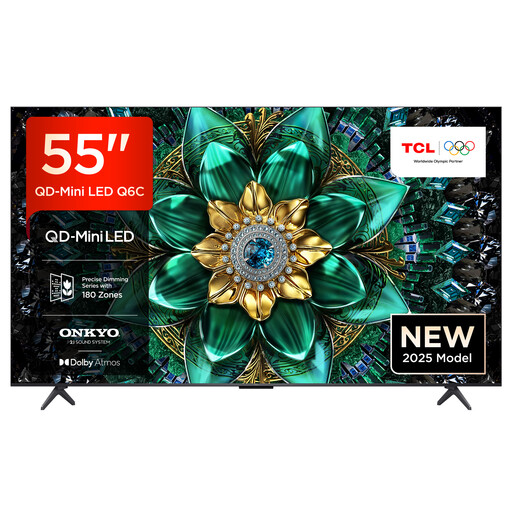
TCL 55Q6C, 55-inch QLED Mini-LED TV

TCL 55Q6C, 55-inch QLED Mini-LED TV

The 55-inch screen could be a mid-sized option for a communal space. Factor in viewing distances and off-centre seating when deciding.

The model is listed as offering 144 Hz VRR, FreeSync Premium Pro, Game Master and four HDMI 2.1 inputs. The product details also specify a wide viewing angle; check the view from where you plan to put it.

View at Joybuy

Frequently asked questions

Are 120 Hz or HDMI 2.1 enough for fighting game tournaments?

No, those specifications alone aren’t enough. Check input lag in Game Mode with the signal you’ll use, and find out which features the HDMI inputs you need actually support. A higher refresh rate only helps if your source and game support the corresponding output.

What should I check before mounting a TV on the wall in a shared house?

Check the type of wall, choose a suitable bracket and read the installation instructions for the specific TV. LG notes that some walls aren’t suitable and recommends getting professional help with wall mounting. This is the manufacturer’s recommendation, not a general legal requirement established here.

How can I work out running costs and my rights after buying?

Compare the EU energy label for the specific device and check delivery or installation costs before you buy. If a product is faulty, the seller is generally responsible under statutory consumer rights; the Verbraucherzentrale says this period is two years. Online purchases usually come with a 14-day right to cancel, which you must notify the retailer about.

Will an extra TV for tournaments mean paying another TV licence fee?

Not just because you have an additional device. According to ARD ZDF Deutschlandradio Beitragsservice, one TV licence fee is generally charged per home, regardless of the number of residents or reception devices. Check separately whether different types of shared accommodation count as one home.

Can everyone in a shared house play loudly late at night without worrying about others?

There’s no single nationwide permission that applies in every case. The Umweltbundesamt lists loud TVs as a possible source of noise affecting neighbours and refers to state law, local rules and house rules for the requirements that apply. Check the rules for your address.