Start by choosing a TV that fits your available space and has low input lag in Game Mode for the signal your console or PC actually outputs. A high maximum refresh rate alone won’t answer that question. If you’ll mostly be sitting directly in front of the screen, an especially wide viewing angle may not be a priority. Also compare the room lighting, placement and Game Mode settings for the specific model.
Who is this gaming TV for?
Competitive players who value responsiveness
If you want your inputs to appear on screen as quickly as possible in the Game Mode you use, compare input lag at the relevant resolution and refresh rate rather than relying on the Hz figure alone. RTINGS explains how it measures input lag across different combinations of resolution and refresh rate.
Players with limited space for a TV
In a compact setup, the screen and stand need to fit the space available. If you’ll mostly be sitting directly in front of the TV, you may not need the same viewing angle as you would for spectators sitting to the side. RTINGS notes that viewing angle can matter less when you’re seated directly in front of the screen.
Tournament sessions in challenging lighting
If there are windows or lamps in the room, reflections and seating position matter as well as gaming features. Samsung advertises an anti-reflection feature on the GQ43QN90FATXZG, but how well it works depends on the specific setup and lighting conditions.
What should you look for when buying?
Compact OLED TV
A good fit if: a 42-inch TV will fit your setup, you can control the room lighting and other players may be viewing the screen from the side.
Consider: reflections and long periods with unchanged images should factor into your decision. Manufacturer claims about gaming features are no substitute for input lag measurements in the relevant signal mode.
Compact LCD or Mini LED TV
A good fit if: players will usually be sitting directly in front of the screen, and room lighting or reflections are key considerations when choosing a TV.
Consider: anti-reflection performance, viewing angle and input lag depend on the specific model and how you use it. The panel type and advertised Hz figure won’t answer these questions on their own.
| What matters |
What to look for when buying |
Who it matters most to |
| Input lag |
Compare measurements for the specific model, resolution and refresh rate you’ll use, and the relevant Game Mode. |
In close fighting game matches, I want my inputs to register as directly as possible, rather than choosing a TV based solely on a high Hz figure. Around 36% of consumers make input lag their top priority. |
| Size and seating arrangement |
Check the TV and stand dimensions against the available space, and take the intended seating positions into account. |
If the screen needs to fit into a tight setup and be visible from the seats we’ll use, the exact layout is my main concern. Around 29% of consumers prioritise size and seating arrangement. |
| Room lighting and visibility |
Consider light sources, reflections and side-on seating at the intended viewing position. |
If I’m playing near windows or lamps, or spectators will be sitting to the side, I want to check how well I can see the screen in those exact conditions. Around 21% of consumers prioritise room lighting and visibility for spectators. |
| Long gaming sessions |
For OLED, check the model’s care guidance and warranty terms. Compare energy consumption on a like-for-like basis using the EU energy label. |
During long tournament sessions with unchanged on-screen elements, I want to consider care requirements and running costs too. Around 14% of consumers are most concerned about extended use and care. |
Common gaming TV buying misconceptions
-
Assuming 144 Hz guarantees low input lag
Refresh rate and input lag are different things. RTINGS measures input lag across different signals, resolutions and refresh rates, so an advertised maximum refresh rate doesn’t tell you how the signal you actually use will perform.
Compare measurements for the specific model and the signal you’ll use. Then check which signal your console or PC outputs.
-
Making viewing angle the top priority regardless of seating position
If you’ll mostly be sitting directly in front of the screen, a particularly wide viewing angle may matter less than it would for spectators sitting to the side. How close you are to the screen also affects how well you can see its edges.
First, mark out the player and spectator positions, then choose your screen size and panel accordingly.
-
Assuming similarly named model variants are identical
RTINGS reviews the OLED42C6PUA, while LG Germany lists the OLED42C6ELB. Similar names don’t prove that the test results or features are fully transferable between the models.
Check the full model number and specifications before applying measurements to a different variant.
-
Overlooking long periods with static images and energy use
If you play for long periods with unchanged on-screen elements, OLED care guidance and warranty terms should be part of your decision. Compare energy use using the EU energy label; the European Commission also provides the EPREL database.
Think about how you use the TV, check the care guidance for the specific model, and look at its energy label if you regularly play for long sessions.
Brands and suitable model ranges
LG
The C Series includes compact 42-inch OLED models, such as the OLED42C57LA and OLED42C6ELB.
- LG Germany lists gaming support up to 4K/144 Hz for the C5 model and up to 4K/165 Hz for the C6 model.
- These manufacturer claims are not comparable input lag measurements. Test results for the OLED42C6PUA can’t be applied to the OLED42C6ELB unless it’s confirmed that the variants are identical.
Samsung
The 43-inch Neo QLED QN90F is a compact Mini LED option to consider if reflections are a factor in your choice.
- Samsung advertises its Glare Free feature on the GQ43QN90FATXZG.
- This doesn’t prove how well it will work with a particular window or lamp, or what the input lag will be with your tournament signal.
Hisense
The 43E7Q PRO is a compact Hi-QLED option, while the 50U7Q is worth considering if your setup has room for a 50-inch TV.
- Hisense lists a 144 Hz Game Mode for both models.
- This doesn’t replace model-specific input lag testing. The 43E77Q PRO has a different model name from the 43E7Q PRO.
Philips
The 42OLED810/12 is a compact OLED alternative with Ambilight as an added feature.
- Philips lists the model as 42 inches, with VRR up to 144 Hz.
- Ambilight is a feature preference, not proof of lower input lag in fighting games.
TCL
The 50C7K is a QD Mini LED option for setups with enough room for a 50-inch TV.
- TCL lists a native refresh rate of 144 Hz for the 50C7K.
- Screen size and refresh rate alone don’t tell you whether it will fit in a tight space or what its input lag will be.
Joybuy products for compact gaming setups
These 43-inch TVs are options for a compact gaming setup. Compare their dimensions and check that the listed features are compatible with your gaming device and signal.
 No image available
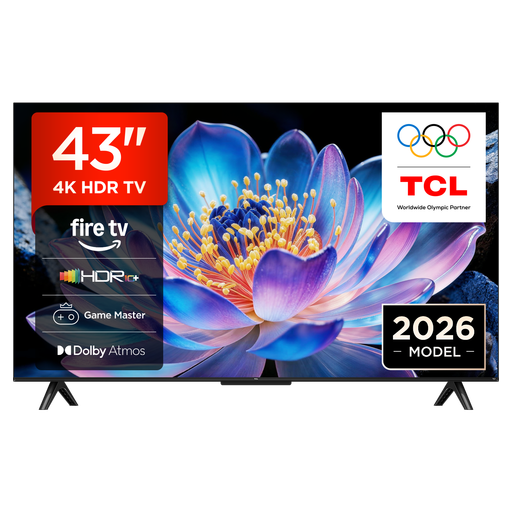
TCL 43V6D, 43-inch, 4K UHD Smart TV with Fire TV
The 43-inch size may suit a compact setup; check the TV’s dimensions against the space available.
Listed specifications: 43 inches; 4K UHD.
Joybuy
 No image available
LG 43QNED86B6B, 43-inch gaming TV with Mini LED and 144 Hz VRR
The 43-inch size may suit a compact space; check the actual TV and stand dimensions before buying.
Listed specifications: Mini LED; VRR up to 144 Hz; AMD FreeSync.
Joybuy
Gaming TVs for fighting games: frequently asked questions
Do I absolutely need 144 or 165 Hz for fighting games?
No, not just because of the TV’s maximum refresh rate. What matters is the signal actually used by the game and your console or PC. Compare input lag for that exact combination. PlayStation says games that support a 120 Hz frame rate can be output at 120 Hz.
How do I check that my PS5 is set up correctly for gaming?
In the PS5 settings, go to ‘Screen and Video’ to check the current output signal and information about the connected HDMI device. ALLM will only switch to a low-latency mode automatically if your TV supports the feature; 120 Hz output requires a game that supports it.
How should I care for an LG OLED TV after long gaming sessions?
LG says its OLED TVs run an automatic Pixel Cleaning process after being switched off, and recommends leaving the TV plugged in so it can do this. Follow the care guidance for your specific model; a care feature can’t guarantee protection against every instance of permanent image retention.
Where can I compare energy use, and what are my rights when buying online in Germany?
The EU energy label and the European Commission’s EPREL database can help you compare TV models for which data is available. Online purchases generally come with a 14-day cancellation period; as explained by the Verbraucherzentrale, the period may start when the contract is made or when you receive the goods. Your statutory rights are separate from any voluntary manufacturer’s warranty.
Can I put an old TV in the household rubbish?
No. The German Environment Agency says that old electrical equipment must be collected separately and returned in line with the ElektroG. Check the return options available from your retailer or local waste disposal authority.


