Choose a gaming TV based on your seating, the space available and the lighting conditions – paying particular attention to the furthest and most off-centre viewing positions. Try a split-screen game in the place where you plan to set up the TV. 4K/120 Hz or VRR only become deciding factors if the TV, HDMI port, console and game all support the output you want. OLED and Mini-LED are both options, but their reflection handling differs from model to model, as does how they cope with static game displays left on screen for long periods.
Who’s playing together?
Co-op group with seats in different positions
If you play at the dining table and from seats off to the side, clear on-screen information and the right screen size matter. The Verbraucherzentrale (German consumer advice centre) points out that the right screen size depends on your viewing distance.
Gaming in daylight
If you often play with light coming in through the windows, check for reflections where you plan to set up the TV and from the actual seating positions. A manufacturer’s claim that a screen is anti-reflective is no substitute for assessing the conditions in your room.
Console group looking for high frame rates
If you want to play supported games at high frame rates, check the TV, HDMI input, console and game together. Sony’s gaming support explains that you need compatible signals and the right settings on the HDMI port you’re using.
What should you consider when buying?
OLED TV
A good fit if: contrast and gaming features matter to you, and you can check the light sources in your planned viewing position.
Trade-off: LG points out that burn-in cannot be completely ruled out with static content displayed for long periods, even with protective features.
Mini-LED TV
A good fit if: you’re considering an LCD/Mini-LED set as an alternative to OLED, and the screen size suits your viewing distance.
Trade-off: manufacturer claims alone don’t tell you how reflections or off-centre viewing will be in your particular set-up.
| Priority |
What to check when buying |
Who is this especially important to? |
| Readability and size |
Consider the viewing distance from every seat, the space available and how easy it is to read the screen while playing a co-op game you actually use. The Verbraucherzentrale recommends choosing a screen size to suit your viewing distance. |
When we play at the dining table and from seats off to the side, I want to be able to read the on-screen information; around 36% of consumers put readability and the right size first. |
| Daylight and viewing angles |
Check the position of the windows, the screen finish and picture quality from every seat in typical daylight. |
With light coming in through the windows, I want to assess reflections and the view from seats off to the side together; around 29% of consumers prioritise lighting and viewing angles. |
| Gaming signals |
Check for 4K/120 Hz and VRR support on the HDMI input you’ll use, as well as the console and game settings. |
If I want to play specific games at high frame rates, I check the whole signal chain; around 21% of consumers prioritise compatible gaming features. |
| Power consumption and long-term use |
Compare the EU energy label and product information sheet for the exact screen size you’re considering. If static game displays stay on screen for long periods, take OLED care guidance into account. |
If the TV is often on for long periods or game displays stay on screen for a while, I want to consider power consumption and how I use it; around 14% of consumers prioritise power consumption and long-term use. |
Which buying mistakes can you avoid?
-
Choosing based on screen size alone
In an open-plan kitchen and living area, players may sit at different distances from the screen. With split-screen games, on-screen information can be harder to read from some seats.
Measure the planned seating positions and the available floor or wall space. Check how easy it is to read the screen while playing a typical co-op game in the spot where you intend to set up the TV.
-
Assuming 144 Hz means a game runs at 144 frames per second
The TV’s specification alone doesn’t tell you the frame rate a particular co-op game will actually output. The source, content, connection and settings all play a part too.
Check the output for the console and game you’ll actually use. Also make sure you’re using the right HDMI input and check its gaming settings.
-
Assuming OLED burn-in is either certain or impossible
There is still a risk when static game displays remain on screen for long periods. LG says protective features cannot rule it out completely.
When weighing up OLED, consider your gaming habits and the care and usage guidance for the specific model. There’s no need to treat it as an automatic deal-breaker.
Relevant brands to consider
LG
The German-market 55-inch C5 OLED55C59LB is a specific OLED option for gaming and contrast.
- LG lists support for up to 4K at 144 Hz, as well as G-Sync and FreeSync, for this model.
- LG says burn-in cannot be completely ruled out, even with protective features. The manufacturer’s specifications are no substitute for checking the lighting conditions from your own seat.
Samsung
The OLED S90H GQ55S90HAEXZG is worth considering if reflection handling is a particular priority in your planned set-up.
- Samsung promotes this model as “Glare Free” and highlights its gaming features.
- The manufacturer’s description doesn’t confirm how the picture will look with every window position or from every seat. Check the specific model where you plan to put it.
TCL
The TCL 55C7K is a specific QD-Mini-LED alternative to OLED.
- TCL lists a native refresh rate of 144 Hz for the 55C7K.
- That doesn’t tell you how it will handle reflections or look from seats off to the side in your own open-plan kitchen and living area.
Sony
BRAVIA 5 is another Mini-LED range to consider.
- Sony’s gaming support explains how to set up compatible console signals on the HDMI port you’re using.
- General guidance on 4K/120 Hz and VRR doesn’t confirm that every size and port in the range supports these features. Check the full model code.
Joybuy products for gaming in an open-plan kitchen and living area
This selection includes gaming TVs with Mini-LED and OLED screens in a range of sizes. What matters is whether the screen size, available space and supported features suit your seating and console.
 No image available
TCL 55Q7D PRO
The 55-inch screen is a useful starting point for checking viewing distances and the space available for shared gaming.
Features listed in the product name: 4K, SQD Mini-LED, 480 local dimming zones, 2,000 nits HDR, anti-reflection and 144 Hz. Also listed: Dolby Vision IQ, Dolby Atmos and Google TV.
View at Joybuy
 No image available
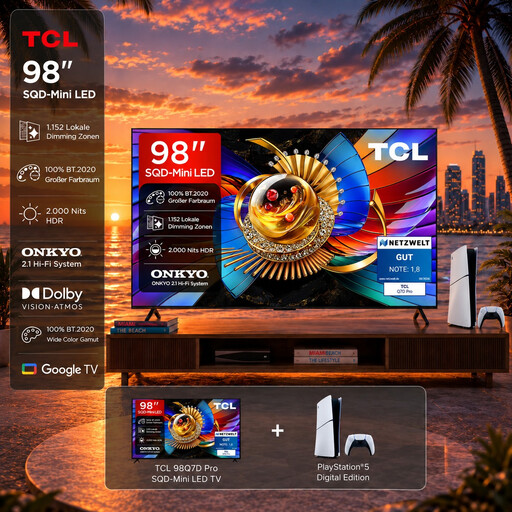
TCL 98T8D Gaming Bundle
This 98-inch bundle is only worth considering if the large screen suits your viewing distance and the space available.
Features listed in the product name: 4K, QD Mini-LED, 144 Hz and VRR. According to the product name, the bundle includes a PlayStation 5 Slim Digital Edition with 825 GB.
View at Joybuy
 No image available
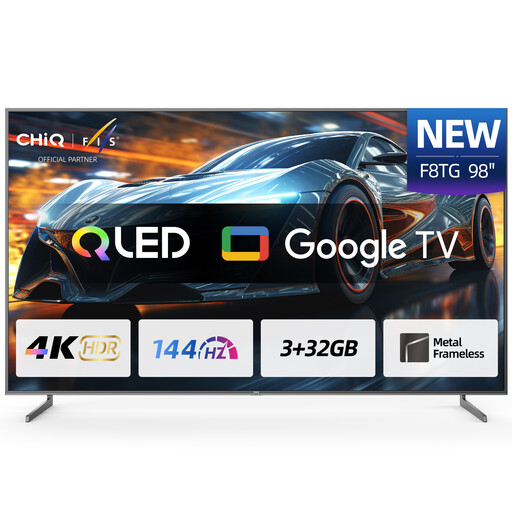
CHiQ U98F8TG
Only consider the 98-inch screen if it suits your viewing distances and you have room for the TV.
Features listed in the product name: 4K, QLED, 144 Hz and Google Smart TV. The product description says installation and moving require at least three qualified professionals, and warns against moving or installing the TV yourself.
View at Joybuy
 No image available
Hisense 55E8S
At 55 inches, this model has a specific screen size you can assess against your seating positions and the space available.
Features listed in the product name: 4K UHD, QLED, Mini-LED, 144 Hz, HomeOS U9 and black.
View at Joybuy
 No image available
LG OLED55B68LA
You can weigh up this 55-inch OLED gaming TV against your viewing distances, lighting conditions and gaming habits.
Features listed in the product name: 4K, 144 Hz, G-SYNC, FreeSync Premium and webOS.
View at Joybuy
Frequently asked questions
Will a gaming TV turn every game into a local co-op game?
No. Local multiplayer depends on the game and the platform you’re using. Check whether local multiplayer is supported and how many controllers you’ll need. Nintendo’s multiplayer portal distinguishes between local and online games.
What should I do if 4K/120 Hz isn’t available after connecting everything?
First, check that the TV, HDMI input you’re using, console and content all support this output. For compatible BRAVIA set-ups, Sony also recommends enabling the enhanced signal format on the correct HDMI port. The menu steps vary by model.
How do I find the right screen size for several seating positions?
Take the viewing distance for every player and the available space into account. The Verbraucherzentrale points out that the right screen size depends on your viewing distance. Also check how easy it is to read a split-screen game from the seats you’ll actually use.
Is burn-in impossible with OLED?
No. LG says burn-in cannot be completely ruled out, even with protective features. If game displays stay unchanged on screen for long periods, take the guidance for the specific model and your gaming habits into account.
How can I compare power consumption before buying?
Compare the EU energy label and product information sheet for the exact screen size on offer. The European Commission’s EPREL database lists information about models that require an energy label on the EU market.


