Gaming with a long viewing distance
If you sit a long way from the TV, the screen size should suit your viewing distance. When choosing where to put it, also consider the TV’s actual dimensions and the space available.


Start by measuring your viewing distance and checking which screen size and TV width will fit your room. For couch co-op, you’ll also want to see how the picture looks from the far end of the sofa. Only consider extra features such as 120 Hz or VRR if your console and games actually support them. OLED and LED/Mini-LED models involve different trade-offs: as well as viewing angles, with OLED you should also take into account game content that stays on screen for long periods.
If you sit a long way from the TV, the screen size should suit your viewing distance. When choosing where to put it, also consider the TV’s actual dimensions and the space available.
If you’re sharing a wide sofa, check how the picture looks from the seats at either end, too. RTINGS notes that viewing angle matters in rooms with several seating positions.
In fast-paced sections, input lag in Game Mode and the output your setup actually supports are important. The frame rate you can achieve also depends on your console and game.
Worth considering if: Several people will be watching the screen from the side. Check the viewing angle of the specific model.
Keep in mind: If fixed game graphics are often on screen for long periods, consider whether an OLED suits your usage. Stress tests can’t be directly applied to ordinary gaming sessions.
Worth considering if: You often play the same game with fixed on-screen displays. These models may be an alternative to consider.
Keep in mind: Panel technology alone doesn’t guarantee a wide viewing angle. Check how the picture looks from the far end of the sofa, too.
| Buying priority | What to check before buying | Who it matters most to |
|---|---|---|
| Screen size for a long viewing distance | Measure your viewing distance and the available width for a stand or wall mount. Don’t confuse screen size with the TV’s width. | If you sit a long way away, you’ll want to make out characters and details while also making sure the TV fits your room. Around 31% of consumers put choosing the right screen size first. |
| Picture quality from seats at the side | Check the specific model’s horizontal viewing angle, or assess the picture from the furthest seat. | If other players are sitting to the side, you’ll want the picture to remain watchable from their seats, too. Around 25% of consumers prioritise picture quality from seats at the edges. |
| Response and usable frame rate | Compare input lag measurements in Game Mode and check support from your console, game and HDMI input. | In fast-paced sections, you’ll want a responsive picture. Higher frame rates only matter if your games and devices support them. Around 25% of consumers put gaming responsiveness first. |
| Power consumption and long-term use | Compare the energy label for the specific model. If you’re considering OLED, factor in fixed game displays that stay on screen for long periods. | If you’re particularly mindful of running costs and your usage habits, weigh these points against extra picture features. Around 19% of consumers prioritise running costs and the effects of use. |
The inch measurement refers to the screen’s diagonal, not the TV’s overall width. For positioning, the full dimensions, including the stand, are what matter.
A TV that’s too large may not suit the space you have in mind. The German Environment Agency also notes that larger screens tend to use more electricity.
Measure the space available and compare the full dimensions and energy label for the specific model.
The output you can actually get depends on the console, game and signal. Nintendo states that the Switch 2 supports up to 60 fps when outputting at 4K; 120 Hz output on PS5 requires a game that supports it.
A TV with a higher refresh rate won’t automatically offer the same benefit in a game that doesn’t support that output.
Check the frame-rate support for your games and assess the TV in the Game Mode you’ll use.
Picture quality from the side varies by model. If you use an OLED extensively with unchanged displays on screen for long periods, you should also consider the risk of burn-in. Stress tests don’t show that the same risk applies to ordinary couch co-op sessions.
Check the viewing angle from the furthest seat on the sofa and weigh the OLED trade-offs against your actual gaming habits.
The OLED-evo-C6 range includes the OLED77C69LB, a 77-inch option to consider if you’re looking for a large screen and a wide seating arrangement.
The OLED-S95H range includes the 77-inch GQ77S95HFTXZG model listed in Germany.
The large-screen QD-Mini-LED C7K range includes the German 75C7K model.
The BRAVIA 7 II is another large-screen LED option. Sony lists a 75-inch screen size for the K-75XR75M2.
This selection features large LED and Mini-LED TVs with gaming features mentioned in the product descriptions. Compare screen size and TV dimensions with your viewing distance and available space. You can only use features such as frame rate and VRR if your console and game support them, too.
 No image available
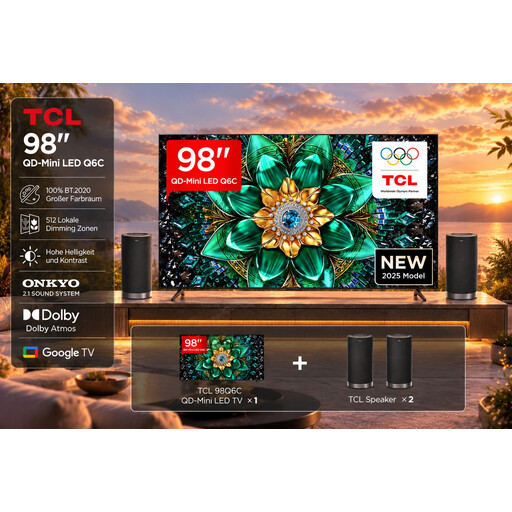
The 98-inch screen makes this a possible choice if you’re looking for a very large picture at a long viewing distance. Check the space available first.
Features listed in the product description: 4K, 144 Hz, VRR, ALLM, HDMI 2.1 and AMD FreeSync Premium Pro. The width with stand is 217,9 cm.
For wall mounting, the listing recommends professional installation and says at least two people are needed to handle and install the TV.
 No image available
The 75-inch screen is a large-screen option if it suits your viewing distance and available space.
Features listed in the product name: 4K SQD Mini LED, 144 Hz, 760 Local Dimming Zones, 2.000 Nits HDR, Dolby Vision IQ and Dolby Atmos.
The stated width with stand is 166,6 cm. Check that it will fit where you plan to put it.
 No image available
At 75 inches, this model could be a good fit if the screen size suits your viewing distance and available space.
Features listed in the product description: QLED, QD Mini LED Dimming, 4K HDR, 144 Hz, VRR and FreeSync Premium. Dolby Vision, HDR10+ and Dolby Atmos are also listed.
 No image available
The 85-inch screen could suit a setup with a long viewing distance, provided the TV fits in your room.
Features listed in the product description: 4K, Mini-LED, 144 Hz, VRR and ALLM. VIDAA is listed as the operating system.
No image available
The 75-inch screen is an option if you’re looking for a large TV and it suits your viewing distance and available space.
Features listed in the product description: Mini-LED, 4K, 144 Hz, QLED, VRR and ALLM. Dolby Vision and VIDAA OS are also listed.
It depends on your console and game. Nintendo states that the Switch 2 supports up to 60 fps when outputting at 4K; the PS5’s 120 Hz option applies to games that support that frame rate. Check your specific games and output signal first.
Select Game Mode on your TV, or use ALLM with a compatible source. On PS5, you can view the current output signal and information about VRR and HDR under ‘Screen and Video’. According to Sony, VRR on the Sony K-75XR75M2 is limited to HDMI 3 and 4.
Compare the full dimensions of the specific TV, including the stand, with the space available. The EU energy label shows, among other things, the energy efficiency class and information for SDR and HDR. Your personal electricity bill will also depend on how you use the TV.
For a qualifying distance purchase from a trader, you generally have a 14-day right to cancel from the date of delivery. In addition, European Union consumer information states that there is a legal guarantee of at least two years; this is separate from any additional guarantee advertised by the seller. Check the applicable terms and any return costs before buying.
There’s no blanket requirement here to buy a TV with a particular efficiency class. EU energy labelling and ecodesign rules apply to electronic displays such as TVs. Compare the label and product data sheet for the specific model.