For split-screen racing with someone sitting to the side, assess the gaming TV from the actual seating position first. OLED is one option to compare, but an LCD model may also be suitable if its viewing angle works for you. A high refresh rate alone guarantees neither a stable picture from the side nor 120 frames per second in split-screen, so also check the game mode, HDMI input and the output supported by the game in question.
Who is this buying guide for?
Players sitting to the side
If you’re not both sitting in the middle in front of the TV, check whether colours and dark areas of the picture remain clear from both seats. RTINGS.com describes horizontal viewing angle as an important difference between LCD panel types.
Split-screen players with limited screen space
With a split screen, each player needs to be able to make out the track, opponents and in-game displays within a smaller area. Your viewing distance and the way the game divides the screen are key. For example, the PlayStation Blog documents a four-player split-screen mode for Gran Turismo 7 on PS5.
Console players looking for high frame rates
If you want to play at 120 Hz, check the TV, HDMI input, console settings and support from the game in question together. Sony points out that games may also run at 60 frames per second or less.
What should you look for when buying?
OLED TV
A good fit if: several people will be sitting well off-centre and you can compare specific models from the seats you plan to use.
Worth noting: LG warns that image retention can occur when static content is displayed for long periods. Follow the care guidance for the specific model.
LCD with an IPS panel
A good fit if: you’re looking for an LCD alternative and the specific model delivers a stable picture from your side seat.
Worth noting: RTINGS.com describes IPS panels as having wider viewing angles but lower contrast than typical VA panels. This is a general panel tendency, not a guarantee for every TV.
VA or HVA LCD with Mini LED
A good fit if: the side seat isn’t too far off-centre and you can check a specific model from the position you plan to use.
Worth noting: According to RTINGS.com, typical VA panels have narrower viewing angles than IPS panels. Mini LED and a high refresh rate don’t, by themselves, prove that a TV has a good viewing angle from the side.
| Buying priority |
What to look for |
Who is this important to? |
| Picture from the side seat |
View the specific model from both seats in game mode, or consult a test of the exact model’s horizontal viewing angle. |
When I sit to the side, I want to be able to make out colours and dark areas of the picture. Around 40% of consumers say a stable picture from the side is their main priority. |
| Readability of split-screen views |
Consider viewing distance and available space; if possible, try your own racing game with its split-screen layout. |
When we share the screen, both of us need to be able to make out the track and in-game displays. Around 30% of consumers put readability of split-screen views first. |
| Frame rate and connections |
Check the right HDMI input, console settings and support for the split-screen mode you want to play. |
If I want to use a high frame rate, the entire signal chain needs to support it. Around 20% of consumers prioritise gaming features and picture output that meet their needs. |
| Energy use and care |
Compare the model-specific SDR and HDR figures on the EU energy label, and read the guidance on static images for OLED TVs. |
If a game displays the same on-screen elements for a long time, I want to take energy use and care requirements into account. Around 10% of consumers say this is their main priority. |
Which buying pitfalls should you avoid?
-
Assuming Mini LED or 144 Hz means a good viewing angle from the side
Backlighting and refresh rate don’t tell you how stable an LCD picture will look from the side. RTINGS.com highlights the differences in viewing angle between typical VA and IPS panels.
Check the exact TV from the side seat and assess its gaming features separately.
-
Assuming the TV’s maximum refresh rate is the same as the split-screen game’s frame rate
A high frame rate requires the right support and settings throughout the signal chain. Sony points out that many PS5 games run at 60 frames per second or less.
Before buying, check the output of your own racing game in the mode you want to use, as well as the HDMI input you plan to connect to.
-
Overlooking long periods with static game displays on OLED and energy comparisons
LG warns that image retention can occur when static content is displayed for long periods. The figures on the EU energy label also let you compare the energy use of specific models.
Read the manufacturer’s care guidance and compare the SDR and HDR figures for the models you’re considering.
Relevant brands to compare
The manufacturer information below relates to specific German model variants. It doesn’t confirm a measured viewing angle from a side seat or the frame rate of a particular split-screen game.
LG
The LG OLED55C57LA is an OLED option to consider when comparing TVs for seating positions spread across the room.
- LG states that this model supports gaming at up to 4K at 144 Hz.
- The manufacturer’s claim doesn’t confirm the frame rate of a split-screen game or a specific viewing angle. Follow the OLED care guidance if on-screen displays remain visible for long periods.
Samsung
The German 55-inch OLED S90F GQ55S90FAEXZG adds another OLED model to compare.
- Samsung states that this model supports up to 144 Hz at 4K.
- This doesn’t provide a specific result for side seating or the split-screen mode you want to use.
Sony
The BRAVIA 8 II K-55XR8M2 is an OLED option with model-specific information about gaming connections.
- Sony lists 120 Hz and 4K/120; VRR is specified for HDMI 3/4 and ALLM for HDMI 1–4.
- These connection details are no substitute for testing the TV from your seat or checking the game’s output.
TCL
The German 55C7K is a Mini LED LCD alternative to compare with OLED models.
- TCL lists an HVA panel and a native refresh rate of 144 Hz for the 55C7K.
- Neither Mini LED nor the refresh rate tells you how stable the picture will look from the side seat.
Joybuy products for split-screen gaming
The Joybuy picks below include 55-inch TVs for gaming and a TV-and-console bundle. Check the viewing angle and how easy the split-screen views are to read on the specific model.
 No image available
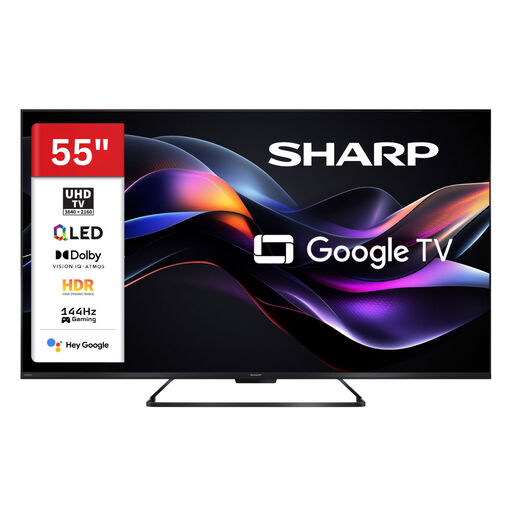
SHARP 55HR7765E QLED TV, 55 inch, 4K UHD
For a 55-inch 4K gaming setup; check whether the viewing angle works for your side seat.
QLED, 4K UHD and 144 Hz gaming are listed in the product title. The product description also lists VRR, ALLM and four HDMI 2.1 ports; check that the game supports the mode you want to use.
View at Joybuy
 No image available
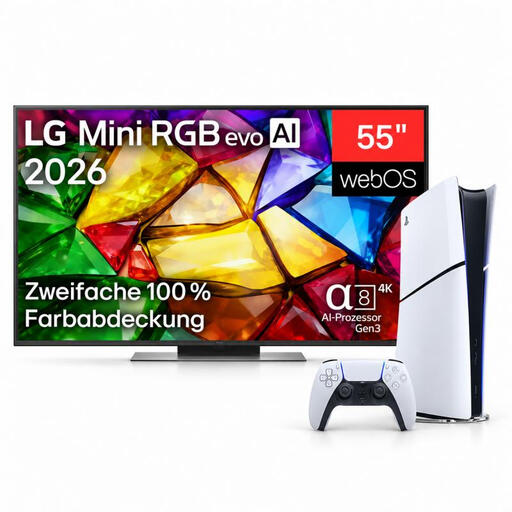
LG 55MRGB86B9A 55-inch 4K Mini RGB Smart TV bundle with PS5 Digital Edition
For anyone looking for a 55-inch TV and console bundle; check that the included console suits your setup.
The product title lists a 4K Mini RGB Smart TV and a PS5 Digital Edition with 825 GB, as well as a DualSense Wireless Controller. The product description lists 144 Hz and VRR for the TV; split-screen output also depends on the game and your settings.
View at Joybuy
 No image available
LG OLED55B68LA 55-inch OLED gaming TV
For a 55-inch OLED gaming setup, provided the picture from your side seat meets your needs.
The product description lists 4K, 144 Hz, VRR, ALLM and four HDMI 2.1 ports. If you play for long sessions with on-screen displays that remain unchanged, follow the OLED care guidance; image retention can occur.
View at Joybuy
Frequently asked questions
Is a 144 Hz TV enough for 120 frames per second in split-screen?
No, the TV’s refresh rate alone isn’t enough. For 4K/120 on PS5, Sony also lists a suitable HDMI connection, console output settings and support from the game as requirements. Check the split-screen mode in your racing game specifically.
Which HDMI input should I connect my console to?
Use an input on your specific TV that supports the features you want, and enable the appropriate output on your console. For the Sony K-55XR8M2, the specifications list VRR for HDMI 3/4 and ALLM for HDMI 1–4; this arrangement doesn’t automatically apply to other models.
How should I manage racing game displays that stay on screen for a long time on OLED?
Read the care guidance for the specific model and consider how long static displays remain on screen while you play. LG warns that image retention can occur if static elements are displayed for extended periods; this doesn’t mean your game will cause a fault.
How can I compare energy use, and what happens if there’s a fault?
Compare the SDR and HDR figures on the EU energy labels for the specific models; these figures don’t tell you the exact cost in euros without knowing how long you use the TV and your electricity tariff. In Germany, consumers generally have a statutory two-year period to make a claim against the seller for faulty goods, as explained by the Verbraucherzentrale. This is separate from a voluntary manufacturer’s warranty.


