For local basketball games with people sitting to the sides, start by checking how well the specific model displays colour and contrast from the outer seats. RTINGS.com highlights the benefits of wide viewing angles for a spread-out seating arrangement. Then check the gaming mode, connections and reflections against your console, game and room. Steam Support distinguishes a display’s refresh rate from the frames per second actually output by a game.
Which features matter most to you?
Basketball nights with people sitting to the sides
If several people are spread out across the room, check the colour and contrast from the outer sofa seats too. RTINGS.com highlights the benefits of wide viewing angles for a spread-out seating arrangement.
Console gamers who value responsiveness
If responsive controls matter to you, check the TV’s gaming mode and connections against your console and game. Steam Support explains that a display’s refresh rate is not the same as a game’s frame rate.
Hosts with a bright living room
If you play in a bright room, consider screen size, viewing distance and reflections together, and factor in power consumption too. The Verbraucherzentrale recommends measuring your usual viewing distance before buying.
What should you look for when buying?
| What matters |
What to look for |
Who should prioritise it? |
| Picture from the side |
Check the specific model from the furthest seat you plan to use. Also consider whether the screen size suits your viewing distance, as recommended by the Verbraucherzentrale. |
If you want a clear view from the outer sofa seats too, the viewing angle of the specific TV matters. Around 40% of consumers put this first. |
| Controls and picture output |
Compare the model’s gaming mode and input lag, and check that its resolution, frame rate, VRR and HDMI inputs suit your console. Steam Support distinguishes between a display’s refresh rate and a game’s frame rate. |
If responsive controls are your priority in local matches, check your game settings and console capabilities against the TV. Around 30% of consumers prioritise this. |
| Size and room lighting |
Measure your viewing distance and the space available for the TV. Check for reflections in the lighting you usually play in, rather than relying on brightness figures alone. |
If several people will be watching from different distances, the screen needs to suit the room and remain easy to see in your usual lighting. Around 20% of consumers put suitability for their room first. |
| Purchase and running costs |
Compare the EU energy label for the exact model and check delivery or installation options. The European Commission lists consumption figures for SDR and HDR use. |
If you’re factoring in running costs as well as the purchase price, compare the label figures with how you plan to use the TV. Around 10% of consumers prioritise these overall costs. |
Common buying misconceptions
-
A high refresh rate guarantees the same frame rate in a game
A TV’s refresh rate and the number of frames per second actually output by a game are different things.
First check your console’s output and settings, along with those of your basketball game. Then compare the TV’s gaming features.
-
The panel type alone tells you how the picture will look from the side
For side-on viewing, what matters is how the specific screen performs. The OLED or Mini LED label alone doesn’t tell you how good the picture will look from the outer seats.
View the model from the seats you plan to use, or check a review of that exact version.
-
One general figure is enough to tell you how much electricity a TV uses
On the EU energy label, consumption figures can differ for SDR and HDR content. Screen size and usage also affect which figure is relevant to your everyday viewing.
Compare the label figures for the specific model and factor your own electricity tariff into your calculations.
Relevant brands compared
Samsung
The German S95H range includes an OLED model worth considering for multi-seat viewing. Samsung lists the 65-inch model number as GQ65S95HFTXZG.
- RTINGS.com gives the tested S95H positive marks for viewing angles, reflection handling and gaming.
- The version tested was the US 77-inch model, so its performance cannot be assumed to match the German 65-inch version.
LG
The OLED65C6ELB is a German 65-inch OLED from the C6 range, offering a point of comparison for gaming and room lighting.
- LG lists an anti-reflection display and gaming up to 4K at 165 Hz for this model.
- These are manufacturer claims, not independently measured performance figures for every viewing position.
TCL
The TCL 65C7K is a 65-inch QD Mini LED LCD model that you can compare with OLED TVs.
- TCL lists a native refresh rate of 144 Hz and an HVA panel for the 65C7K.
- These specifications don’t prove that the TV has wide viewing angles or that a game will actually output 144 frames per second.
Sony
The OLED BRAVIA 8 II K-65XR8M2 is a useful comparison if you’re considering connection options and installation dimensions.
- Sony lists 4K/120 and VRR on HDMI 3 and 4 for this model.
- If you’re connecting several devices or a sound system, check which inputs you’ll need in advance. These specifications aren’t an independent test of input lag.
Joybuy models for basketball nights
The Joybuy models below are all in the Mini LED LCD category. Compare their size and gaming specifications with your room, seating arrangement and console.
 No image available
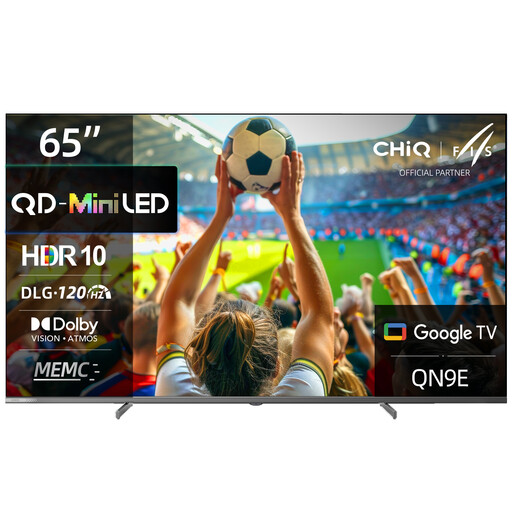
CHiQ M65QN9E 65-inch 4K UHD Mini LED QLED TV
The 65-inch version could work well for a group, provided the screen size and viewing distance suit your room.
The product title lists 4K UHD, Mini LED and QLED, as well as DLG 120 Hz and MEMC.
A 120 Hz figure alone doesn’t tell you how many frames the specific game outputs.
View at Joybuy
 No image available
TCL 55Q7D PRO 55-inch 4K SQD Mini LED TV
Check whether this 55-inch model suits your viewing distance and the space available for a stand or wall mounting.
The product title lists 4K, SQD Mini LED, Anti-Reflection and 144 Hz. The product description also lists VRR and AMD FreeSync Premium Pro.
Check which of these features your console and the game you’re playing can use.
View at Joybuy
 No image available
Hisense 55E8S 55-inch 4K UHD QLED Mini LED Smart TV 144 Hz
Check that the 55-inch screen suits the distance from your seats and the space you have available.
The product description lists VRR and ALLM, as well as horizontal and vertical viewing angles of 178 degrees. Even so, check the picture from the furthest seat.
View at Joybuy
Frequently asked questions
Do I need 144 or 165 Hz for local basketball games?
No. A display’s refresh rate isn’t the same as the frame rate a game actually delivers. First check your console’s output and settings, along with those of the game. Then compare the TV’s gaming mode and input lag. Steam Support distinguishes between these two figures.
Is the TV all you need for a match with several players?
No. The game, platform and controllers matter too. The German PlayStation Store lists NBA 2K26 for PS5 as supporting 1–4 players, with optional online play. Check whether the player count for your game applies to local play.
How can I check that the picture looks good from the outer seats?
Check the specific model from the seats you actually plan to use. RTINGS.com notes that wide viewing angles can help with a spread-out seating arrangement. However, a review of a different screen size doesn’t automatically prove that your version will perform just as well.
What should I check before wall-mounting and connecting the TV?
Measure your viewing distance and the space available, then compare them with the TV’s dimensions and its mounting bracket. Also check that your console can connect to a suitable gaming HDMI input. For example, Sony lists VRR on HDMI 3 and 4 for the K-65XR8M2.
How do I compare the electricity use of different TVs?
For the exact model, compare the EU energy label figures in kWh/1000 h for SDR and HDR, and factor in your usual usage and electricity tariff. The European Commission explains that the label gives consumption figures for both types of use.


