For fighting game sessions where players sit to the side, OLED is a sensible place to start: RTINGS.com reports that the LG C5 it tested has a wide viewing angle, but that does not automatically apply to every model variant. In bright rooms or during long sessions with static displays, a specific LCD model may also be a good fit if its picture holds up from the side. With OLED, you should also take note of the manufacturer’s advice on image retention. Compare independently measured input lag in the relevant game mode, and check the connections against your console or PC rather than relying on the advertised refresh rate alone.
Who is this TV for?
Gaming sessions with players seated to the side
When several players sit at an angle to the screen, colours, contrast and in-game displays should still be clear from the furthest seat. RTINGS.com explains how viewing angles and contrast vary between LCD panel types.
Reaction-focused tournament players
If you want your inputs to appear on screen with as little delay as possible, check the game mode, HDMI connection and supported refresh rate against your gaming device. LG Deutschland notes that Game Optimizer may restrict certain picture settings.
Gaming sessions in bright rooms
In a room with incoming daylight, you need to consider both reflections and picture quality from seats to the side. RTINGS.com describes changes in colour and brightness when viewed further off-centre on the Samsung QN90F it tested.
What should you look for when buying?
OLED
A good fit if: Players sit well apart and you want the picture to remain clear from seats to the side.
Things to weigh up: Reflections where the TV will be placed, and long sessions with unchanging displays; LG warns of possible image retention.
IPS LCD
A good fit if: You prefer an LCD and a wider viewing angle matters more to you than high native contrast.
Things to weigh up: RTINGS.com says IPS LCDs typically offer wider viewing angles but lower native contrast than VA LCDs; check the specific model.
VA or Mini LED LCD
A good fit if: The room is bright, or most players will sit in front of the screen, and you can assess a specific model.
Things to weigh up: Mini LED alone tells you nothing about viewing angles; picture quality falls off at wider angles on the Samsung QN90F tested.
The proportions below each refer to consumers’ main buying concern in the tournament scenario described.
| Buying priority |
What to check when buying |
Who is this especially important for? |
| Viewing angle and picture clarity |
Assess the picture in game mode from the furthest seat; consult viewing-angle tests for the exact model and screen size. |
If I want to see colours, contrast and in-game displays clearly from the furthest seat, viewing angle matters most to me. Consumers who put it first are likely to account for around 33%. |
| Input lag and signal path |
Check measured input lag at the refresh rate you want, and make sure the HDMI input and game mode are compatible with your device. |
For time-critical inputs, I want to know how the TV and gaming device actually work together. Consumers who prioritise response time above all else are likely to account for about 27%. |
| Reflections and room lighting |
Take windows and lights near the TV into account; assess reflection handling and picture quality from the side separately. |
If I play with daylight coming in, I want to reduce reflections on screen without overlooking the seats to the side. Consumers who prioritise room lighting are likely to account for around 20%. |
| Long sessions with static displays |
Read the OLED care guidance and conditions for the specific model; with an LCD, continue to check viewing angles from your own seat. |
During long sessions with recurring, unchanging displays, I want to take image retention guidance into account. Consumers who put extended use first are likely to account for around 20%. |
Common buying mistakes
-
Assuming Mini LED means wide viewing angles
Mini LED describes the backlighting and, by itself, does not tell you what the picture looks like from the side. On the Samsung QN90F tested by RTINGS.com, colour and brightness change when viewed further off-centre.
Where possible, check the viewing angle of the exact model from the seat furthest from the screen.
-
Choosing based only on the maximum refresh rate
You can only use an advertised refresh rate if your game, console or PC and the connection you choose support it. LG lists up to 165 Hz for the OLED55G57LW, specifically with compatible games or PC inputs.
Check that your gaming device, the HDMI input you plan to use and the TV settings all work together.
-
Assuming OLED care features guarantee there will be no image retention
LG warns that image retention can occur when static images are displayed for extended periods; care features do not rule this out.
Consider how long in-game displays or menus stay unchanged on your screen, and read the guidance for the specific model.
Key brands to consider
LG
With the OLED C5 and G5, LG offers OLED options for gaming and wider seating arrangements. Compare sizes and variants separately.
- LG Deutschland lists gaming support up to 4K at 144 Hz for the OLED55C57LA and up to 4K at 165 Hz for the OLED55G57LW; the latter requires a compatible gaming or PC device.
- RTINGS.com reports a wide viewing angle for the C5 it tested; this finding does not automatically apply to every German variant.
- LG warns that image retention may occur when static images are displayed for extended periods.
Samsung
The S95F and QN90F are different OLED and LCD options to consider, depending on the room lighting and seating position.
- Samsung Deutschland advertises the German 65-inch S95F with Glare Free and refresh rates of up to 165 Hz.
- Picture quality drops off at wider angles on the QN90F tested by RTINGS.com. The test covers a US variant and does not confirm the features of every German variant.
TCL
The C7K range is a Mini LED LCD option to consider for gaming and your seating position.
- TCL lists an HVA panel and a native refresh rate of 144 Hz for the C7K range.
- The product page reviewed relates to the 85-inch variant; it does not establish either a wide viewing angle or the performance of the 55C7K.
Philips
The 65OLED910/12 is an OLED option for buyers who also want to consider built-in sound and Ambilight.
- Philips lists a 65-inch OLED display and VRR up to 144 Hz for this German model.
- The product specifications do not include independently measured input lag for your intended gaming setup.
Sony
The BRAVIA 8 II is another OLED option where it’s worth checking the connections against your setup.
- Sony lists a 120 Hz OLED panel and VRR on HDMI 3 and 4 for the K-55XR8M2.
- Don’t assume the other HDMI inputs support the same connection; the specifications do not include viewing-angle measurements.
Joybuy gaming models
The Joybuy models below include Mini LED, QLED and OLED TVs for gaming. For each one, check separately how the picture looks from the furthest player’s seat and whether its advertised features work with your gaming device.
 No image available
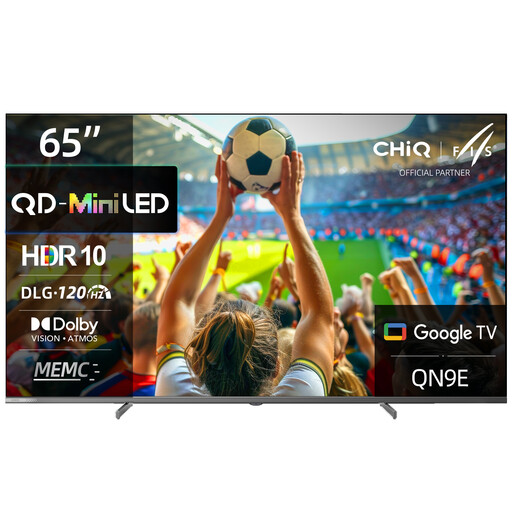
CHiQ M65QN9E 65-inch 4K UHD Mini LED QLED TV
An option if you’re looking for a Mini LED QLED TV for gaming; check this model’s picture quality from seats to the side separately.
65-inch, 4K UHD, DLG 120 Hz, MEMC, Dolby Atmos, Dolby Vision and Google TV (Android 14).
View at Joybuy
 No image available
TCL 55Q7D PRO 55-inch 4K SQD Mini LED TV
An option if you want to consider Mini LED and explicitly advertised anti-reflection; check the viewing angle of the specific model separately.
55-inch, 4K, 144 Hz, 480 Local Dimming Zones, 2,000 Nits HDR, Anti-Reflection, Dolby Vision IQ, Dolby Atmos and Google TV.
View at Joybuy
 No image available
Hisense 55E8S 55-inch 4K UHD QLED Mini LED Smart TV
A Mini LED QLED option for gaming; check the specific TV to see whether it suits seats to the side.
55-inch, 4K UHD, 144 Hz, HomeOS U9, Black.
View at Joybuy
 No image available
LG OLED55B68LA 55-inch OLED Gaming TV
An OLED option if players will be sitting to the side; check the view from the furthest seat and take note of the guidance on long periods with static displays.
55-inch, 4K OLED, 144 Hz, G-SYNC and FreeSync Premium.
The product description recommends leaving the TV in standby so that automatic pixel refresh can run.
View at Joybuy
 No image available
LG 43QNED86B6B 43-inch Gaming TV
An option for gaming with a variable refresh rate; check the picture from your actual seat and make sure the features are compatible with your gaming device.
43-inch, Mini LED, 120 Hz native, VRR up to 144 Hz, AMD FreeSync, HGiG and Dolby Atmos.
View at Joybuy
Frequently asked questions
How should I set up my TV for a fighting game?
Connect your console or PC to an HDMI input that supports the features you want, then switch on game mode. LG Deutschland describes Game Optimizer and ALLM for supported models; some other picture settings may be restricted. Check the menus on your specific TV and view the picture from both players’ seats.
Are 144 or 165 Hz automatically an advantage in a tournament?
No. The TV’s maximum refresh rate alone does not tell you whether your gaming device and the specific game can output at that rate. LG lists up to 165 Hz for the OLED55G57LW specifically with supported games or PC inputs.
What should I bear in mind if in-game displays stay on screen for a long time?
LG warns that displaying static images for extended periods can lead to image retention on OLED TVs, and describes its care features. Read the guidance for your specific model; these features do not guarantee that image retention will not occur.
How can I compare energy consumption, and what are my rights if there’s a fault?
TVs sold in the EU must meet energy labelling requirements. According to the European Commission and Your Europe, the energy label must also be clearly visible in online shops. If there’s a fault, statutory rights against the retailer are separate from a voluntary guarantee, as explained by Verbraucherzentrale. For online orders, Verbraucherzentrale says you generally have 14 days from receipt to exercise your right to cancel.


