Start by measuring your viewing distance and available space: 42 or 43 inches may be compact options, but they won’t suit every set-up. For fast-paced arcade games, the measured input lag in Game Mode matters; RTINGS.com highlights its importance for reaction-based games. Also check that the TV, game and source device actually support the signals you want, such as 120 Hz or VRR. Take reflections into account too, along with long periods of static game graphics if you’re considering an OLED TV.
Who is a compact gaming TV for?
Gamers short on space
Check the screen width, viewing distance and space for the stand or a suitable wall mount before choosing a screen size. RTINGS.com looks at the relationship between screen size and viewing distance, while LG Germany points out that the right wall mount depends on the TV in question.
Players who enjoy fast-paced matches
If you want your inputs to appear on screen straight away, check the specific model’s input lag in Game Mode, as well as the signals your game and source device can actually use. RTINGS.com explains why input lag matters in reaction-based games.
Players in a bright living room
In daylight or when sitting off-centre, reflections and viewing angles matter just as much as gaming specs. Compare the conditions in your room with information for the specific model, rather than treating a manufacturer’s term as an independent measurement.
What should you look for when buying?
For arcade sports in a small living room, focus first on the factor that matters most for your set-up and how you’ll use the TV.
| Priority |
What to check |
Who should pay particular attention |
| Size and placement |
Check the viewing distance, screen and overall TV width, and stand dimensions; for wall mounting, take the suitable mount and wall into account. |
If I need to fit a TV into a small living room, I’ll check the available space and viewing distance before settling on a screen size. For around 36% of consumers, finding the right size and placement is the top priority. |
| Responsiveness during fast-paced moves |
Check input lag measurements for the specific model, Game Mode, resolution and refresh rate you’ll use; only factor in ALLM and VRR if your devices are compatible. |
If you rely on responsive controls during fast-paced matches, give the specific model’s input lag more weight than a high refresh-rate figure alone. Around 29% of consumers put gaming responsiveness first. |
| Visibility and seating positions |
Consider the position of windows, the light in the room and where people will sit; check the specific model’s reflection handling and viewing-angle information. |
If several people will be playing or daylight falls on the screen, I’ll make sure the action is easy to follow from the seats we’ll be using. Around 21% of consumers prioritise visibility in bright conditions or from different seating positions. |
| Refresh rate and ongoing costs |
Check whether your game and source device can use higher refresh rates; use the specific model’s energy label to compare energy efficiency. |
If my games run at 60 Hz, I only want to pay more for extra gaming features if I’ll actually use them. Around 14% of consumers prioritise purchase and running costs. |
Common buying misconceptions
-
An HDMI 2.1 label automatically means you get the full range of gaming features
The HDMI Licensing Administrator explains that individual HDMI features are optional. So a version number alone doesn’t confirm support for either VRR or 4K at 120 Hz.
Check exactly which resolutions, refresh rates and gaming features are supported by the specific TV model and the input you’ll use.
-
A high refresh rate automatically means low input lag
The panel or VRR refresh rate isn’t the same as the measured delay between the signal and the picture. Input lag also depends on the signal and the mode you select.
Compare measurements for the specific model in Game Mode, using the resolution and refresh rate you intend to play at.
-
Choosing OLED or LCD based on a single feature alone
With OLED, long periods of static game graphics may be worth considering. On the other hand, terms relating to reflection handling or picture quality alone don’t tell you how an LCD model will perform in your room.
Think about your gaming habits and lighting conditions, and check independent reviews alongside the manufacturer’s guidance for the specific model variant.
-
Assuming wall mounting will always be suitable
The TV design, wall and installation environment all affect whether the intended mounting method is suitable.
Check the dimensions and mounting instructions for the specific TV against your wall and available space.
Depending on your set-up, a suitable mount and professional installation may involve extra effort and cost.
Brands and models to consider
LG
The OLED42C6ELB is a 42-inch OLED model. LG Germany lists support for up to 4K at 165 Hz for this variant.
- The manufacturer’s specification describes what the model can support, not the output of every game.
- LG Germany notes that burn-in cannot be ruled out entirely, even with proper OLED use. Check the warranty terms for the specific model too.
Hisense
The 43-inch 43E7Q PRO and 43E6NT models offer different refresh rates, as specified by the manufacturer.
- Hisense Germany lists a native 144 Hz refresh rate and VRR for the 43E7Q PRO, and 60 Hz for the 43E6NT.
- These specifications apply to the respective model variants and don’t provide a comparison of input lag.
Philips
According to Philips Germany, the compact 42OLED810/12 combines OLED with Ambilight and VRR up to 144 Hz.
- These features relate to this specific model.
- The refresh-rate figure doesn’t prove that a particular game or source device can output at that rate. With OLED, long periods of static images are still worth considering.
Samsung
The 43-inch Neo QLED GQ43QN90FATXZG is a Mini LED option. Samsung promotes Glare Free for this model.
- The model specification gives you a useful starting point for checking its suitability for a bright room.
- The manufacturer’s description isn’t a substitute for independent measurements of reflections or input lag for the exact variant.
Sony
The 43-inch KD43X85KPAEP is another 4K option in this size. Sony lists 120 Hz for the X85K series.
- This specification relates to the series and the signals described by the manufacturer.
- Check the supported refresh rate and gaming features for the specific model number and input you’ll use.
Joybuy product selection
This selection includes compact LCD and QLED TVs with gaming features, as well as OLED models for small living rooms. Check the exact signals and dimensions against your game and where you plan to put the TV.
 No image available
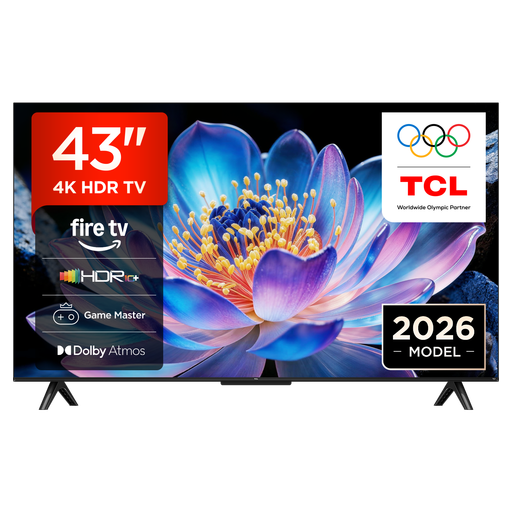
TCL 43V6D, 43-inch, 4K UHD
The 43-inch screen gives you a practical starting point for checking the viewing distance and available space.
- 4K UHD
- Fire TV
- Game Master
- HDR10+
- Energy rating F
View at Joybuy
 No image available
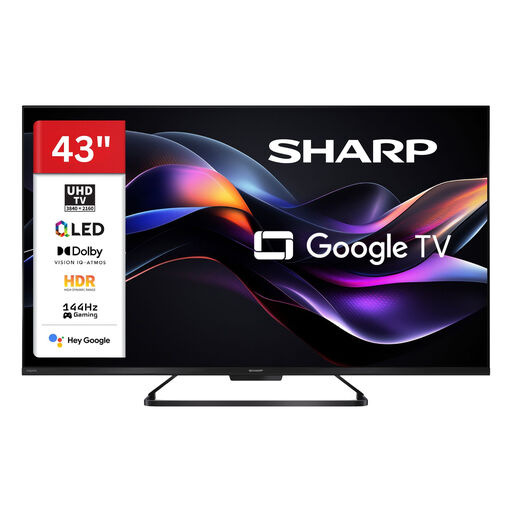
SHARP 43HR7765E, 43-inch, QLED
Check how the 43-inch model fits your available space and viewing distance.
- 4K UHD
- 144 Hz
- Google Smart TV
- Dolby Vision
View at Joybuy
 No image available
LG 43QNED86B6B, 43-inch, 144 Hz VRR
The 43-inch screen may suit a small living room, provided it works with your viewing distance and available space.
- Gaming TV
- 144 Hz VRR
- AMD FreeSync
- Dolby Atmos
View at Joybuy
 No image available
CHiQ U43QM10E, 43-inch, 4K UHD QLED
Check that the 43-inch screen suits your intended viewing distance and available space.
- 4K UHD
- QLED
- VRR and ALLM
- Google TV
- Triple tuner (DVB-C/T/T2/S/S2)
View at Joybuy
 No image available
LG OLED42C67LA OLED evo AI C6, 42-inch, 4K
The 42-inch OLED model is a compact option if it suits your room and how you use it. LG Germany notes that burn-in cannot be ruled out entirely, even with proper use, so it’s worth considering long periods of static game graphics.
- 4K Smart TV
- 165 Hz VRR
- Dolby Vision and Dolby Atmos
- G-SYNC
- webOS 26
View at Joybuy
Frequently asked questions
Does an “HDMI 2.1” label mean support for 120 Hz and VRR?
No. The label alone doesn’t confirm support for these features. The HDMI Licensing Administrator notes that individual HDMI features are optional. Check which resolutions, refresh rates and VRR features the inputs on the exact TV model support, and whether your game and source device can output the signal you want.
What should I consider when placing or wall-mounting my TV?
Check the dimensions, mount and wall type against the specific TV. In its installation guide, LG Germany notes that the type of wall and installation environment can affect mounting, and recommends professional installation. This is a manufacturer recommendation, not a general legal requirement.
What are my cancellation and warranty rights when buying a TV online?
According to the German Consumer Advice Centre, online consumer purchases generally come with a 14-day right to cancel, which you must notify the retailer of. Statutory consumer rights and a voluntary manufacturer’s warranty are separate rights.
How can I check energy use and dispose of my old TV?
Compare the energy label for the specific model with its information in the EU EPREL database. The German Federal Ministry for the Environment notes that old electrical appliances must be taken to authorised collection points or returned to manufacturers, or to retailers where the relevant conditions apply. They must not be put in household rubbish.


