
Lieferung heute & morgen

Qualitätsgarantie

Willkommens-Angebote freischalten: KOSTENLOSE Lieferung | Bis zu 80 % RABATT | Kostenlose 30-Tage-JoyPlus-Testphase
App herunterladen
A gaming keyboard should do more than simply match your desk aesthetically. The layout, key arrangement, switch technology, connection and day-to-day use are what really matter. If you focus solely on RGB lighting or high polling rates, it is easy to overlook important details: an unfamiliar US layout, missing arrow keys or an impractical wireless connection can quickly make your purchase disappointing.
This buying guide from the Joybuy Product Recommendation Officer explains which details are genuinely relevant and which gaming keyboard suits different types of user.
Many compact models are offered with a QWERTY US layout. The positions of Y and Z, as well as special characters, differ from the German layout. This may be less noticeable while gaming, but when writing texts, emails or passwords, it takes time to adjust.
If you regularly type in German, look specifically for a QWERTZ keyboard. The description ‘compatible with Windows’ says nothing about the physical key arrangement.
Terms such as Rapid Trigger, Hall Effect or ‘8K polling rate’ describe technical features, but they are not necessary for every use case. A Hall Effect keyboard uses magnetic sensors and may support adjustable actuation. This is particularly interesting for users who practise making rapid changes of direction in competitive games.
For office work, casual gaming and everyday typing, layout, noise levels and comfort are often more important than an extremely high polling rate.
A 60% keyboard typically omits separate function keys, arrow keys and navigation blocks. These commands are usually accessed via Fn combinations. A 75% keyboard, by contrast, often retains the function and arrow keys while taking up less space than a full-size model.
Before buying, check whether you need a number pad, separate arrow keys or dedicated media keys. A 100% keyboard may be more practical for spreadsheets, accounting or certain games. A TKL keyboard removes the number pad while retaining a familiar main key block.
A mechanical keyboard uses individual switches beneath the keycaps. Linear switches offer a smooth, consistent keypress, while tactile switches provide a noticeable bump. Clicky switches produce additional noise and are not always suitable in shared spaces.
Membrane models such as the Logitech G213 or Logitech K120 use a rubber dome. They generally require no switch maintenance and are suitable for users who prefer a familiar, relatively quiet typing feel.
A Hall Effect keyboard detects the position of magnetic switches. On suitable models, the actuation point and reset behaviour can be adjusted using software. Important: Hall Effect switches are not automatically compatible with standard mechanical 3- or 5-pin switches. If you want to buy a hot-swappable keyboard, you must therefore check which type of switch is supported.
A USB keyboard does not need a battery and is generally powered directly by the computer. The wired connection is straightforward for stationary gaming PCs. A detachable USB-C cable makes transport and replacement easier.
A Bluetooth keyboard is suitable for tablets, laptops and multiple work devices. Models with Bluetooth and a 2.4 GHz receiver can be used flexibly, depending on the device. Before buying, check the range, charging method and number of devices that can be stored. Wireless models require either a rechargeable battery or disposable batteries and may be affected by a low charge level or wireless interference.
An RGB keyboard mainly improves visibility and enables personalised lighting. It does not replace clearly legible keycaps or a suitable layout. PBT keycaps are less prone to developing a glossy worn finish than ABS, although the actual quality depends on the material thickness and manufacturing.
A volume control is useful if you frequently adjust audio output while gaming or working. Sound-dampening mats, gasket-mount designs and adjustable feet can affect both the typing feel and perceived noise. Claims such as ‘waterproof’ should be read carefully: a protected PCB or splash-resistance rating does not mean that the USB connection and the entire keyboard can be submerged.

Why this product suits this profile: This wired 60% keyboard takes up little space and is specified for use with PC, Mac, PS4 and Xbox One. The US QWERTY layout should be considered carefully before buying.
The product details explicitly state the 61-key layout and a mechanical-style feel rather than fully mechanical switches. This makes it easier to set realistic expectations about the typing experience.
Compact design, USB connection, RGB modes and specified IPX4 protection for the key panel or circuit board.
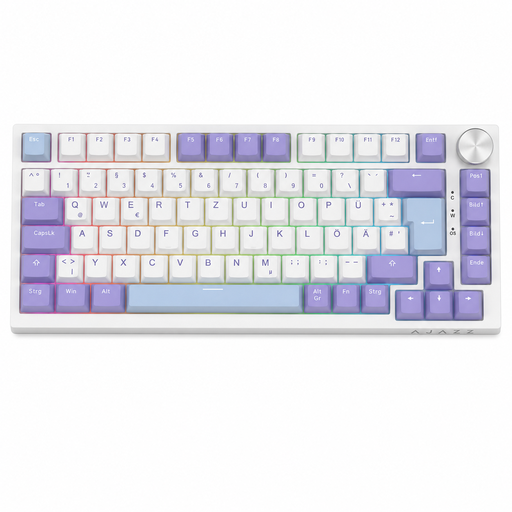
Why this product suits this profile: The German QWERTZ layout, 82 keys, a volume control and hot-swap support combine gaming with everyday typing.
The product data clearly specifies the Type-C cable, 75% layout and QWERTZ version. This reduces the risk of buying the wrong layout or an impractical size.
Gasket-mount construction, five sound-insulation layers, PBT keycaps, RGB lighting and compatible hot-swap sockets.
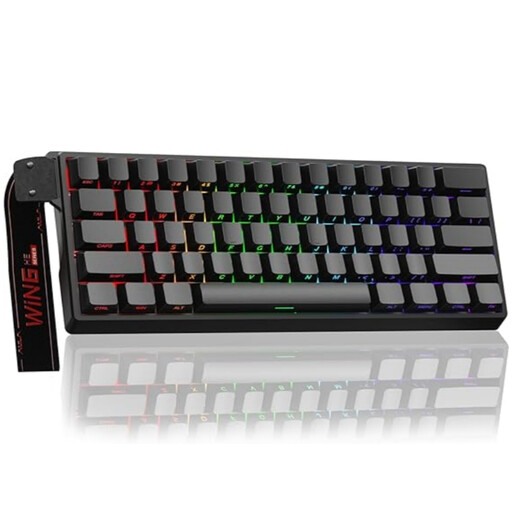
Why this product suits this profile: This model is aimed at users looking for a Hall Effect and Rapid Trigger keyboard for competitive gaming in a compact 60% design.
The safety information explicitly states that only Hall Effect magnetic switches may be used. Standard switches are not a suitable upgrade option.
Adjustable actuation point, Rapid Trigger mode, hot-swap support for compatible magnetic switches, RGB and a specified 8,000 Hz polling rate.
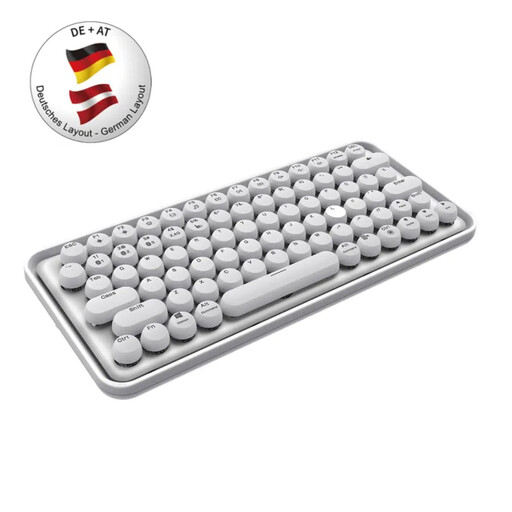
Why this product suits this profile: This wireless keyboard features a German QWERTZ layout and supports Bluetooth 3.0, Bluetooth 5.0 and 2.4 GHz. It is suitable for users with a PC, tablet and other devices.
The specifications list several connection methods, a range of up to 10 metres and a built-in battery. This makes pairing and power requirements easier to assess before buying.
QWERTZ layout, connections for multiple devices, quiet typing experience and integrated lithium-polymer battery.
We have put together a complete, regularly updated list of products that fully meet these strict selection criteria and the safety regulations applicable in the EU.
For regular typing, a QWERTZ keyboard is usually the more straightforward choice. While you can set German as the input language on US models, the key labels and positions remain different.
Service life depends on the switch type, usage, build quality and maintenance. Some product specifications, for example, state 50 million actuations for certain switches. This manufacturer figure is not a guaranteed period of everyday use. Dust, liquids and damaged USB connections can shorten the service life regardless of the switch.
Power consumption depends on the connection type, lighting and battery capacity. Bluetooth models with scissor switches and no permanently active RGB lighting are often designed for economical operation. With an RGB keyboard, power consumption typically increases when the lighting is permanently switched on at high brightness.