
Lieferung heute & morgen

Qualitätsgarantie

Willkommens-Angebote freischalten: KOSTENLOSE Lieferung | Bis zu 80 % RABATT | Kostenlose 30-Tage-JoyPlus-Testphase
App herunterladen
A gaming mouse does not need to rely solely on a high DPI rating or striking RGB lighting to stand out. What matters is whether the sensor, shape, weight, buttons and connection suit your playing style. For FPS, MOBA and esports players, even small differences in weight, cable movement or button count can affect everyday use.
As a Joybuy Product Recommendation Officer, I assess the specifications based on clear, verifiable technical criteria and highlight common purchasing misconceptions. This makes it easier to choose a gaming mouse objectively and find a model that genuinely fits your needs.
A gaming mouse with a high DPI rating allows its sensitivity to be adjusted very precisely. That alone, however, does not indicate how well it performs at low or medium sensitivity. The sensor type, tracking behaviour, polling rate and surface being used also play an important role.
For many games, several easily accessible DPI levels are more practical than the highest possible maximum value. An optical gaming mouse with 6,400, 8,000 or 12,000 DPI is sufficient for numerous PC setups. Extremely high values of up to 25,600 or 30,000 DPI are mainly useful if you want to fine-tune your sensitivity in detail.
An RGB gaming mouse can complement your setup visually and, with some models, synchronise with other illuminated components. RGB lighting does not improve sensor precision or response time, however. Check the technical specifications first and treat the lighting as an added feature.
A gaming mouse with programmable buttons can be useful for MOBAs, strategy games and productivity applications. For FPS games, many users prefer a lighter mouse with just a few well-positioned buttons. Additional controls can increase the weight or get in the way with certain grip styles.
The sensor should transmit movements smoothly and consistently. Most of the models listed here use optical sensors. Pay attention to:
A USB gaming mouse connects directly to the computer, eliminating battery changes and charging breaks. Even so, check whether the cable length, stiffness and connector position suit your desk setup.
A lightweight gaming mouse weighing approximately 55 to 80 grams can make rapid movements easier. Heavier models may offer more buttons or an adjustable weight system. The right choice depends on your grip style, sensitivity settings and preferred game genre.
Hand orientation is also important:
The term ergonomic gaming mouse is not uniformly regulated. Compare specific dimensions, weight, thumb support and shape rather than relying on the marketing term alone.
Consider the number of programmable buttons, their positioning and the software required to configure them. Switch lifespan figures are generally provided by the manufacturer and should be understood as technical specifications rather than a guaranteed service life under all conditions.
A flexible cable can reduce drag on the mouse. With a wired mouse, you should also look for sufficient length, effective strain relief and a cable path that remains unobstructed. A mouse bungee or suitable cable holder can further improve freedom of movement.
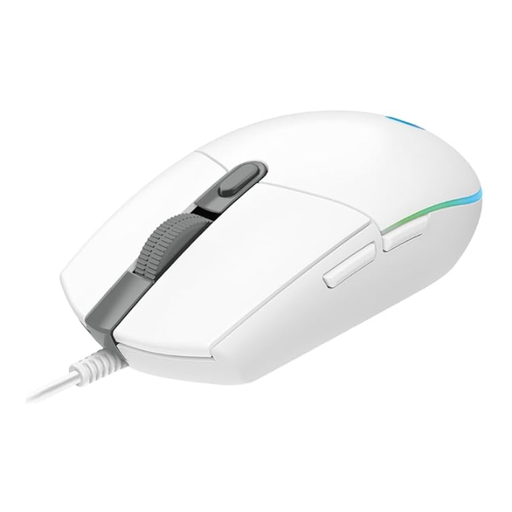
Why this model is a good fit: This USB gaming mouse features an optical sensor with 200 to 8,000 DPI, six buttons and a wired connection for PC and laptop use.
The specifications state a specific DPI range and a 1,000 Hz polling rate rather than relying on vague performance claims.
Six programmable buttons, LIGHTSYNC RGB and USB plug-and-play; configuration is handled through Logitech G HUB.
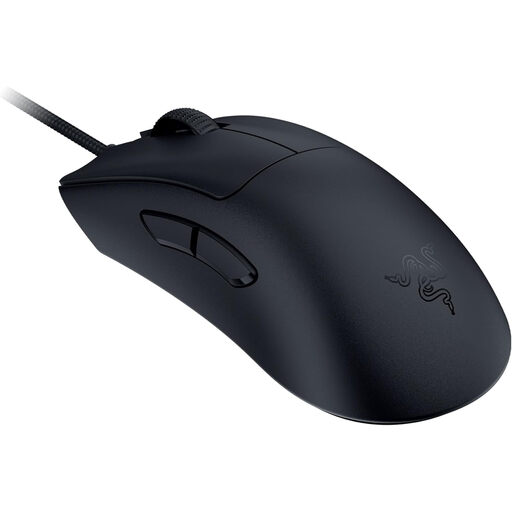
Why this model is a good fit: Its stated weight of 59 grams and Focus Pro sensor with up to 30,000 DPI will appeal to users who prefer fast, controlled movements.
The selection is not based on DPI alone; it also considers weight, the wired USB connection and the ergonomic design.
Optical sensor, Speedflex cable and support for Razer Synapse to adjust DPI and polling rate.

Why this model is a good fit: This mouse is designed for users who want to control numerous commands directly from the mouse and adjust its weight to their preferences.
The eleven programmable buttons make sense if you genuinely need them. For minimalists, the higher weight of around 121 grams may be less suitable.
HERO-25K sensor, 200 to 25,600 DPI, five additional 3.6-gram weights and customisable LIGHTSYNC RGB lighting.
According to the product specifications, the Reaper 330 Gaming Mouse combines a weight of 75 grams, a Pixart PMW3333 sensor with up to 8,000 DPI, nine buttons and a 1,000 Hz polling rate. The model is designed for right-handed users and features a detachable cable and PTFE glide surfaces.
If you are looking for a symmetrical shape, review the product description of the Corsair KATAR PRO XT particularly carefully before buying. The available data contains contradictory information about the wired and wireless versions. Check the connection, power supply and contents of the package on the product page.
The full category features a current selection of wired gaming mice with different sensors, weights, button layouts and lighting functions.
It depends on the game, monitor resolution and personal sensitivity preferences. FPS games often use lower sensitivity settings, while high DPI levels enable fast cursor movements. A configurable range with several profiles is usually more practical than a high maximum value alone.
A wired gaming mouse does not require a battery and receives power directly via USB. A wireless mouse reduces cable clutter on your desk, but it needs to be charged or operated with batteries. For longer sessions, the most important factors are the weight distribution and freedom of movement that suit you best.
Service life depends on usage, switches, cable, scroll wheel and maintenance. Manufacturers sometimes specify click ratings such as 10, 50 or 70 million clicks. These figures are technical specifications, not a guarantee of identical service life in everyday use. Dust, liquids, severe cable bending and hard impacts should be avoided.