
Lieferung heute & morgen

Qualitätsgarantie

Willkommens-Angebote freischalten: KOSTENLOSE Lieferung | Bis zu 80 % RABATT | Kostenlose 30-Tage-JoyPlus-Testphase
App herunterladen
When comparing gaming mice, you quickly come across specifications such as 35,000 DPI, an 8K polling rate or “esports performance”. However, these figures do not automatically mean that a mouse suits your style of play. What matters is how the shape, weight, sensor, connection and software work together.
For PC gamers, FPS and MOBA players, and anyone looking for a mouse for both gaming and working from home, it is therefore worth focusing on the features that genuinely matter. The following selection from the Joybuy Product Recommendation Officers provides an objective overview of the technical specifications and highlights common buying pitfalls.
A gaming mouse with a high DPI rating allows you to adjust its sensitivity very precisely. However, 26,000 or 44,000 DPI does not mean that using a high setting is necessarily beneficial when gaming. Many FPS players use considerably lower values and adjust the sensitivity in the game as well.
A well-performing optical sensor, stable signal processing and consistent motion tracking are more important. Pay attention to the sensor, the supported DPI levels and whether they can be adjusted using software or a button.
A gaming mouse with an 8K polling rate theoretically reports its position to the computer up to 8,000 times per second. This can increase the time resolution of inputs, but it also places a greater load on the system than 1,000 Hz. The game, operating system and hardware must also support the feature.
With models from Razer, Logitech G and ATTACK SHARK, the polling rate can be adjusted depending on the product and connection type. For many users, 1,000 Hz remains a practical starting point. Before buying, check whether an 8K mode is genuinely necessary and whether it requires a separate receiver or specific software.
A lightweight gaming mouse can support rapid changes of direction, while heavier models offer a different feel in use. However, the weight alone says little about comfort. Length, width, height, thumb-rest design and grip style are also important.
An ergonomic gaming mouse is generally designed for a specific hand. If you often switch between your left and right hand, look specifically for a gaming mouse for left- and right-handed users or a symmetrical shell.
An optical sensor should match your requirements. Examples from the selection include:
The maximum figure is only one part of the assessment. For everyday usability, adjustable profiles, clear DPI controls and compatibility with the configuration software are also important.
The polling rate is measured in hertz. 1,000 Hz corresponds to one report every millisecond, while 8,000 Hz enables shorter sampling intervals. In practice, the noticeable difference depends on your monitor, game, system performance and personal settings.
There are three connection options:
Tri-mode models combine Bluetooth, 2.4 GHz and USB-C. This is useful if you want to use the same mouse with both a gaming PC and a work device.
The products mentioned range from around 53 to 102 grams. A lightweight gaming mouse weighs 53 grams, for example, in the CHERRY XTRFY M64, or 54 grams in the Razer Viper V3 Pro. By contrast, the Logitech G502 X LIGHTSPEED weighs 102 grams and offers 13 programmable buttons.
For FPS players, low weight, controlled glide feet and a suitable shape are often more important than a large number of additional buttons. MOBA players or users who rely on many shortcuts can benefit from a gaming mouse with programmable buttons. RGB lighting, on the other hand, is primarily an aesthetic extra and should not be confused with sensor performance.
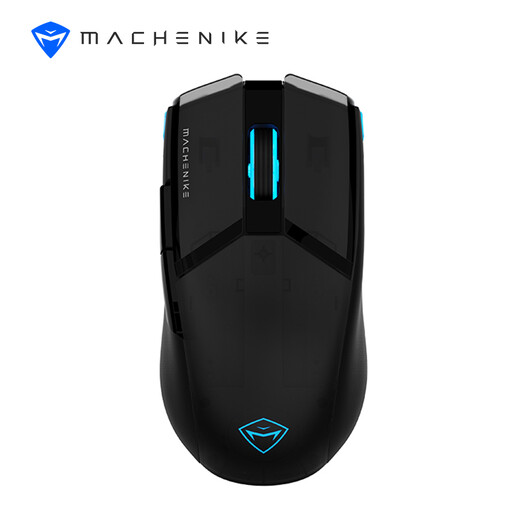
Why this product suits the profile: The combination of USB and 2.4 GHz connectivity offers a flexible introduction to wireless gaming without giving up the option of wired use. It weighs 75 g.
The technical specifications clearly state the sensor, DPI range, weight and battery capacity. The product description quotes up to 85 hours of battery life.
PixArt PAW 3104, up to 8,000 DPI, a 600-mAh battery and adjustable 3-zone RGB lighting.
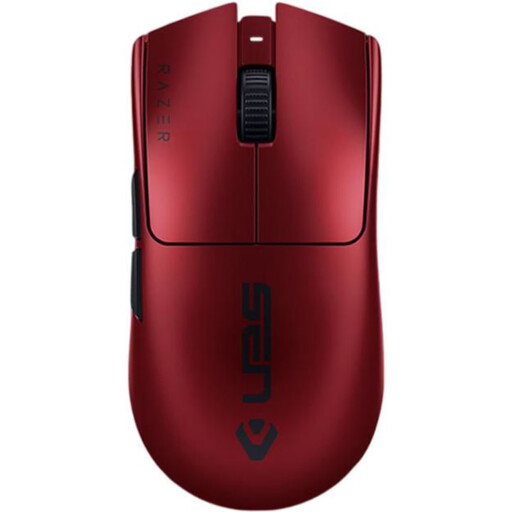
Why this product suits the profile: This model is aimed at users who want to combine low weight with a high polling rate for FPS and esports scenarios.
The advertised 8,000 Hz function is linked to a specific system requirement: your system should support this mode for it to work.
54 g weight, Razer Focus Pro with up to 35,000 DPI, 6 programmable buttons and up to 95 hours of battery life according to the product specifications.
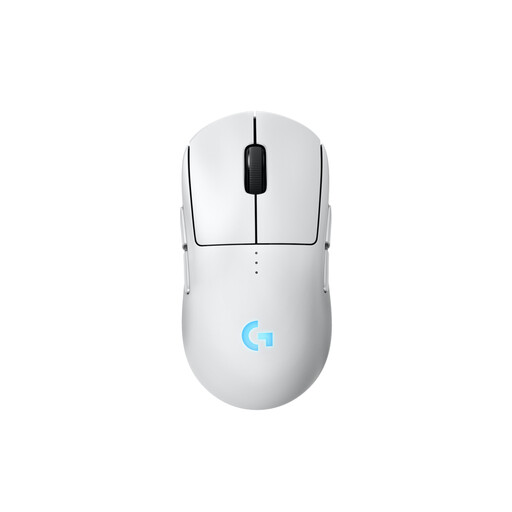
Why this product suits the profile: The symmetrical design with interchangeable magnetic side buttons appeals to users who want to configure a mouse for either their left or right hand.
Handedness is not merely mentioned in the marketing: optional side buttons and covers allow the mouse to be adapted in practice.
HERO 2 sensor with up to 44,000 DPI, up to 95 hours of battery life without lighting, and optionally up to 8 kHz with a separately available receiver.

Why this product suits the profile: If you need plenty of actions, macros or profiles, you get 11 programmable buttons and an adjustable weight system.
The higher weight is clearly stated. You can adjust the balance with up to five additional weights, each weighing 3.6 g.
HERO sensor with up to 25,600 DPI, 11 programmable buttons and adjustable LIGHTSYNC RGB lighting.
We have put together a complete, regularly updated list of products that fully meet these strict selection criteria and the safety regulations applicable in the EU.
There is no single correct figure. FPS games often use lower sensitivities, while high DPI settings allow for finer adjustment. Sensor quality, game configuration and personal control are what matter most.
A 2.4 GHz wireless gaming mouse can be suitable for competitive gaming, provided the receiver, battery, polling rate and software work reliably together. For maximum simplicity, a wired gaming mouse remains a sensible alternative.
Its lifespan depends on the switches, cable or battery, cleaning and intensity of use. Manufacturer ratings such as 10, 20 or 100 million clicks refer to the relevant switches and are not a guarantee of the lifespan of the entire device. With battery-powered models, you should also pay attention to charging habits and safe disposal.