
Lieferung heute & morgen

Qualitätsgarantie

Willkommens-Angebote freischalten: KOSTENLOSE Lieferung | Bis zu 80 % RABATT | Kostenlose 30-Tage-JoyPlus-Testphase
App herunterladen
A gaming mouse should not be chosen solely based on its DPI rating, RGB lighting or eye-catching product name. What matters is whether its weight, shape, sensor, connection and button layout suit the way you use it. This applies to PC gamers and esports players as well as office and creative users looking for a mouse for PC and Mac.
A gaming mouse with a high DPI setting can adjust its sensitivity very precisely. However, a maximum resolution of 30,000 or 40,000 DPI does not automatically mean that you should use the mouse at this setting in-game. Many users prefer considerably lower settings and adjust the sensitivity within the game instead.
Consistent tracking, a well-tuned sensor and a surface on which the sensor works reliably are more important. Also check whether the software can save your preferred DPI stages.
An 8,000 Hz polling rate describes how often the mouse sends its position data to the computer. In theory, this can reduce the time between updates. At the same time, it increases the processing load on the computer. For many everyday users and occasional gamers, a lower polling rate is sufficient.
Therefore, check whether your PC supports the desired setting and whether the feature is only available through specific software or a dedicated receiver. With a wired gaming mouse, a high polling rate can be used directly via USB; with a wireless gaming mouse, the receiver, radio environment and battery level also come into play.
An ergonomic gaming mouse is usually designed for a particular hand and grip style. A pronounced thumb rest can be comfortable for right-handed users, while left-handed users may get on better with a symmetrical or ambidextrous gaming mouse.
Before buying, consider:
A lightweight gaming mouse is easier to move quickly. Models weighing around 47 to 59 grams can be appealing for low sensitivity settings and large mouse movements. Heavier mice, on the other hand, often offer more housing volume, additional buttons or a more solid feel.
The weight should suit your playing style. For strategy games and productive work, additional buttons may be more important than particularly low weight.
Optical sensors detect movement across the surface. Specifications such as 6,400 DPI, 30,000 DPI or up to 40,000 DPI initially show the available adjustment range. Also check whether the mouse can save your preferred values in small increments and whether configuration software is required.
For most users, a stable, finely adjustable sensor is more important than the highest possible number. The surface of the mouse mat also affects performance.
A wired gaming mouse does not need to be charged and is ready to use straight away. A flexible cable can reduce drag, but it remains an additional item on your desk.
A Bluetooth mouse is particularly suitable for laptops, tablets and changing workspaces. Bluetooth often eliminates the need for a separate receiver, but not every model is designed for the lowest latency over Bluetooth. Tri-mode mice with Bluetooth, 2.4 GHz and USB-C offer greater flexibility. With wireless models, you should check the stated battery life, charging method and receiver placement.
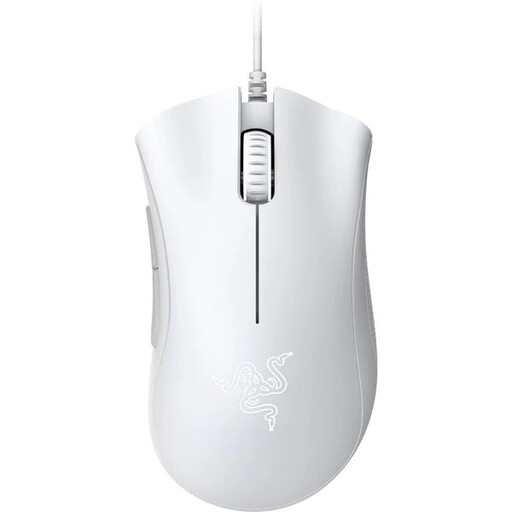
Why this product suits the profile: This wired gaming mouse combines straightforward USB plug-and-play use with five programmable buttons and an ergonomic shape for right-handed users.
Its features focus on USB plug-and-play, 6,400 DPI and programmable buttons rather than wireless connectivity or lighting that may not be needed.
6,400 DPI optical sensor, five programmable buttons and mechanical switches rated for up to 10 million clicks.
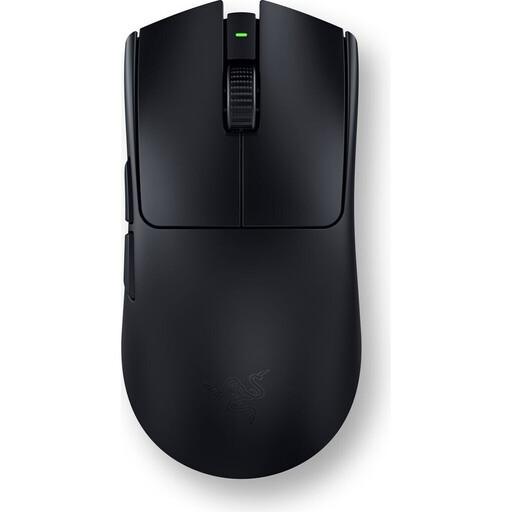
Why this product suits the profile: This model is aimed at users who want to combine low weight, wireless 2.4 GHz connectivity and extensive customisation options.
The wireless setup is complemented by a HyperPolling receiver and a USB-C cable included in the box. This means the mouse can still be used in wired mode while charging.
54-gram weight, sensor supporting up to 35,000 DPI, up to 8,000 Hz polling rate and stated battery life of up to 95 hours.
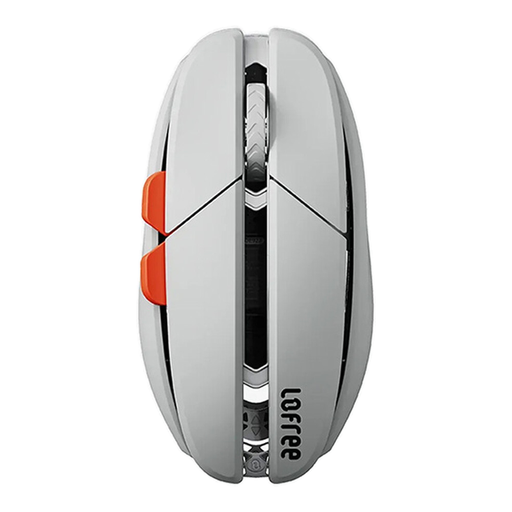
Why this product suits the profile: This tri-mode mouse is suitable for users who switch between PC, Mac, tablet and wired use, while preferring a lightweight design.
Bluetooth, 2.4 GHz and USB-C are clearly separate connection options. Check compatibility before buying: according to the product information, Boot Camp dual systems on Mac are not supported.
47-gram weight, PAW3950 sensor adjustable via software up to 40,000 DPI and up to 100 hours of battery life in Bluetooth mode.
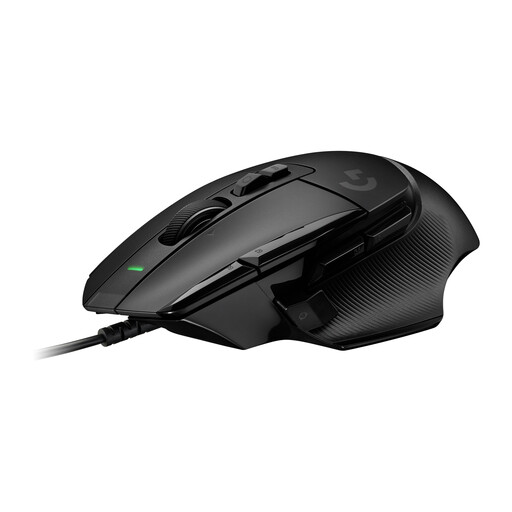
Why this product suits the profile: For users who want to carry out plenty of commands directly from the mouse, this wired model offers more controls and an adjustable scroll wheel.
This selection does not rely solely on a high DPI rating. Instead, it combines the HERO-25K sensor with programmable controls and an adjustable DPI Shift button.
89-gram weight, HERO-25K sensor with up to 25,600 DPI, 13 programmable controls and a switchable Hyperfast scroll wheel.
We have put together a complete, regularly updated list of products that fully meet these strict selection criteria and the safety regulations applicable in the EU.
That depends on the game, screen resolution and personal sensitivity. An adjustable range of around 800 to 4,000 DPI covers many applications. Higher maximum values offer additional headroom, but they are not essential proof of quality.
A modern wireless mouse with a 2.4 GHz receiver can be suitable for fast-paced games, provided you take the receiver, radio environment and battery level into account. Bluetooth is convenient for multiple devices, but it is often chosen more for everyday use and mobility than for minimal delay.
Its lifespan depends on the switches, cable or battery, cleaning and intensity of use. Manufacturer specifications such as a rating of up to 10 or 90 million clicks are technical guidelines, not a guarantee of a particular service life. With wireless models, long-term battery performance is also a relevant factor.