
Lieferung heute & morgen

Qualitätsgarantie

Willkommens-Angebote freischalten: KOSTENLOSE Lieferung | Bis zu 80 % RABATT | Kostenlose 30-Tage-JoyPlus-Testphase
App herunterladen
By Joybuy Product Recommendation Officer, August 29, 2026
The search for a new charger often starts with a simple problem: too many devices, too few outlets, and a mess of cables cluttering your desk or luggage. A single, powerful GaN charger promises to be the solution. But the market is flooded with options, confusing technical specs, and marketing claims that often overpromise and underdeliver.
Before you make a decision, it's crucial to understand the most common pitfalls that can lead to a bad purchase.
To make an informed decision, you should focus on three core parameters. These will determine whether a charger meets your needs and is a future-proof investment.
The power you need depends directly on the devices you want to charge. A modern Power Delivery charger intelligently adjusts its output to match the connected device. As a rule of thumb:
Look for the Power Delivery (PD) 3.0 or the newer PD 3.1 standard. Only these standards ensure that your USB-C laptop charger will achieve maximum charging speed.
A modern multi-port USB charger should prioritise USB-C. These ports are the current standard for fast charging and data transfer.
The crucial question is: How is the power distributed when multiple ports are used simultaneously? Product descriptions should provide clear information on this (e.g., "65W + 30W when using two USB-C ports").
Gallium nitride (GaN) is a semiconductor material that replaces traditional silicon in chargers. The practical benefit for you: GaN chargers are significantly smaller, lighter, and generate less waste heat for the same power output. This makes them ideal not only for a tidy desk but also the perfect universal travel adapter. However, the compact form factor should not come at the expense of stability or cooling.
Based on these objective criteria, we have identified some models that are well-suited for specific use cases.
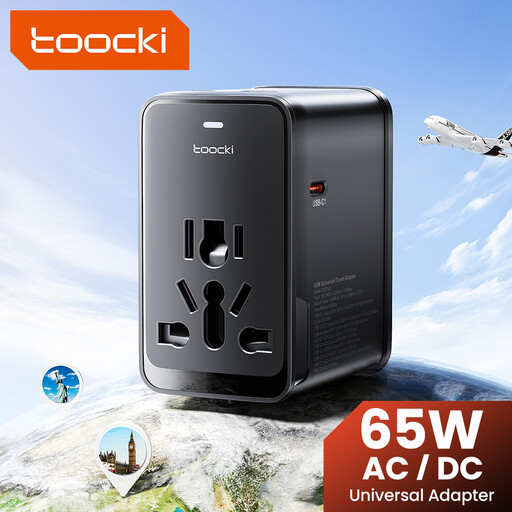
Why This Fits Their Persona: Ideal for digital nomads and business travellers who need a single, compact solution for global travel. This device combines a powerful 65W GaN charger with an integrated universal plug for the EU, UK, US, and AUS.
It solves the problem of carrying multiple adapters and a separate charger. The 65W output via USB-C is clearly specified and sufficient for most laptops, thus avoiding the trap of ambiguous power distribution.
All-in-one design with 4 ports (3x USB-C, 1x USB-A) and worldwide compatibility. GaN technology ensures a very compact and travel-friendly form factor.
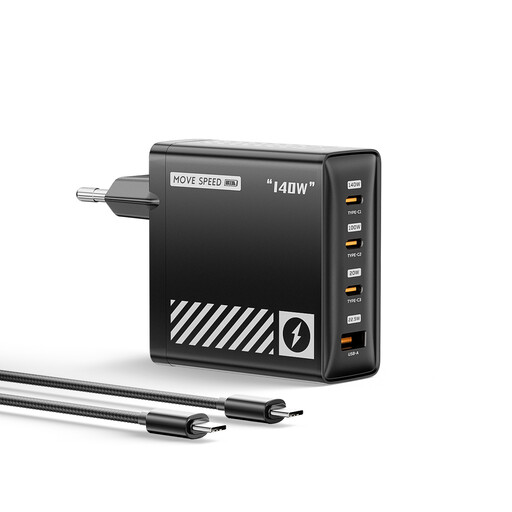
Why This Fits Their Persona: Perfect for users with high power demands who want to power a MacBook, a tablet, and a smartphone simultaneously at maximum speed. Ideal for a clean and efficient workspace.
This charger directly addresses the "total output" trap: It supports the PD 3.1 standard and, according to the manufacturer, delivers up to 140W from a single port. This allows even the most demanding laptops to be charged without compromise.
Extremely high single-port output of 140W. Four ports (3x USB-C, 1x USB-A) with smart power distribution for maximum flexibility. Despite its high power, it remains compact thanks to GaN technology.
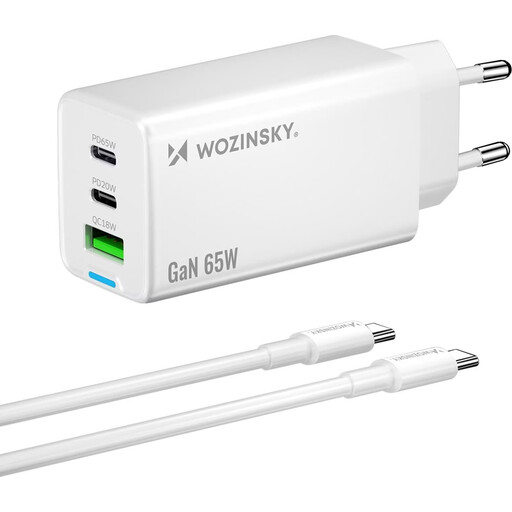
Why This Fits Their Persona: An excellent choice for users looking for a reliable and versatile fast charger for everyday use without breaking the bank. It efficiently charges smartphones, tablets, and even many laptops.
This model avoids the trap of low-quality, cheap products. It offers certified safety and a solid 65W output with a practical port combination (2x USB-C, 1x USB-A) at a fair price.
Excellent value for money. It comes with a matching 65W USB-C cable, so you can start fast charging right out of the box. Compact design.
We have compiled a complete, up-to-date list of products that fully meet these strict selection criteria and rigorous safety standards.
It depends on your most power-hungry device. For a smartphone, 30W is sufficient. For a laptop, you should aim for at least 65W. If you want to fast-charge multiple devices at once, a model with 100W or more is a smart choice. Check your laptop's power requirements (often printed on the original power adapter) to determine the exact wattage needed.
Yes, it's normal and safe for the charger to get warm during operation, especially when charging at high power. GaN chargers generally run cooler than traditional silicon-based chargers. However, if the device becomes excessively hot or emits an unusual smell, unplug it from the power source immediately.
No. To utilise the full power, especially above 60W, you need an appropriately rated USB-C cable. Look for cables that are certified for 100W (or more) and feature an "E-Marker" chip. Using an unsuitable cable can reduce charging speed or, in the worst-case scenario, lead to damage.