Laptop users with an unclear incoming connection
You want to check whether there’s a usable LAN connection in your garden office. A switch distributes an existing network connection, but it doesn’t create one (TP-Link Deutschland).


If your garden office already has a working LAN connection and you only need to connect your work laptop, you can plug it in directly; you won’t need a switch. If you want to connect the laptop and other wired devices, a basic Gigabit switch is usually suitable, provided the incoming connection and devices support it. If you’re setting up a new connection between buildings or installing equipment in an exposed location, check the cable route and operating conditions first.
You want to check whether there’s a usable LAN connection in your garden office. A switch distributes an existing network connection, but it doesn’t create one (TP-Link Deutschland).
You already have a suitable incoming connection and want to connect other devices by cable as well as your work laptop. NETGEAR describes the GS305v3 as a five-port Gigabit switch.
You may need power over Ethernet, VLAN management or Multi-Gigabit support for compatible devices, for example. The features you need depend on your existing network equipment (TP-Link Deutschland, Ubiquiti and MERCUSYS Deutschland).
First, check whether your garden office already has a network connection. Then consider where the switch will be installed, how many ports you need and whether you require any special features.
| What you need | What to look for | Who is it important to? |
|---|---|---|
| Incoming connection and whether you need a switch | Check whether there’s a working LAN connection in your garden office and how it connects to your home. Fluke Networks gives 100 m as the limit for a standards-compliant copper Ethernet channel. | If I’m not sure how the connection is set up, I’d check that first before buying extra hardware. Around 33% of consumers put the incoming connection first. |
| Location and outdoor cabling | Check the temperature and humidity at the installation site against the conditions specified for the exact model. If you’re setting up a new connection between buildings, get the cable route and protection measures professionally assessed. | If the device will be in an unheated or exposed garden office, I want to know whether it can operate there safely. Around 27% of consumers prioritise a suitable location. |
| Ports and standard speed | Count the connection to your home and all the devices you’ll use at the same time; this uplink takes up one port. Also check that the switch, incoming connection and devices support the speed you need. | If I want to connect my laptop and other devices by cable at the same time, I need enough ports. Around 20% of consumers prioritise extra LAN devices. |
| PoE for additional devices | Check whether the switch has a PoE input to power the switch itself or PoE outputs for connected devices. Also compare the PoE standard, the power required by each device and the total power budget. | I want to be able to power a compatible access point or other PoE device through the network cable. Around 13% of consumers prioritise PoE for additional devices. |
| VLAN or Multi-Gigabit | Choose management features only if you have a suitable configuration in mind. For speeds above Gigabit, your incoming connection and connected devices must also support the higher speed. | If my network uses VLANs or compatible Multi-Gigabit devices, the switch needs to support them too. Around 7% of consumers prioritise these specialist features. |
A switch distributes an existing network connection, but it won’t connect your home to your garden office. DEHN Blitzplaner includes data cables between buildings in its lightning protection planning.
First, check whether there’s a working LAN connection in your garden office. If you’re setting up a new connection between buildings, get the cable route and protection measures professionally planned; fibre-optic cable with compatible devices is one possible alternative.
A PoE input can power the switch itself. That doesn’t mean the switch can also power an access point or other devices via PoE.
Check the exact model for the direction of power, the PoE standard it supports and the available total power budget. Ubiquiti describes the PoE port on the USW-Flex-Mini as an input; MERCUSYS Deutschland lists PoE outputs for compatible devices on the MS105GP.
TP-Link Deutschland specifies a range of up to 250 m for Extend mode on the TL-SG1005P, but also notes that the speed on the relevant ports is reduced to 10 Mbit/s. The actual distance you can achieve depends on factors including the cable and power requirements.
For long runs, assess the range and the speed you need separately. Don’t plan to use the maximum distance quoted as a standard Gigabit uplink.
The casing material alone doesn’t prove that a device is suitable for outdoor use. Manufacturers specify different operating conditions for individual models; Ubiquiti explicitly states that the USW-Flex is suitable for indoor and outdoor use.
Check the conditions at your actual installation site against those specified for the exact model. A dry garden office is not the same as a location exposed to the weather.
The range includes basic Gigabit switches, managed models and Multi-Gigabit options.
The GS305v3 is a five-port Gigabit option for easily adding more wired connections.
The DGS-105 is a compact, unmanaged Gigabit switch for adding more wired devices.
The GS-100 series includes models such as the GS-105B V5 and GS-108B V5.
The USW-Flex-Mini and USW-Flex differ in areas including power supply and intended use.
The MS105GP and MS105GS-M2 are designed for different needs: PoE power or Multi-Gigabit speeds.
The following Joybuy models offer different ways to expand an existing network connection, from Gigabit and PoE ports to managed or Multi-Gigabit features.
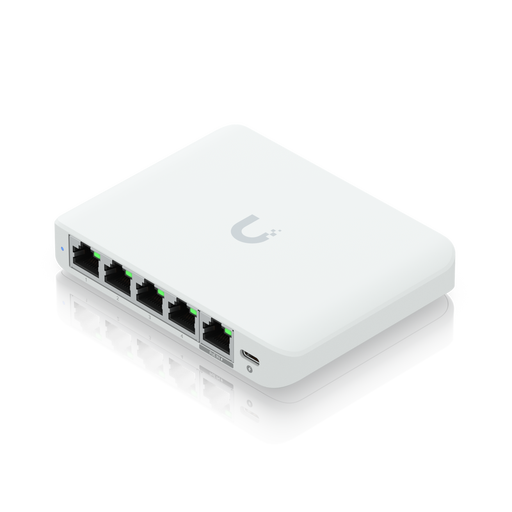 No image available
For a network with compatible Multi-Gigabit devices and a need for UniFi management.
The Joybuy product listing specifies 2.5G Ethernet and PoE. The PoE port is described as an input, not as an output.
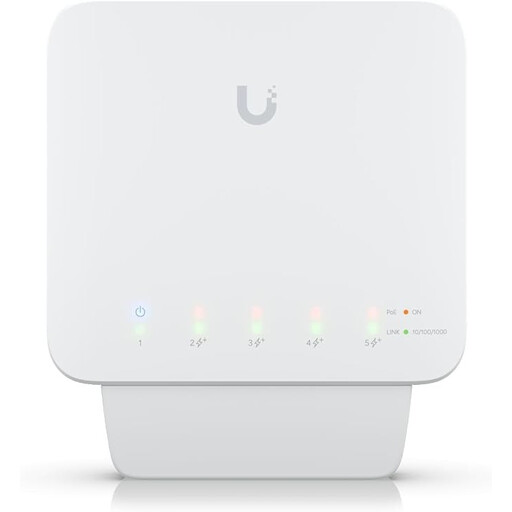 No image available
For an existing network connection with compatible PoE devices and a suitable installation location.
Joybuy lists a five-port Gigabit switch with PoE+ and 46 W. According to the product information, the available PoE budget depends on the power supply; a compatible PoE++ switch or 60 W PoE adapter is required and is not included.
 No image available
For several wired devices connected to an existing network in a dry indoor space.
Joybuy lists five Gigabit ports and USB-C or 802.3af/at PoE power. The product information specifies use in dry indoor spaces and warns against water and moisture.
 No image available
For adding more wired devices and compatible PoE devices to an existing network connection.
The Joybuy product listing specifies five Gigabit ports, four PoE+ ports and a total PoE budget of 60 W. It advises protecting the device from moisture, liquids and high humidity.
 No image available
For a laptop and other wired devices on an existing connection, if Gigabit speeds are sufficient.
Joybuy lists five 10/100/1000 Mbit/s RJ45 ports. The specified operating temperature is 0–40 °C; check that this suits the actual installation location.
If you have a LAN connection and only one laptop, you can connect the laptop directly. To connect several devices, plug the incoming connection into one of the switch’s ports; the remaining ports are available for your laptop and other devices. A switch can’t create a connection to your home if one doesn’t already exist.
Only if the conditions at the installation site fall within the model’s operating limits. TP-Link Deutschland specifies 0–40 °C and non-condensing humidity for the TL-SG105; Ubiquiti warns against exposing the USW-Flex-Mini to water and moisture. A dry office and an exposed location are not the same.
If a product is faulty, you may have statutory rights against the seller; these rights are separate from any voluntary guarantee. Verbraucherzentrale lists repair or replacement as ways of resolving a fault.
Devices covered by relevant EU harmonisation rules must carry the required CE marking. This is the manufacturer’s declaration, not an independent performance test (European Union, Your Europe). In Germany, old switches must not be put in household waste; they should be taken to a separate collection point for waste electrical equipment (Umweltbundesamt).