What should you look for when choosing one?
First check whether there’s already a suitable network connection at your workstation. Then consider the cable route and whether you need extra ports or PoE.
| What you need |
What to check before buying |
Who needs this? |
| Extra LAN ports |
Count the existing connection and all your devices, including the uplink, which uses one of the switch’s ports. |
If I want to connect other devices by cable as well as my desktop PC, I need enough spare ports. Around 40% of consumers prioritise this. |
| Connection between buildings |
Before buying, check whether a suitable connection is already in place or needs to be planned; have the installation professionally assessed. |
If the route from the house to the garden office still needs to be decided, planning the cable run is essential. Around 40% of consumers have this as their main concern. |
| PoE for additional devices |
Only if you’re planning to use a PoE device, check its requirements against the supported ports and total power budget. |
If you want to power a compatible access point or camera over Ethernet, you’ll need suitable PoE ports. Around 20% of consumers prioritise PoE. |
Joybuy products for extra LAN ports
The following models add local LAN ports. Some versions also provide PoE for compatible devices.
 No image available
D-Link DGS-1005P/E, 5-port Gigabit switch
Suitable if you want to connect other LAN devices as well as your desktop PC, and need to power a PoE device.
Five Gigabit RJ45 ports, four of which are PoE+ ports; stated total PoE budget: 60 W. The combined power requirements of PoE devices must stay within this budget.
View at Joybuy
 No image available
D-Link DGS-1210-10/E, 10-port Gigabit smart managed switch
An option if you want to connect several devices to the garden office network and are looking for a managed switch.
The product name lists eight Gigabit RJ45 ports, two SFP slots and L2/L3 management. Check that the ports and management features suit your setup.
View at Joybuy
 No image available
TP-Link TL-SG1005D, 5-port Gigabit desktop switch
Suitable if you need extra wired connections for your desktop PC and other devices.
Five RJ45 ports with 10/100/1000 Mbps, auto-negotiation and Auto MDI/MDIX; this product is described as a desktop switch with a plastic casing.
View at Joybuy
 No image available
TP-Link TL-SG105PE, 5-port Gigabit Easy Smart switch
An option if you need extra LAN ports and want to power a compatible PoE device.
Four PoE+ ports; stated total budget: 65 W. VLAN and QoS features are also listed. The combined power requirements of all connected PoE devices must fit within the total budget.
View at Joybuy
 No image available
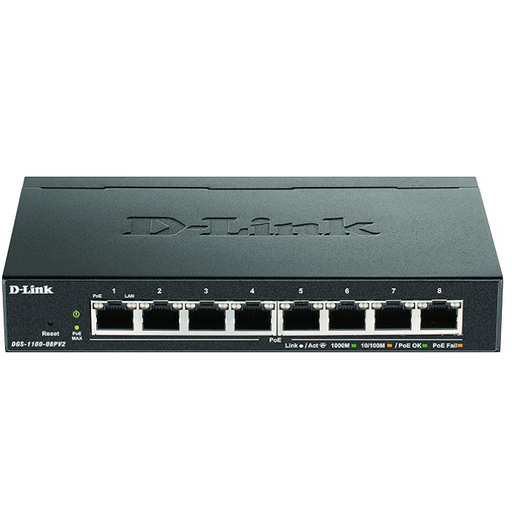
D-Link DGS-1100-08PV2, managed Gigabit switch with PoE
Suitable if you need several local network connections and PoE for compatible devices.
Described as a managed L2/L3 Gigabit Ethernet switch with PoE. The product details list eight Gigabit Ethernet ports and a total PoE budget of 64 W; the combined power requirements of connected devices must stay within this budget.
View at Joybuy
Frequently asked questions
Do I need a switch for just one desktop PC in my garden office?
Not just because you have a PC. If there’s already a suitable network connection at the location, check whether you can connect directly. A switch is mainly useful if you need extra LAN ports.
Can I connect a fibre-optic link directly to a standard RJ45 switch?
Not to a standard RJ45 port. For a fibre-optic link, you’ll need compatible optical ports or media converters to connect fibre to copper Ethernet. The components at both ends must be compatible.
What should I check if my D-Link DGS-105 develops a fault or needs replacing?
Start by checking the power supply, connections and link lights. For revision E1, which it identifies as live, D-Link lists a five-year manufacturer’s warranty and refers to registration to extend the warranty period. The terms for the specific device supplied will apply.
What should I look out for when buying an electrical product in Germany?
Among its checks, the Bundesnetzagentur lists correct CE marking, an identifiable product, manufacturer details, a German instruction manual and a declaration of conformity. Check the information for the specific product listing.
Can an old switch go in the general rubbish?
No. Under section 10 of the ElektroG, old equipment must be collected separately from unsorted municipal waste.


