If your garden office already has a suitable network connection, a basic Gigabit switch with enough free ports will usually be sufficient for a smart home hub with its own power supply and a few other LAN devices. PoE is only worth considering for devices that are explicitly compatible. If you’re planning a new wired connection between your home and garden office, check the cable route and surge protection before choosing a switch. A switch on its own won’t connect the garden office to your home or power a hub that doesn’t support PoE.
Who is this buying guide for?
Garden office with a planned connection to your home
You want to work out how to get the network uplink into your garden office using the existing cable route. Fluke Networks and DEHN cover considerations relating to copper cabling and building wiring.
A hub and a few LAN devices
Your garden office already has a network connection, but you need more ports for a hub with its own power supply and other wired devices. Bosch Smart Home, for example, describes this LAN and power supply connection for the Controller II.
Garden office with PoE devices
You’d also like to connect a compatible access point or camera and take its power requirements into account when choosing a switch. Manufacturers’ information on PoE standards and power budgets can help you check which devices are suitable.
What should you consider when choosing?
First, check whether your garden office already has a usable network connection or whether you’ll need to install a new one. This will determine how many ports you need, whether you need PoE and, where relevant, how to configure the network.
| What you need |
What to check before buying |
Who this matters most to |
| Connection between your home and garden office |
Check what connection is already available or what route you plan to use. For copper, check the cable length and route; for fibre, allow for compatible connections or converters. Fluke Networks gives a 100 m limit for a twisted-pair copper link; this isn’t a guarantee that any garden connection will work. |
If I still need to plan the connection to my garden office, I’ll check the uplink and cable route before buying a switch. Around 36% of consumers consider the building connection their most important buying decision. |
| Enough LAN ports |
Count the ports needed for the uplink, hub and other devices. Check whether the hub has an Ethernet connection and its own power supply. |
If you want to add a hub and a few devices to a garden office that’s already connected, make sure you have enough ports. Around 29% of consumers put extra LAN ports first. |
| PoE for additional devices |
Check the PoE standard and power requirements of each device. Also compare the total power needed when all devices are connected at once with the switch’s power budget. |
If I want to power a compatible access point or camera over an Ethernet cable, I’ll compare its requirements with the per-port output and total power budget. Around 21% of consumers put PoE devices first. |
| Configurable network separation |
Check whether you need VLANs and whether your router and other devices can be configured to support them. If not, an unmanaged model can save you from unnecessary setup. |
If you want to segment your smart home network, the right configuration features are essential. Around 14% of consumers consider network separation their most important buying decision. |
Which mistakes should you avoid?
-
Buying a switch to make up for a missing connection to your home
A switch distributes an existing network connection, but it won’t create the uplink between your home and garden office. DEHN identifies metal data cables between buildings as relevant to lightning protection planning.
Decide on the connection point and cable route first. If you’re installing a new connection between buildings, ask a qualified professional to assess the risk from lightning and power surges.
Depending on the route, you may need extra cabling, compatible connections or converters, as well as expert planning.
-
Confusing the PoE output per port with the total power budget
According to TP-Link, the TL-SG1005LP can supply up to 30 W per PoE port, while its total power budget is 40 W. Both limits matter when powering several devices at the same time.
Check the requirements of all the PoE-compatible devices you’ll actually connect against the per-port limit and the total power budget of your chosen switch.
-
Assuming a hub with its own power supply can use PoE
Bosch describes the Smart Home Controller II as having a LAN connection and a separate plug-in power supply. This doesn’t mean that other hubs support PoE.
Check the power requirements of your exact hub model. Only plan to use PoE for devices that are explicitly stated to be compatible.
A hub with its own power supply will still need a suitable socket or a separately planned power supply.
-
Installing an indoor switch without checking the conditions
Operating conditions vary by model. For example, TP-Link specifies a temperature range of 0 to 40 °C and non-condensing humidity for the TL-SG105. Ubiquiti recommends an additional protective enclosure for the Switch Flex in exposed outdoor locations.
Check the temperature, condensation risk and installation location against the specifications for your chosen model.
If the location isn’t suitable, you may need a device with different specifications or a compatible protective enclosure.
Which network switch brands are worth considering?
TP-Link
The range includes everything from basic Gigabit switches to models with PoE+ or a management interface.
- TP-Link describes the TL-SG105 and TL-SG1005D as models that work without any initial configuration.
- PoE outputs and management features are only available on models equipped with them. The TL-SG1005LP has a total power budget of 40 W, despite offering up to 30 W per PoE port.
NETGEAR
The GS305 is a basic five-port Gigabit switch, while the GS305EP adds PoE+ and configurable features.
- NETGEAR specifies four PoE+ ports and a total power budget of 63 W for the GS305EP.
- According to NETGEAR, the GS305 doesn’t have a PoE budget. A model having PoE doesn’t mean it will be compatible with any smart home hub.
D-Link
The DGS-105GL is designed to distribute Gigabit connections across five ports in a protected office environment.
- D-Link specifies a metal casing and fanless operation for this model.
- These specifications don’t mean it’s weatherproof or suitable for outdoor installation, and they don’t apply to every model in the range.
Zyxel
According to Zyxel, the GS-100 series comprises compact, unmanaged Gigabit switches for straightforward network connections.
- Zyxel describes the series as plug-and-play and fanless.
- For PoE or configurable network separation, choose a model with the features you need.
Ubiquiti
The range includes the Flex Mini, which can be powered over PoE or USB-C, and the Switch Flex, which has PoE outputs.
- PoE is one way to power the Flex Mini switch; the Switch Flex is designed to provide PoE outputs.
- A PoE input isn’t the same as PoE outputs for connected devices. Ubiquiti recommends an additional suitable enclosure for the Switch Flex in exposed outdoor locations. You’ll still need to plan the connection to your home separately.
Joybuy products for your garden office
The models below cover basic Gigabit connections, PoE and management features, as well as switches with SFP ports for compatible uplinks.
 No image available
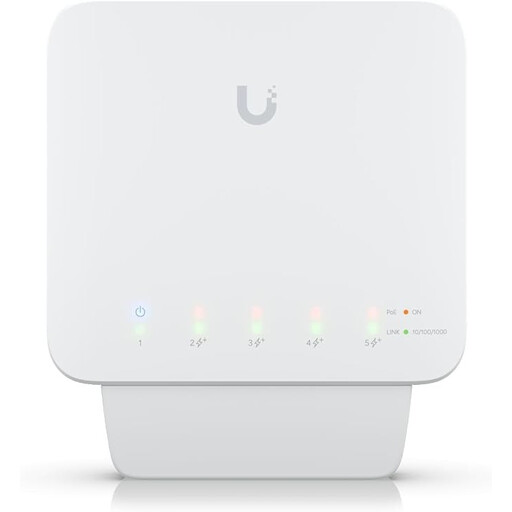
Ubiquiti UniFi Switch Flex USW-Flex, 5-port Gigabit PoE+ switch
Worth considering if you want to power compatible PoE devices as well as your hub, and have a suitable power supply for the switch.
Five Gigabit RJ45 ports and four PoE+ outputs. The stated PoE output is up to 46 W when using a suitable PoE++ or 60 W input power supply. A PoE injector or power supply isn’t included. Ubiquiti recommends an additional suitable enclosure for exposed outdoor locations.
View at Joybuy
 No image available
Ubiquiti UniFi Switch Flex Mini USW-FLEX-MINI-EU
An option for a garden office that’s already connected if you need extra LAN ports and configurable features, and the switch will be in a dry, well-ventilated indoor space.
Five Gigabit RJ45 ports; VLANs and port isolation are listed as features. It can be powered via USB-C or PoE. The PoE port is for powering the switch only; it doesn’t provide PoE to connected devices.
View at Joybuy
 No image available
D-Link DGS-1210-10/E, 8 Gigabit RJ-45 ports and 2 SFP slots
Worth considering if you want to connect several LAN devices or are looking at an uplink using compatible SFP components.
Eight Gigabit RJ-45 ports and two SFP slots; VLAN support and web-based management are specified. A fibre connection requires compatible SFP transceivers and a suitable device at the other end. It isn’t specified whether the transceivers are included.
View at Joybuy
 No image available
TP-Link TL-SG1005D, 5-port Gigabit desktop switch
A straightforward choice for an existing garden office network if your hub has its own power supply and you’re adding a few other LAN devices.
Five RJ45 Gigabit ports with automatic speed adjustment; plug-and-play, with no additional configuration needed. The plastic casing is specified for operation from 0 to 40 °C. Check that the temperature and humidity at the installation location are suitable.
View at Joybuy
 No image available
TP-Link TL-SG105PE, 5-port Gigabit switch with 4 PoE+ ports
Suitable for a garden office that’s already connected if you want to power compatible PoE devices as well as your hub and use VLAN features.
Five Gigabit Ethernet ports, four PoE+ ports and a stated total power budget of 65 W; VLAN support and a fanless design are also listed. PoE devices must support the relevant standard, and their combined power requirements must stay within the total budget.
View at Joybuy
Frequently asked questions
Does the smart home hub itself need PoE?
Not necessarily. Bosch describes the Smart Home Controller II as having a LAN connection and a separate plug-in power supply. Check the power requirements of your specific hub model before choosing a PoE switch for it.
Can I install a standard desktop switch outside or in a damp shed?
Only if the conditions at the installation location meet the manufacturer’s specifications for that model. For example, TP-Link specifies 0 to 40 °C and non-condensing humidity for the TL-SG105. For exposed outdoor locations, Ubiquiti recommends adding a suitable enclosure for the Switch Flex.
Who should plan a new copper cable between a home and garden office?
The cable should be planned as part of the building installation, with a qualified professional assessing the risks from lightning and power surges. DEHN explicitly includes metal data cables between buildings in its risk planning; a desktop switch can’t carry out this assessment.
What does the CE marking on a switch mean?
According to information from the European Union, CE marking applies to products covered by relevant EU legislation; it isn’t an independent quality mark.


