What should you look for when buying?
First check that the network connection in your garden office is working. Then decide how many ports you need and which extra features you’ll actually use.
| Priority |
What to check before buying |
Who is this particularly important to? |
| Extra ports |
Count your computer and other devices; on a five-port switch, the uplink takes up one port. |
If I want to connect my computer and, for example, a printer by cable at the same time, I need enough free ports rather than management features I won’t use. Around 31% of consumers put extra ports first. |
| Connection to your home |
Check that the uplink works, identify its type and plan how the cable will be routed before choosing a switch. |
If I don’t yet know whether the network reaches my garden office reliably, I need to check the connection between the buildings first. Around 25% of consumers say the uplink is their main priority. |
| Space and noise |
Check whether the specific model is fanless, along with its dimensions, port positions and the space needed for its power supply and cables. |
If the switch is right next to me on a small desk, I want to avoid fan noise and taking up unnecessary space. Around 19% of consumers prioritise a quiet, space-saving workspace. |
| PoE and management |
For PoE, check the power required by each device and the overall power budget. Only choose VLAN or other management features if you have a specific need for them. |
If I want to power a compatible access point or other network device through its data cable, the PoE output and features need to be suitable. Around 13% of consumers prioritise PoE or configurable network features. |
| Faster local speeds |
Make sure your network adapters, connected devices and uplink support the speed you want; a faster switch alone won’t speed up a slower connection. |
If I want to transfer large amounts of data locally between compatible devices, both endpoints and the connection between them need to support the higher speed too. Around 12% of consumers put faster local networking first. |
Joybuy products for your garden office connection
This selection includes switches for adding wired connections in your garden office, from five-port Gigabit models to an eight-port managed model.
 No image available
Ubiquiti UniFi Switch Flex Mini USW-FLEX-MINI-EU
For connecting several wired devices at your desk; the PoE port is a power input and doesn’t provide PoE to connected devices.
- 5 RJ45 ports with 10/100/1000 Mbps
- Powered via USB-C or 802.3af/at PoE
- Switching capacity: 10 Gbit/s
View at Joybuy
 No image available
D-Link DGS-1005P/E
For an existing network connection with several devices, including compatible PoE devices, as long as the port output and overall power budget are suitable.
- 5-port Gigabit desktop switch
- 4 PoE+ ports, up to 30 W per port
- Total PoE budget: 60 W
- Fanless metal casing; plug-and-play
View at Joybuy
 No image available
TP-Link TL-SG1005D
For a straightforward way to add wired connections when you don’t need network management.
- 5 RJ45 Gigabit ports with 10/100/1000 Mbps
- Auto-negotiation and Auto-MDI/MDIX
- Plastic casing
View at Joybuy
 No image available
TP-Link TL-SG105PE
For extra ports and compatible PoE devices, or specific network settings. You don’t need the extra features if you simply want more ports.
- 5 Gigabit ports
- 4 PoE+ ports, up to 30 W per port
- Total PoE budget: 65 W
- VLAN, QoS and IGMP; fanless metal design
View at Joybuy
 No image available
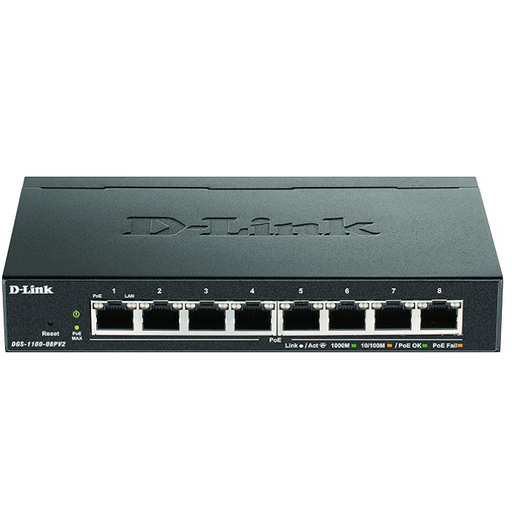
D-Link DGS-1100-08PV2
For more wired devices and a specific need for PoE or VLAN management; configuration is carried out through a web interface.
- 8 Gigabit ports
- PoE with a total power budget of 64 W
- Managed L2/L3 switch
View at Joybuy
Frequently asked questions
Can I connect my garden office computer without a switch?
Yes, if you already have a working Ethernet port connected to your existing network. A switch is mainly useful if you want to connect more wired devices to that port. You’ll still need a suitably configured router to share your internet connection.
Where should I put the switch, and does it need configuring?
A fanless desktop model can be a good fit for a quiet workspace. Check that there’s room for the cables and power supply, and make sure the specific hardware version is suitable for its operating environment. According to the manufacturer, an unmanaged model doesn’t need configuring. A standard desktop switch isn’t rated for damp or unprotected outdoor use just because it’s in a garden office.
What should I consider when running a data cable from my home to my garden office?
First check the type, function and length of the uplink. DEHN’s Lightning Protection Guide identifies communication cables between buildings as a relevant part of lightning protection planning. Ask a qualified professional to assess the specific cable route and any potential protective measures. For a standardised Ethernet copper channel, Fluke Networks specifies a limit of 100 m.
What’s the difference between a guarantee and your statutory rights if a product develops a fault?
Your statutory rights are set by law and apply to the seller; a guarantee is an additional voluntary commitment with its own terms. The consumer advice centre explains that the two aren’t the same. So check the terms for the specific offer.
What does the CE marking tell me about a switch?
The CE marking is the manufacturer’s declaration that the product meets applicable requirements; it isn’t an independent quality mark. In its market surveillance guidance, the German Federal Network Agency lists correct marking, manufacturer details and the required declaration of conformity among the points to check.


