Who might need a USB Ethernet adapter?

Garden office with existing LAN

If you want to connect your laptop to a working Ethernet connection, first check which USB adapter is compatible with your device. TP-Link Deutschland and UGREEN DE offer USB Ethernet adapters for different connectors and network speeds.

Laptop with limited ports

If your laptop only has certain USB ports available, or you need connections other than LAN, make sure the connector and features of the specific adapter or hub meet your needs. UGREEN DE distinguishes between simple adapters and USB-C hubs with a network port.

Users of fast local networks

If you transfer large files across your own network, check whether your router or switch and the other device also support 2.5 Gigabit Ethernet. StarTech.com Deutschland lists this speed for the C22G-USB-ETHERNET model.

What should you look for when choosing one?

Priority What to check before buying Who is this particularly relevant to?
USB and operating system compatibility Check that you have a free USB-A or USB-C port, and compare the supported USB standard and driver information for the exact model. If my laptop only has certain USB ports available or runs an older operating system, I’ll check the connector and driver information for the specific model. Around 33% of consumers prioritise this compatibility.
Existing LAN connection Check for a network socket or cable route to the router or switch. If the cable runs outdoors or through damp areas, assess the suitability of the specific cable separately. If the connection to the garden office isn’t in place yet, I’ll first check the socket, cable route and router or switch. A USB adapter can’t replace this LAN connection. Around 33% of consumers are primarily looking for a usable LAN connection.
Usable network speed Make sure the Ethernet speed of your router or switch, the other device, your laptop’s USB standard and the cabling all match the adapter. For large file transfers on a local network, I’ll check whether the other device and the rest of the network connection also support 2.5 Gigabit. Around 17% of consumers prioritise local network speed.
Additional ports List the extra ports you need. If you’re choosing a hub, check its LAN speed and compatibility with your laptop too. If I want to connect devices as well as LAN, I’ll compare the hub’s ports with those of a standalone adapter. Around 17% of consumers prioritise additional ports.

Avoid common buying mistakes

  • Buying an adapter before checking the LAN connection

    A USB Ethernet adapter connects your laptop to an existing wired network, but it won’t extend the connection to your garden office.

    First, check the network socket, cable route and connection to the router or switch. If the cable runs outdoors or through damp areas, it must be suitable for those conditions.

    Depending on the distance, you may also need suitable cabling or have to spend time troubleshooting.

  • Assuming 2.5 Gbit/s is the actual connection speed

    The speed listed for an adapter doesn’t automatically tell you the speed you’ll get across the entire network connection. A slower device at the other end can limit its benefits.

    Choose an adapter with a higher rated speed if your laptop, the other device and the cabling can all support it.

  • Assuming ‘plug and play’ works with every operating system

    For the TP-Link UE306, TP-Link Deutschland explicitly states that a driver is required for Windows 7/8.

    Before buying, check the operating system and driver information for the exact adapter version against your laptop.

    Finding and installing drivers can take extra time with older operating systems.

  • Choosing based only on the brand or USB-C connector

    Models vary in Ethernet speed and the number of additional ports. The connector type alone doesn’t tell you what LAN features or hub functions a specific model offers.

    Compare the model number, rated Ethernet speed and the ports you actually need.

Key brands at a glance

TP-Link

According to TP-Link Deutschland, the UE300C and UE306 models offer USB-C and USB-A 3.0 respectively for Gigabit Ethernet.

  • TP-Link lists speeds of up to 1000 Mbit/s for both models, along with details of supported operating systems.
  • The UE306 requires a driver for Windows 7/8; TP-Link also lists older systems that require a driver for the UE300C. These are manufacturer specifications, not independent speed test results.

StarTech.com

The C22G-USB-ETHERNET is a USB-C option for a network connection with 2.5 Gigabit Ethernet.

  • StarTech.com Deutschland specifies USB-C 3.2 Gen 1 and 2.5 Gbit/s Ethernet, with support for lower speeds.
  • The higher rated speed requires compatible devices at both ends and suitable cabling; it doesn’t guarantee a particular performance in a garden office.

UGREEN

The range includes various USB Ethernet adapters and USB-C hubs with network ports.

  • UGREEN DE describes its listed USB-A model as offering speeds of up to 100 Mbit/s for basic networking tasks.
  • This specification doesn’t apply to every model from the brand. Check the speed of the specific product rather than assuming it from the brand name.

D-Link

The DUB-E130 is a USB-C to Gigabit Ethernet model and an example of this type of adapter.

  • D-Link Deutschland lists USB-C and Gigabit Ethernet for this model.
  • D-Link marks revision A as ‘End of Sale’ on its German product page. Any specific offer should therefore be assessed separately.

USB Ethernet adapters and hubs at Joybuy

This selection includes USB-to-Gigabit standalone adapters and USB-C hubs with Gigabit Ethernet. It’s relevant if there’s already a working wired network connection in your garden office.
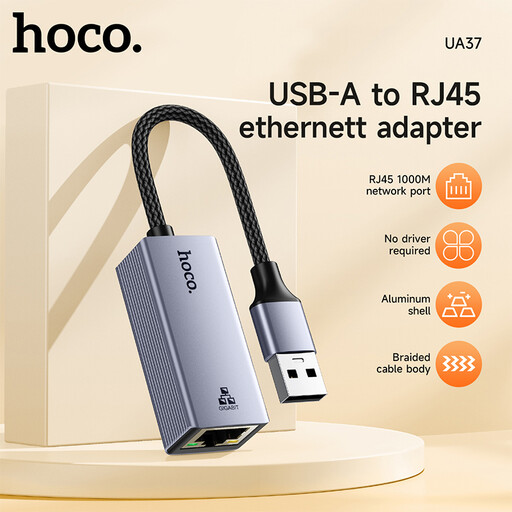
HOCO UA37 USB-to-Gigabit Ethernet adapter

HOCO UA37 USB-to-Gigabit Ethernet adapter

An option if you’re looking for a USB Ethernet adapter for a laptop and a Gigabit network connection.

The product specifications list 10/100/1000 Mbit/s and compatibility with Windows 98/ME/2000/XP/Vista/Win7/8/9/10, Linux and Mac OS.

Joybuy

HOCO UA37 USB-C Ethernet adapter, 1000 Mbps

HOCO UA37 USB-C Ethernet adapter (1000 Mbps)

A suitable standalone adapter if your laptop has a USB-C port and you want to use a Gigabit LAN connection.

The product specifications list Type-C to RJ45 and 10/100/1000 Mbit/s.

Joybuy
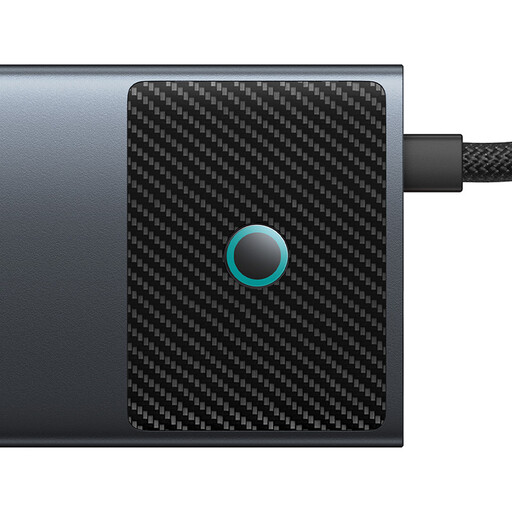
BASEUS Metal Gleam Series II 10-in-1 USB-C hub

BASEUS Metal Gleam Series II 10-in-1 USB-C hub

A hub option if you need ports other than Ethernet on your laptop.

The product specifications list RJ45 at 1000 Mbit/s, HDMI 4K@120Hz and 4K@60Hz, USB-A 10Gbps, USB-C 10Gbps, two USB-A 480Mbps ports, SD/TF and USB-C (PD).

Joybuy

WOZINSKY 14-in-1 USB-C hub

WOZINSKY 14-in-1 USB-C hub

An option if you need Ethernet and other ports through a USB-C hub.

The product specifications list Gigabit Ethernet at up to 1000 Mbit/s, HDMI, DisplayPort, a card reader and an audio port. The product is also listed with a 15-cm cable.

Joybuy
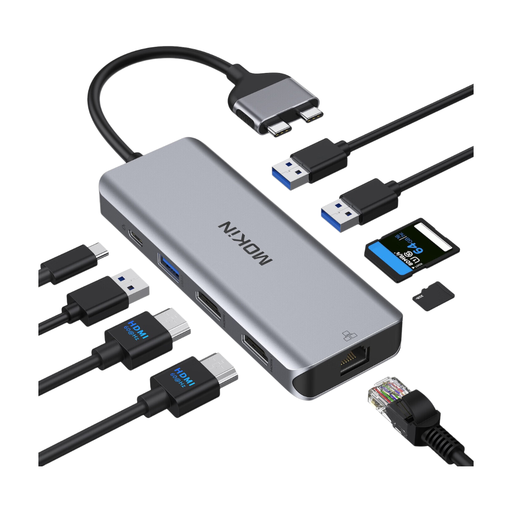
Mokin docking hub with USB-C and RJ45 Ethernet

Mokin docking hub with USB-C and RJ45 Ethernet

This docking option may suit you if a compatible MacBook needs ports other than LAN.

The product specifications list Gigabit Ethernet up to 1000 Mbit/s, as well as HDMI, USB, SD/TF and Power Delivery. According to the description, the dock is only compatible with the MacBook Pro/Air configurations listed there; MacBooks with standard M1, M2 or M3 chips are explicitly excluded.

Joybuy

Frequently asked questions

How do I connect my laptop in a garden office?

Connect a USB Ethernet adapter that’s compatible with your laptop to an existing network connection using the RJ45 socket. Check the operating system compatibility for the specific model too: for example, TP-Link Deutschland says that the UE306 requires a driver for Windows 7/8.

Do I need a special USB adapter if the cable runs through the garden?

Whether an Ethernet cable is suitable for outdoor or damp conditions depends on the cabling, not the USB adapter. Belden describes a specific Cat-5e cable as suitable for outdoor and wet locations; for direct burial, Belden recommends extra protection against pressure and impact. These specifications don’t apply to all cables.

What should I know about a fault or returning an online purchase in Germany?

If a product is faulty, your statutory rights against the seller are separate from any voluntary manufacturer’s warranty. The Verbraucherzentrale explains that consumers generally have a 14-day right to cancel from the date they receive goods bought online; the terms of the specific purchase should be checked.

What labelling should I look for on an electronic adapter?

According to the Bundesnetzagentur, products covered by the relevant EU harmonisation legislation and placed on the EU market must carry a CE marking. The CE mark is the manufacturer’s declaration that the conformity assessment has been completed; it isn’t an independent performance test mark. Whether the rules apply to a specific product must be assessed separately.