Don’t replace your main router just because streaming stutters in your garden office. First, check the connection at the playback device itself, then focus on improving the link between your home and garden office. Depending on your existing setup, you could use a mesh node, a wired access point, powerline adapters after testing them, or a building bridge. If installing equipment outdoors, make sure the location is approved and complies with the applicable German frequency regulations.
Which solution might work for you?
Streaming with a Wi-Fi dead spot in your garden office
If your internet works inside the house but video stutters on the playback device in your garden office, the connection between the buildings is the key. Check the signal where you actually use the device.
A garden office with a possible cable route
If you can use or install a network cable, you can provide Wi-Fi directly in your garden office with an access point, rather than relying on a wireless link all the way from the house.
A garden office without an easy cable route
If installing a new network cable isn’t an option, choosing between powerline and a wireless bridge will depend on your electrical wiring and the locations available for mounting equipment.
What should you look for when choosing?
First, test the connection at your playback device. Then check whether there’s a suitable location for a wireless node, a route for a cable or an option that doesn’t require a new network cable. A new main router won’t necessarily help if the connection to your garden office is the bottleneck.
| What you need |
What to check before buying |
Who this matters most to |
| Stable connection |
Check the signal where you watch and where you’d place the mesh node. |
If video stutters in my garden office, I want to improve the connection right there, without placing a wireless node somewhere that already has poor coverage. Around 36% of consumers put a stable signal first. |
| Wired uplink |
Check the existing cable route, Ethernet connection and suitable power supply. |
If a cable route is available, I want to provide Wi-Fi in the garden office itself, rather than relying on a wireless link between the buildings. Around 29% of consumers prioritise a LAN connection to the destination. |
| Connection without a new cable |
Test powerline adapters in the intended sockets, or check for suitable mounting locations for a wireless bridge. |
If I can’t install a new network cable, I want a connection that works with the sockets or mounting locations I already have. Around 21% of consumers particularly value a solution that doesn’t require a new cable route. |
| Streaming needs and replacing the router |
Test the connection at your playback device and, if replacing the router, check that it supports your internet connection type. |
Before replacing my router, I want to check the connection and video quality my streaming service actually needs. Around 14% of consumers want to avoid replacing their router unnecessarily. |
Netflix recommends a minimum internet speed of 5 Mbit/s for Full HD and 15 Mbit/s for 4K UHD. These are guidelines for Netflix, not a guaranteed router performance or a requirement for other streaming services.
Which buying and installation mistakes should you avoid?
-
Comparing advertised Wi-Fi speeds alone
Product specifications don’t tell you what connection will actually reach the playback device in your garden office. Walls and distance can affect the wireless link.
Test the connection where you plan to use it, then focus on improving the weak link.
A new main router can mean extra setup without changing the wireless link to your garden office.
-
Placing a repeater where the signal is poor
A repeater also needs a decent connection to the main router. If its uplink is weak, it may not solve the problem.
Check the location before buying, and see whether you can connect an access point with a LAN cable.
-
Assuming powerline speed ratings reflect performance at the destination
Electrical interference and the sockets you use can affect the connection.
Test the adapter pair in the wall sockets you intend to use. A multiway extension or extension lead is not a substitute.
-
Assuming “outdoor” means you can install it anywhere outside
Where you can install a device depends on the specific model. A building bridge connects two network points, but doesn’t automatically provide Wi-Fi for your playback device.
Check that the mounting location is approved, confirm what’s included in the box, and separately check how Wi-Fi will be provided in your garden office.
A building bridge may require extra installation and setup, and you may also need an access point at the destination.
Which brands are worth considering?
FRITZ!
Mesh extensions for existing FRITZ! networks, including devices for indoor use and sheltered outdoor areas.
- FRITZ! says the FRITZ!Repeater 1610 Outdoor offers IP54, Gigabit LAN and PoE+.
- According to the manufacturer, this model is intended for sheltered outdoor areas. Check whether your chosen mounting location qualifies.
TP-Link
Deco mesh systems for the home and garden, plus Omada access points for targeted Wi-Fi installations.
- The manufacturer says the Deco X50-Outdoor offers IP65, PoE and compatibility with other Deco devices. TP-Link lists IP65 and PoE for the EAP225-Outdoor.
- Deco and Omada are separate product ranges, so this doesn’t confirm that they can form a shared mesh network.
devolo
Magic powerline kits can provide Wi-Fi over your existing electrical wiring if you don’t want to install a new network cable.
- According to the manufacturer, the Magic 2 WiFi 6 next Starter Kit includes two adapters, with Wi-Fi available from the destination adapter.
- devolo notes that electrical devices can interfere with the connection. Test the adapters in the sockets you plan to use.
Ubiquiti
A Building-to-Building Bridge provides a dedicated link between two buildings, rather than simply extending the range of a home router.
- According to Ubiquiti, the Building Bridge pair uses a 60-GHz connection with a 5-GHz backup.
- This is a bridging solution, not a confirmed replacement for a Wi-Fi access point where you use your playback device. Also check whether you’re buying a single unit or a two-pack.
Joybuy products for Wi-Fi in your garden office
The models below include mesh systems for extending coverage indoors and access points for providing Wi-Fi at the destination. If installing equipment outdoors, make sure the installation, power supply and approval for the specific device are suitable for the location.
 No image available
TP-Link Deco BE22 (2-Pack) Mesh System, Wi-Fi 7
Could be suitable if you want to use a two-unit mesh system indoors; the product description specifies a dry indoor environment.
Wi-Fi 7 and two Gigabit WAN/LAN ports per unit are listed. Router and access point modes are also mentioned.
Joybuy
 No image available
Ubiquiti U7 Mesh
Could be suitable if you want to provide Wi-Fi at the destination using an access point with the right Ethernet and PoE setup.
The product description lists a 2.5 Gigabit Ethernet uplink, PoE and an IPX6 weather-resistant enclosure. Configuration is designed to be managed through UniFi Network.
Joybuy
 No image available
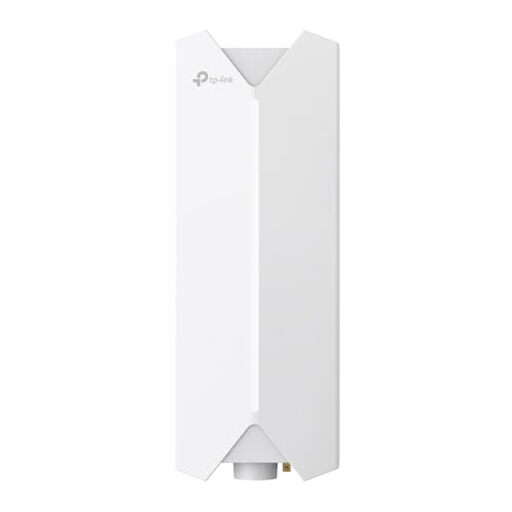
TP-Link Festa F61 Outdoor
Could be suitable if you want to provide Wi-Fi using an access point connected via Ethernet. The power supply and mounting must be suitable for the location.
Wi-Fi 6, one Gigabit port and support for 802.3at or Passive PoE power are listed.
Joybuy
 No image available
TP-Link Deco M4 (3-Pack), AC1200
Could be suitable if you want to use several mesh units to cover different areas of your home.
AC1200 dual-band Wi-Fi and two Gigabit ports per unit are listed. The description mentions roaming and setup through the Deco app.
Joybuy
 No image available
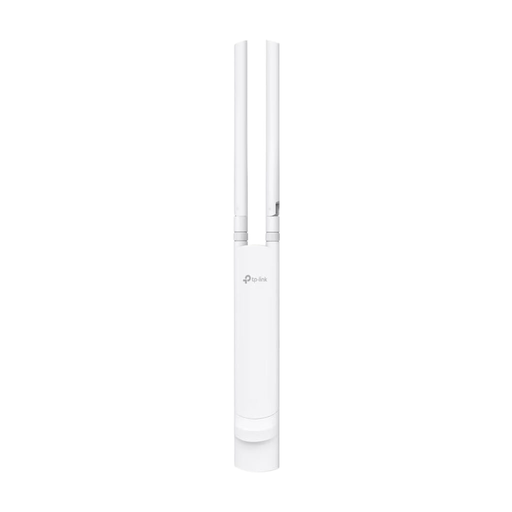
TP-Link Festa F52 Outdoor, AC1200
Could be suitable if you can connect an outdoor access point via Ethernet and mount it appropriately for the location.
The description lists an IP65 enclosure, dual-band AC1200, one Gigabit port and PoE support. Wall and pole mounting are also listed.
Joybuy
Frequently asked questions
How can I check whether the connection is good enough for a documentary?
Test the connection on the playback device you plan to use in your garden office, not just beside the router. Netflix recommends at least 5 Mbit/s for Full HD or 15 Mbit/s for 4K UHD. Check the requirements of other services, too, and look out for dropouts.
Can I install an ordinary repeater outdoors?
That depends on whether the specific model is approved for outdoor use. FRITZ! describes the Repeater 1610 Outdoor as suitable for sheltered outdoor areas, with IP54, while TP-Link lists the Deco X50-Outdoor as IP65 and suitable for outdoor use. These specifications apply only to the models named and don’t replace the need to check your installation location.
What should I check before using powerline adapters permanently?
Test both adapters in the wall sockets you’ll be using. devolo recommends wall sockets rather than multiway extensions and notes that electrical devices can cause interference. Testing in different sockets won’t necessarily show how the connection will perform where you plan to use it.
What extra installation tasks might be involved?
Depending on the solution you choose, you may need a second adapter, PoE accessories or a building bridge installation. If you buy your own main router, the Verbraucherzentrale says you’re responsible for setup and updates.
Can I use any Wi-Fi frequencies and settings I like?
No. Germany is subject to the relevant general frequency assignments and frequency-use regulations set by the Bundesnetzagentur. Before using your device, check that its configuration is intended for Germany and is suitable for your planned use.


