You don’t necessarily need a new router. What matters is whether the videos can be reliably sent from their storage location in the house to the playback device in the garden office. If you can run a network cable, a suitable access point or mesh node with a LAN connection could be the answer. Without a cable, you could consider wireless mesh if there’s a usable backhaul connection, or Powerline after testing it at the intended sockets. heise online recommends planning for a wired connection wherever possible.
Who is this relevant to?
Families with video storage in the house
If your family videos are stored on a device or storage drive in the house, the connection needs to reach the playback device in the garden office. heise online covers the full Wi-Fi route in its guide to Wi-Fi in the garden.
Homes with an existing router
If you want to keep your working router and just get Wi-Fi to the garden office, check the compatibility and connection options for an additional node. FRITZ!, for example, explains how to configure its repeaters to work with a compatible home mesh network.
Garden offices without a network cable
If there’s no LAN cable running to the office, your choice depends on whether there’s still a usable wireless connection where you plan to put the node, or whether Powerline works at the target sockets. heise online outlines different ways to get Wi-Fi in the garden; devolo notes that your electrical installation can affect Powerline performance.
What should you look for when buying?
| Priority |
What to look for |
Who should make this a priority? |
| Reliable playback |
Check the signal where you’ll watch and at the potential node location. If you can run a cable, consider a wired access point. |
If I want videos to play without interruption in the garden office, I need to consider the connection along the whole route. Around 31% of consumers put reliable playback first. |
| Connection between buildings |
Check whether you can run a cable and what connections or power supply the access point needs. If it’s going outdoors, make sure the device is suitable for outdoor use. |
If I want to set up a connection from the house to the garden office, the right way to carry the signal is what matters most to me. Around 25% of consumers prioritise the connection between buildings. |
| Keeping your existing equipment |
Make a note of your router model and device generation, then check whether the additional device can work with your existing network as a mesh node, repeater or access point. |
If I want to keep using my router, I need an additional device that can be integrated with my existing network. Around 19% of consumers prioritise keeping their current networking equipment. |
| No new network cable |
Test the wireless connection where you plan to put the node, or try Powerline at the intended sockets. Don’t assume the stated data rate reflects the results you’ll get at home. |
If I can’t run a network cable, I’m looking for a practical connection using Wi-Fi or my existing electrical wiring. Around 13% of consumers prioritise a solution that doesn’t require a new network cable. |
| Sharing private videos |
Check where the files are stored and which devices will play them. Review sharing options, your Wi-Fi password, guest network and updates separately from the range. |
If I want family videos to be available on several chosen devices, I also need to keep access to private files in mind. Around 12% of consumers put private, easy-to-understand video sharing first. |
Common buying mistakes
-
A more powerful main router will definitely fix the Wi-Fi dead spot
The connection to the garden office is a separate part of the route. A new router alone doesn’t guarantee that a usable signal will reach it.
First, check the signal where you’ll watch, where you could put a node and whether there’s a cable route you can use.
Depending on the connection, you may also need a suitable node or a wired connection.
-
A wireless node will work even where there’s no signal
The node needs a usable connection to the rest of your home network. Putting it in a dead spot won’t solve the problem by itself.
Test the backhaul connection at the intended location and consider a LAN or Powerline connection as an alternative.
-
The advertised speed or outdoor rating proves it will work in your home
Actual Powerline performance can depend on your electrical installation and interference from other electrical devices. For outdoor devices, check the conditions specified for the particular model and its installation.
Test Powerline at the target sockets and follow the device instructions if installing it outdoors.
If the sockets or installation conditions aren’t suitable, you may need a different solution.
Useful brands to consider
FRITZ!
FRITZ!Repeaters can extend a compatible FRITZ! home network. According to the manufacturer, the FRITZ!Repeater 3000 AX offers both wireless and LAN connections.
- FRITZ! lists three wireless units and two Gigabit LAN ports for the 3000 AX.
- The connection to the garden office still depends on the specific location and a suitable network configuration.
TP-Link
The Deco X50-Outdoor is designed for use with a compatible Deco mesh network; the EAP610-Outdoor is part of the Omada product range.
- TP-Link lists an IP65 rating, PoE and compatibility with other Deco models for the Deco X50-Outdoor. For the EAP610-Outdoor, TP-Link lists an IP67 rating and Omada Mesh.
- Deco and Omada Mesh are different product ranges and shouldn’t be treated as part of the same mesh family.
devolo
Magic 2 WiFi next uses Powerline to connect different locations, with Wi-Fi provided by the adapter at the far end.
- devolo lists two Gigabit LAN ports for the WiFi next adapter and compatibility with devices in the Magic range.
- dLAN range adapters aren’t supported. Electrical interference and certain VDSL setups can affect suitability.
ASUS
The ZenWiFi XD5 can be part of a suitable ASUS setup, particularly when the nodes are connected via Ethernet.
- ASUS describes the XD5 as supporting Ethernet backhaul and AiMesh.
- Check the Wi-Fi coverage in your garden office and whether the operating mode will work with your existing router and specific installation.
Ubiquiti
The UniFi U6 Mesh is an access point for a suitably configured UniFi setup, not a standalone replacement for an internet router.
- Ubiquiti lists a Gigabit Ethernet uplink, PoE and IPX5.
- According to Ubiquiti, weather resistance for outdoor installation applies when the LED side faces upwards and the supplied mount is used.
Telekom
Speed Home WLAN is designed to extend compatible Speedport setups.
- Telekom describes Ethernet as a connection option for Speed Home WLAN.
- Router models and device generations vary. A repeater won’t automatically be integrated as a mesh node.
Joybuy products for extending your Wi-Fi
The following products include wireless repeaters and access points for a wired connection or a suitable outdoor connection to your garden office.
 No image available
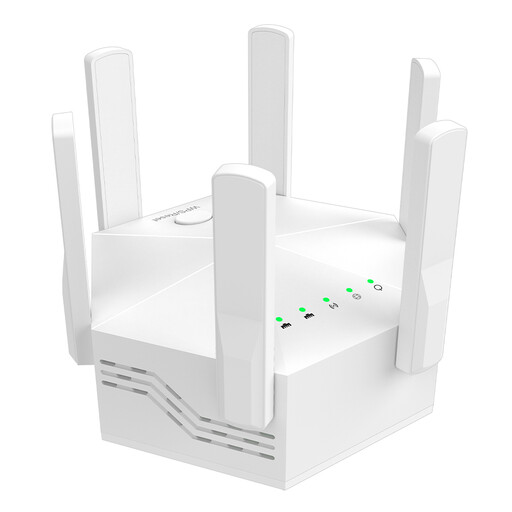
Dual-band Wi-Fi repeater, 1200 Mbps, 6 adjustable antennas
Could work as a wireless repeater if there’s still a usable connection to your home network where you plan to put it.
Listed in the product name: dual-band, 1200 Mbps and six adjustable antennas. It’s also described as suitable for indoor and home use.
View at Joybuy
 No image available
Ubiquiti UniFi U7 Pro XG WiFi 7 Access Point, Tri-Band, 10GbE, PoE+
Could be suitable if you’re planning a wired access point for an indoor network.
Listed in the product name: WiFi 7, tri-band, 10GbE and PoE+. A PoE+ switch or PoE+ injector is required but not included; this device isn’t a router.
View at Joybuy
 No image available
Ubiquiti UniFi U6 Mesh WiFi 6 Indoor/Outdoor Access Point
Could suit a garden office with a suitable wired connection, provided it’s compatible with your UniFi setup and the installation requirements.
The product name lists WiFi 6 and six spatial streams, and says a PoE adapter is included. Ubiquiti lists an IPX5 rating. For outdoor installation, the LED side must face upwards and you must use the supplied wall or pole mount.
View at Joybuy
 No image available
Wi-Fi repeater, 1200 MBit/s, 5 GHz
Could be an option if there’s still a usable wireless connection to your existing network at the intended location.
The product name lists 1200 MBit/s and 5 GHz. The two RJ45 ports are listed as 10/100 Mbps.
View at Joybuy
 No image available
Compact Wi-Fi repeater
Could be suitable if you want to extend your existing indoor Wi-Fi and there’s still a connection to your home network where you plan to put it.
The product name describes it as a compact Wi-Fi booster for extending your wireless network.
View at Joybuy
Frequently asked questions
Do I need a new internet router to watch family videos in the garden office?
Not necessarily. If your existing router and internet connection are working, first check the connection from where the videos are stored to the office. A suitable access point or mesh node could extend your existing network. Before replacing your router, make sure the type of connection and setup are right for your current service.
How do I set up playback for locally stored videos?
First, check which device stores and serves the files and which device you want to play them on. For supported FRITZ!Box models, FRITZ! describes a media server that can stream videos to devices on your home network. Check the feature is available on your specific router and that it’s compatible with your playback device.
What should I do regularly to maintain my setup?
Keep your router and connected devices up to date, and use suitable passwords. The Verbraucherzentrale recommends setting up a separate guest Wi-Fi network for visitors. Check its access permissions before sharing private videos.
What extra tasks or costs might I need to allow for?
Depending on how you connect, you may need to install a cable, add a suitable access point or provide the right power supply. If you set up your own router, you’ll also need to manage its updates. Test Powerline at the intended sockets before deciding to rely on it long term.


