A wireless indoor repeater is an option if there’s still a strong enough signal from your home router at a sheltered spot between the house and garden office. If the wireless connection is weak, you could use an Ethernet connection with an access point or AP mode instead. Powerline performance depends on your specific electrical installation. For an exposed outdoor installation, you’ll need a device designed for the job, and you should check the applicable radio regulations for your intended use. Your music library must also be accessible to your playback system from your computer or NAS – improving Wi-Fi coverage won’t make it available automatically.
Which solution is right for you?
Music library in a garden office
If you want to play music files from a computer or NAS on your home network, you’ll need a suitable Wi-Fi connection and an accessible shared folder. Sonos Support explains how to access a music library on a local network.
Garden office with a weak home Wi-Fi signal
If the Wi-Fi signal barely reaches your garden office, consider a sheltered spot for your repeater or a wired connection. FRITZ! recommends placing a repeater between the router and other Wi-Fi devices, with as few obstacles in the way as possible.
Garden office with an outdoor installation
If you plan to install the device outdoors without shelter, choose a model specifically designed for this purpose and check the wireless configuration for your intended use. TP-Link lists indoor and dedicated outdoor devices as separate product types.
What should you consider when choosing?
First, check whether there’s still a usable connection to your router at a possible repeater location. Then make sure your music library will be accessible and decide how best to connect.
Wireless indoor repeater
Suitable if: there’s a sheltered spot with a strong enough signal from the router, and you don’t want to run an Ethernet cable.
Consider: The wireless connection to the router could still be a bottleneck. An indoor device isn’t designed for outdoor use just because it has a long range.
Ethernet with an access point or AP mode
Suitable if: you can run a network cable to the garden office or to a suitable location for a Wi-Fi access point.
Consider: A wired connection avoids relying on a wireless link to the router, but you’ll need a suitable cable route and a device that supports AP or Ethernet bridge mode.
Powerline with Wi-Fi
Suitable if: there’s no practical cable route or strong enough wireless connection, and your electrical installation supports a Powerline connection.
Consider: Performance depends on your specific electrical installation and any electrical interference. Test the adapters in the sockets you intend to use.
Wi-Fi device designed for outdoor use
Suitable if: you’re planning to install the device outdoors without shelter, and have checked the power supply and connection to your home network.
Consider: An outdoor-rated casing won’t solve a weak connection to the house or remove the need to check the applicable radio regulations.
| What you need |
What to check before buying |
Who it matters most to |
| Connection to the house |
Signal strength at a sheltered spot between the house and garden office; obstacles between the router and repeater. |
If I want to improve the connection to my garden office, I’ll first check the router signal at the planned location. Around 33% of consumers put the wireless link between the house and garden office first. |
| Access to the music library |
Whether the local shared folder is accessible and what the playback system requires. |
If I want my playback device to get music from a computer or NAS, the shared folder must also be accessible on my home network. Around 27% of consumers prioritise access to their music library. |
| Connection without a wireless bridge |
Whether there’s a cable route and the device supports AP mode; test Powerline in the sockets you plan to use. |
If the wireless link through the house wall is the problem, I’ll look into a wired alternative. Around 20% of consumers prioritise a connection that doesn’t rely on a reliable wireless bridge. |
| Exposed outdoor location |
Whether the specific device is suitable for the installation location, as well as the power supply and wireless configuration. |
If the device is going to be installed outdoors without shelter, I’ll first check that it’s designed for the job and suitable for the intended use. Around 20% of consumers prioritise suitability for outdoor installation. |
Common buying and planning mistakes
-
Placing the repeater where the Wi-Fi has already dropped out
A wireless repeater needs a usable connection to the router itself. If it’s placed somewhere with a weak signal, it may not be able to reliably extend the connection to your garden office.
Check the signal at a sheltered spot between the house and garden office. If it’s too weak there, consider Ethernet or an alternative you’ve tested on site.
-
Assuming better Wi-Fi coverage means access to your music files
Extending your Wi-Fi won’t set up file sharing. To access a local music library, your computer or NAS must be available on your home network, and the files must be shared with the playback system you use.
Check your shared folder and playback system requirements before deciding whether to buy additional networking equipment.
-
Assuming Powerline speeds will be the same in your garden office
Electrical devices and the sockets you use can affect data transfer. devolo notes that electrical interference can disrupt your powerline network and that speeds vary depending on the location.
Test the adapter pair in the sockets you plan to use before relying on Powerline as an alternative to a wireless connection.
-
Treating an indoor device like a weatherproof outdoor model
Indoor repeaters and models specifically designed for outdoor use aren’t automatically suitable for the same installation locations.
For an exposed installation, check that the specific model is suitable and that its wireless configuration is right for your intended use. You’ll also need to plan for suitable outdoor hardware, a power supply and installation.
Key brands at a glance
FRITZ!
FRITZ! describes the FRITZ!Repeater 1200 AX as suitable for existing FRITZ! home networks, and lists Gigabit LAN and FRITZ! Mesh features.
- The Gigabit LAN port may be useful for a wired connection.
- These specifications don’t confirm that the signal will reach a particular garden office, and don’t apply to every model.
TP-Link
TP-Link says the RE705X can work as a repeater or access point. EasyMesh requires a compatible router.
- Its documented AP mode and Gigabit port are useful for a wired connection.
- These features don’t make this indoor model weatherproof. TP-Link has separate devices for outdoor use.
devolo
devolo describes Powerline as one way to extend your network towards a garage or garden.
- Powerline may be worth considering if your electrical installation is suitable.
- devolo notes that electrical interference and the location can affect performance.
NETGEAR
NETGEAR offers Wi-Fi repeaters for areas where the router doesn’t provide enough coverage.
- A repeater may be useful for extending existing Wi-Fi coverage.
- The product range doesn’t tell you whether a connection will reach a particular garden office or if a device is suitable for an exposed outdoor installation.
Joybuy products for extending your Wi-Fi
This selection includes indoor Wi-Fi extenders, including models with AP mode or an Ethernet port. You’ll still need to set up access to your computer or NAS music library on your home network.
 No image available
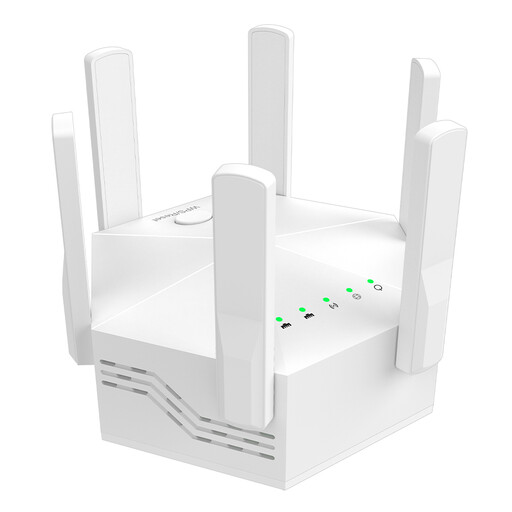
Wi-Fi repeater, dual-band, 1200 Mbit/s, 6 adjustable antennas
May be suitable if there’s a signal from the router at the installation location or an Ethernet connection for AP mode.
The product description lists two 10/100 Mbit/s LAN ports and AP, repeater and router modes. The title specifies an EU plug; the device is designed for indoor use.
Joybuy
 No image available
Wi-Fi repeater, 1200 Mbit/s, 5 GHz
May help extend your Wi-Fi if there’s still a signal from the router at the planned location.
The description lists dual-band, AP, repeater and router modes, plus two RJ45 Ethernet ports with 10/100 Mbit/s. The device is designed for indoor use.
Joybuy
 No image available
Compact Wi-Fi booster
May be an option for adding Wi-Fi coverage to an office or home.
The description presents it as a compact plug-and-play Wi-Fi booster for extending an existing network.
Joybuy
 No image available
MERCUSYS ME80X Wi-Fi 6 range extender
AP mode and the Gigabit port may be useful if you can run an Ethernet cable to the installation location.
The title lists AX3000 dual-band, with 574 Mbit/s at 2.4 GHz and 2402 Mbit/s at 5 GHz. It also specifies a Gigabit port, app control, a signal strength indicator and AP mode. This model is designed for indoor use.
Joybuy
 No image available
TP-LINK RE235BE BE3600 dual-band Wi-Fi 7 range extender
For wireless extension, place the extender within range of your existing Wi-Fi router.
The title lists a 2.5G multi-gigabit port, MLO, Smart Roaming and EasyMesh compatibility. Your router must also be compatible to use EasyMesh.
Joybuy
Frequently asked questions
Why can’t I see my music library even though my Wi-Fi is better?
Better Wi-Fi coverage won’t set up file sharing. With Sonos, your computer or NAS must be accessible on the local network, and your music files must be shared with the right permissions. Check the requirements for your playback system if you use a different one.
How do I connect an access point using an Ethernet cable?
Choose a supported access point or Ethernet bridge mode, then connect the device to your home network using the designated Ethernet port. TP-Link documents this mode for the RE705X; for other models, follow the instructions for that specific device.
Does a computer need to stay switched on if my music is stored on a NAS?
For the NAS access method described by Sonos, you don’t need a computer to make the library available. Sonos specifies SMBv2 or SMBv3 for this use. Check the requirements for other playback systems.


