What should you look for when buying?
First, check the connection at the planned location. If it isn’t strong enough, compare a direct Ethernet connection with a powerline alternative that you’ve tested on site.
Indoor repeater
Suitable if: There’s still a usable signal from your home router at the sheltered location.
Bear in mind: A repeater can’t reliably compensate for a weak incoming signal just because it has a high advertised wireless speed.
Outdoor device
Suitable if: The most practical installation point is outdoors and the specific model is approved for that location.
Bear in mind: An IP rating and weather approval don’t replace a suitable power supply or a reliable connection to your router.
Ethernet with an access point
Suitable if: There’s a network cable running to your garden office, or you can install one.
Bear in mind: The cable needs to reach the access point. Also check that the specific device supports this operating mode.
Powerline with Wi-Fi
Suitable if: There’s no suitable Ethernet connection and the wireless link isn’t strong enough.
Bear in mind: Electrical interference and the sockets you use can affect performance. Test the connection on site.
| What you need |
What to check before buying |
Who is it most relevant to? |
| Connection to the garden office |
Check the signal at the planned repeater location, then check the actual connection at the playback device. |
If I want to stream a documentary in my garden office, I need a stable connection all the way to the screen. Around 33% of consumers are likely to be primarily concerned with the wireless link. |
| Making use of existing Ethernet |
Check for access point mode and a suitable Ethernet port. A LAN port for a device doesn’t replace a cable connection to the router. |
If I already have Ethernet in my garden office, I want to connect the access point there by cable. Around 25% of consumers are likely to want to use an existing network cable for Wi-Fi. |
| Outdoor installation |
Check the approved installation area, IP rating and power or PoE supply for the specific model. |
If the access point needs to be installed outdoors, I need a model whose stated suitability matches the installation location. Outdoor installation is likely to be the main concern for around 25% of consumers. |
| Connection over power cables |
Allow for a suitable starter kit and test the connection using the wall sockets you intend to use. |
If neither a reliable wireless link nor Ethernet is available, I want to check whether my existing power cables can provide a suitable connection. Around 17% of consumers are likely to need this kind of alternative. |
Joybuy products for Wi-Fi in your garden office
This selection includes indoor repeaters, a wired access point and an additional Deco Mesh unit. For each device, check that its intended connection type suits the link to your garden office.
 No image available
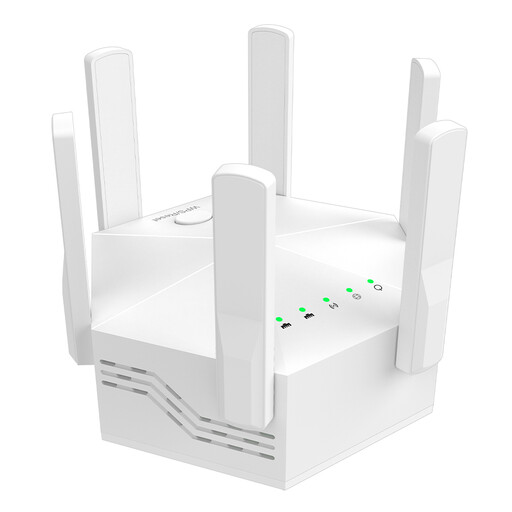
Dual-band Wi-Fi extender, 1200 Mbit/s, with 6 antennas
Described as an indoor Wi-Fi extender. Before using it in your garden office, check the connection at the planned location.
Dual-band; 1200 Mbit/s according to the product name; 6 adjustable antennas.
2 LAN ports rated at 10/100 Mbit/s according to the product description.
View at Joybuy
 No image available
Ubiquiti UniFi U7 Lite WiFi 7 access point
For Wi-Fi in your garden office when there’s an Ethernet connection to the network.
2.5 GbE and PoE+; the product description mentions wall or ceiling mounting.
For the access point set-up described, you’ll need an Ethernet connection, PoE power and UniFi configuration.
View at Joybuy
 No image available
Wi-Fi repeater, 1200 Mbit/s, 5 GHz
Described as an indoor repeater. Check that there’s a usable incoming signal at the location where you plan to install it.
Product name: 1200 Mbit/s and 5 GHz. The description specifies dual-band and two RJ45 ports.
Operating modes listed: access point, repeater and router.
View at Joybuy
 No image available
Compact Wi-Fi booster
Described as a Wi-Fi booster for extending an existing signal. Test whether the signal is strong enough at the planned location.
The product description mentions a compact design and plug-and-play set-up.
View at Joybuy
 No image available
TP-Link Deco X10 Mesh Wi-Fi unit (1-pack)
Described as an additional unit for an existing Deco Mesh system. Check that you already have one of these systems.
Dual-band Wi-Fi 6 AX1500 and 2 Gigabit Ethernet ports according to the product description.
The extension described requires an existing Deco Mesh system.
View at Joybuy
Frequently asked questions
What speed should I check on the playback device when watching a documentary?
Check the connection on the device in your garden office while you’re using it. Netflix recommends service-specific speeds of at least 3 Mbit/s for HD at 720p, 5 Mbit/s for Full HD and 15 Mbit/s for 4K. These figures aren’t a general guarantee for other streaming services or for simultaneous use.
Can I plug a repeater into my garden office if there’s almost no router Wi-Fi there?
A wirelessly connected repeater needs a usable connection to the router itself. First, find a sheltered location with a stronger incoming signal. If the wireless link still isn’t reliable, compare a wired access point with a powerline connection tested on site.
Is a single Wi-Fi extender enough for powerline?
For a new set-up, you’ll also need to plan the connection from the router to the powerline. devolo sells starter kits with one LAN adapter and one Wi-Fi adapter separately from individual add-on adapters. Then test the connection using the specific sockets you intend to use.
Can an outdoor repeater be installed outside without protection?
That depends on the specific model’s approval and the installation location. FRITZ! rates the FRITZ!Repeater 1610 Outdoor IP54 for sheltered outdoor areas; TP-Link specifies IP65 for the Deco X50-Outdoor. Also check the required power supply and the connection back to your router.
Which Wi-Fi frequencies are relevant for a garden office?
Germany’s Federal Network Agency provides general information on Wi-Fi frequencies allocated in the 2.4 and 5 GHz bands. The relevant usage conditions still apply; this doesn’t mean that every frequency band, device or installation location is automatically approved.


