A Wi-Fi repeater may be enough for online lessons if you can place it somewhere with a strong signal from your router and a test at your study space confirms the connection is stable. If the wireless link to your garden office is unreliable, an access point connected via Ethernet is a more targeted alternative. If you need to install a device outdoors, choose one specifically approved for the intended location and follow its installation requirements.
Which solution is right for you?
Weak Wi-Fi in your garden office during lessons
If you’d rather not install a new cable, a Wi-Fi repeater could be an option, provided you can place it somewhere with a strong signal from your router. What matters is the connection at your actual study space, not just the advertised data rate.
Garden office with an Ethernet connection
If your garden office already has a network connection, or you’re planning to install one, a device with access point mode can provide Wi-Fi there. This means the connection doesn’t have to travel back to the router over a wireless link.
Network device for outdoor installation
If you really do need to install equipment outdoors, choose a device that the manufacturer specifically approves for the intended location. Also check the power and network connections you’ll need.
What should you look for when choosing?
First decide whether a wireless connection from a suitable location will do, or whether you’ll need an Ethernet cable or an outdoor installation.
Indoor Wi-Fi repeater
A good fit if: There’s a suitable indoor spot between the router and garden office with a strong signal from the router, and a test at your study space confirms the connection is stable.
What to consider: The repeater still depends on its wireless connection to the router and on obstacles along the way. A high advertised data rate is no substitute for a strong signal.
Access point connected via Ethernet
A good fit if: Your garden office has, or will have, a suitable network connection, especially if the wireless link from your home is unreliable.
What to consider: You won’t need a wireless backhaul, but you will need suitable cabling and a device with access point or Ethernet bridge mode.
Access point rated for outdoor use
A good fit if: The device really does need to be installed outside a protected indoor space, and you have a suitable installation location with power and network connections.
What to consider: The device’s weather resistance, installation and power supply must all suit the specific equipment and location. Approval for sheltered outdoor areas does not automatically cover every outdoor installation site.
| What you need |
What to check before buying |
Who it matters most to |
| Stable Wi-Fi for lessons |
Check that the location is suitable and the signal indicator shows good reception. Then test sound, video and, if needed, screen sharing at your study space. |
If I need to take lessons in my garden office, a reliable wireless connection comes first. Around 36% of consumers would prioritise a stable wireless backhaul. |
| Ethernet backhaul |
Check whether there’s a suitable Ethernet connection where you want to use the device, and whether it supports access point or Ethernet bridge mode. |
If there’s already an Ethernet connection in my garden office, or one is planned, I’d like to use it for the backhaul rather than rely on a wireless signal travelling through walls and over distance. Around 29% of consumers would prioritise an Ethernet connection. |
| Outdoor installation |
Check that the intended installation location, approved operating conditions, power supply and network connection are all suitable. |
If the device really does need to be installed outdoors, I want to be sure that the manufacturer’s approval covers that exact location. Around 21% of consumers would prioritise suitability for outdoor installation. |
| Router compatibility and set-up |
Check your router model and the mesh features you want. Separately, check the device’s connection mode and requirements. |
If I want to keep using my router’s existing features, the specific compatibility and set-up requirements matter to me. Around 14% of consumers would consider router compatibility and set-up effort their main priorities. |
Common mistakes when choosing
-
Assuming the advertised Wi-Fi data rate guarantees uninterrupted lessons
Your connection also depends on how well the repeater can reach your router and how strong the signal is at your study space.
Test your planned set-up with a call from the place where you’ll be studying, rather than simply comparing maximum data rates.
-
Installing an indoor repeater outdoors without checking first
Outdoor locations have different weather and operating conditions from indoor spaces.
Check that the manufacturer approves the device for your specific location, or consider placing it somewhere suitable inside your garden office.
-
Assuming a connection to your router means full mesh compatibility
The mesh features available may depend on the combination of router and repeater you use.
Check your exact router model against the repeater’s stated compatibility requirements.
Key brands at a glance
FRITZ!
The range includes indoor repeaters as well as a separate option for sheltered outdoor areas.
- According to the manufacturer, the FRITZ!Repeater 1200 AX offers Wi-Fi 6, mesh and a Gigabit LAN port.
- FRITZ! describes the 1610 Outdoor as an IP54 device for sheltered outdoor areas, with PoE+ and Gigabit LAN. This does not mean it is approved for every outdoor installation location.
TP-Link
The RE705X is an indoor repeater with access point mode, while the Omada outdoor solution uses a different installation and network set-up.
- TP-Link lists Gigabit Ethernet and EasyMesh with a compatible router for the RE705X.
- TP-Link highlights environmental factors to consider when installing devices outdoors. This does not mean the RE705X itself is designed for outdoor use.
devolo
The WiFi 6 Repeater 3000 and 5400 are relevant for extending Wi-Fi wirelessly or, where cabling is available, for access point operation.
- devolo documents both operating modes for these devices.
- Access point mode requires an Ethernet cable. The manufacturer’s statements about set-up or Wi-Fi performance are not a measurement of how the device will perform in your specific garden office.
Telekom
Speed Home WLAN is a mesh extender for Speedport routers whose compatibility has been checked in advance.
- Telekom lists Wi-Fi 6 and Ethernet.
- The mesh features available depend on the specific router model. Telekom lists the Speedport Smart 4, among others.
Joybuy products for Wi-Fi in your garden office
The products below include indoor Wi-Fi repeaters and access points for Ethernet and outdoor use. Before choosing, check the connection, installation and compatibility requirements for each device.
 No image available
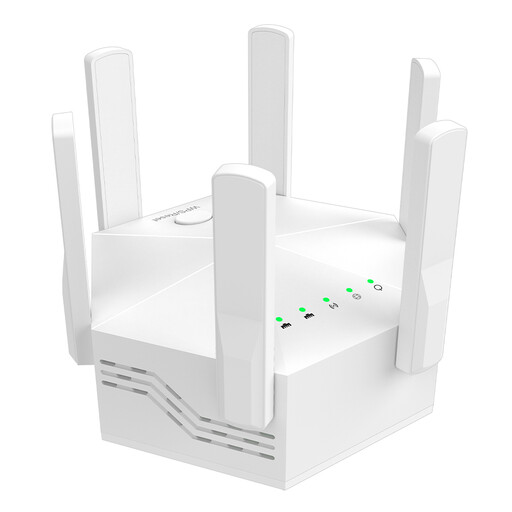
Dual-band Wi-Fi repeater, 1200 Mbps, 6 aerials
For extending Wi-Fi indoors, if there’s still a suitable signal from your router at the installation location.
Dual-band; up to 1200 Mbps; six adjustable aerials; for indoor use; EU plug.
View at Joybuy
 No image available
Ubiquiti UniFi U6 Mesh WiFi 6 access point
For extending Wi-Fi if the planned installation and system requirements are suitable for your garden office.
Described as an indoor/outdoor access point with IPX5; 6 spatial streams; Gigabit Ethernet uplink; PoE adapter included. Outdoor installation requires PoE power, installation with the LED side facing upwards and a UniFi Network system version 6.0.45 or later.
View at Joybuy
 No image available
1200 Mbit/s 5GHz Wi-Fi repeater
For an indoor space where you want to provide Wi-Fi using repeater or access point mode.
Dual-band; four aerials; repeater, access point and router modes. The two RJ45 ports are specified at 10/100 Mbps; bear this in mind if you want to use a wired connection.
View at Joybuy
 No image available
Compact Wi-Fi booster
For extending Wi-Fi in a home or office, provided the wireless connection is strong enough at the intended location.
The product description highlights a compact, portable design and plug-and-play set-up.
View at Joybuy
 No image available
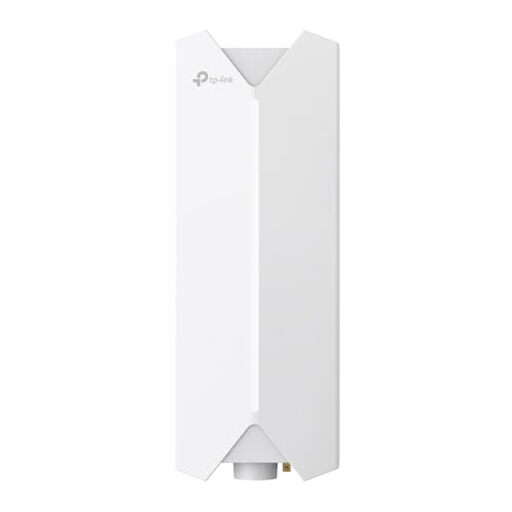
TP-Link Festa F61 outdoor Wi-Fi access point
For a planned outdoor Wi-Fi installation, if the installation and power supply meet the device’s requirements.
Dual-band; mesh features; Gigabit port; supports 802.3at and passive PoE. Installation requires an Ethernet cable for data and PoE, and a qualified professional to install the device in line with local regulations.
View at Joybuy
Frequently asked questions
How can I tell whether a Wi-Fi repeater will be enough for online lessons?
Check the signal at the planned location for the repeater, then test a call from the place where you’ll actually be studying. The bandwidth figures Zoom quotes for 720p HD video apply to specific meeting requirements. They are neither a minimum data rate for repeaters nor a guarantee that your connection won’t drop out.
Can a repeater work over an Ethernet cable in my garden office?
Yes, if the specific model supports access point or Ethernet bridge mode. devolo describes these operating modes for its WiFi 6 Repeater 3000 and 5400; an Ethernet connection is required.
Can I install a standard plug-in repeater outdoors?
Don’t assume a repeater is suitable for outdoor use just because it can extend Wi-Fi. Check that the manufacturer approves it for your exact installation location. For example, FRITZ! describes the 1610 Outdoor as an IP54 device for sheltered outdoor areas.
Do I need an individual frequency licence for Wi-Fi in my garden office?
Wi-Fi in Germany is covered by the general frequency allocations set out by the Federal Network Agency (Bundesnetzagentur), and the relevant conditions of use must be followed. This does not mean that every device can be used on every channel or in every location.


