Products at Joybuy
This selection includes indoor Wi-Fi repeaters and an access point for a suitable indoor or outdoor location. The key question is whether there’s a usable wireless connection or a suitable wired connection at the installation point.
 No image available
Compact Wi-Fi repeater
For extending your existing Wi-Fi indoors; before setting it up, check that the repeater location still gets a signal from your router.
View at Joybuy
 No image available
MERCUSYS ME80X Wi-Fi 6 Range Extender
An option if you’re looking for an indoor repeater with a signal strength indicator or access point mode; according to the product information, it’s designed for indoor use.
The product name lists AX3000 Dual Band, 574 Mbps at 2.4 GHz, 2402 Mbps at 5 GHz, a Gigabit port and AP mode. These specifications don’t guarantee a particular download speed in the garden office.
View at Joybuy
 No image available
TP-LINK RE235BE BE3600 Dual-Band Wi-Fi 7 Range Extender
For extending an existing Wi-Fi network; if you want to use EasyMesh, check your router is compatible.
The product name lists a 2.5 Gigabit Ethernet port and EasyMesh compatibility. These specifications alone don’t tell you the actual download speed at your office.
View at Joybuy
 No image available
Ubiquiti UniFi U6 Mesh WiFi 6 Indoor/Outdoor Access Point
An option if you need an access point for a suitable indoor or outdoor location; check the installation and connection method for the specific spot.
The product name lists 6 Spatial Streams and an included PoE adapter. According to the product information, UniFi Network version 6.0.45 or later is required for management.
View at Joybuy
 No image available
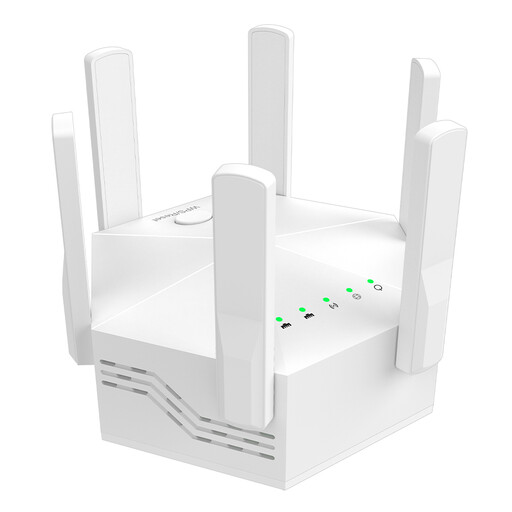
Dual-band Wi-Fi signal booster, 1200 Mbps
For extending Wi-Fi indoors; as with other wireless repeaters, the intended location still needs to receive a signal from your router.
The product name lists dual band, 1200 Mbps, six adjustable antennas and an EU plug. The quoted speed doesn’t guarantee a particular download speed in the garden office.
View at Joybuy
Frequently asked questions
Where should I put a wireless repeater for my garden office?
Put it in a dry location where it can still receive Wi-Fi from your router, not in a spot where the signal has already dropped out. Check the connection indicator on the specific device, then test the connection in the garden office. Telekom’s instructions distinguish between a weak signal and a location that’s out of range.
Can a repeater speed up a slow internet connection?
No. A repeater can improve the Wi-Fi link, but it can’t increase the speed provided by your internet connection. Compare speeds at the router and in the garden office before buying extra Wi-Fi equipment to solve slow game downloads.
How do I use a repeater if there’s already a LAN cable to my garden office?
If your specific device supports AP or LAN bridge mode, you can connect its Ethernet port to the cable and set it to the appropriate mode. TP-Link explains how to set this up using its app or web interface; always follow the instructions for your particular model.
What ongoing costs and maintenance should I allow for?
An additional device uses electricity, and installing a cable may involve extra work. Check the support and update information for your specific model, and keep its firmware up to date. The amount of effort involved depends on factors such as the device, how long you use it and the installation method.
Can I simply use a 5 GHz repeater outdoors as a Wi-Fi bridge?
There’s no one-size-fits-all answer: the applicable rules and the specific operating mode are what matter. The Bundesnetzagentur lists a general allocation for the specified 5 GHz bands, amended in 2023. For the FRITZ!Repeater 1610 Outdoor, FRITZ! does not allow Wi-Fi bridge mode outdoors and requires a LAN connection; this device-specific requirement does not automatically apply to other models.


