For learners with a suitable midway spot
You want to access your learning portal from your garden office and can place the repeater somewhere sheltered where it can still receive a usable signal from your router.


A Wi-Fi repeater is a sensible first option for accessing your learning portal from a garden office, provided it can still pick up a usable signal from your router at a sheltered midway point. If the signal is already weak there, consider an Ethernet bridge or wired access point, or Powerline after testing it at the sockets you plan to use. If you’re installing a device outdoors, make sure its weather protection, power supply and wireless configuration are suitable for the location.
You want to access your learning portal from your garden office and can place the repeater somewhere sheltered where it can still receive a usable signal from your router.
There isn’t enough Wi-Fi reaching your garden office from the house. It’s worth checking whether you can run a network cable or use Powerline at the sockets you plan to use.
The device will be installed outside. As well as its connection to the house, make sure its weather protection, power supply and wireless configuration are suitable for the specific location.
The key questions are how the connection will get from your router to the garden office, and whether the device will be installed indoors in a sheltered spot or outdoors.
A good fit if: You can find a sheltered spot with a usable signal from your router, and the connection is strong enough to use your learning portal at your desk.
Bear in mind: A repeater extends the connection it receives at its own location; it won’t fix a signal that’s already too weak to reach the router.
A good fit if: You can run a working network cable to a suitable location and the specific device supports the wired mode you need.
Bear in mind: Plan the cable route, power supply and operating mode. AVM documents a LAN bridge, while TP-Link lists an Ethernet access point mode for the RE705X.
A good fit if: There’s no suitable midway spot for a wireless signal or route for an Ethernet cable, and you can test the connection at the sockets you plan to use.
Bear in mind: Performance depends on the electrical connection. devolo warns that power supplies and dimmer switches can cause interference.
A good fit if: You plan to install the device outdoors and have checked that its connection, power supply and wireless configuration are suitable for the location.
Bear in mind: Weather protection alone won’t solve a weak connection back to the house or answer questions about permitted wireless use.
| Buying criterion | What to check | Who it matters most to |
|---|---|---|
| Usable wireless signal | Check the signal at the planned repeater location and whether you can actually access your learning portal at your desk. | If I want to use a wireless repeater, I need a usable signal from my router at the planned location; around 36% of consumers prioritise this. |
| A connection back to the router when Wi-Fi is weak | Check in advance whether you can run Ethernet to the access point; test Powerline at the sockets you plan to use. | If the home Wi-Fi doesn’t reach my garden office, I want to use a cable or a Powerline connection that I’ve tested on site; around 29% of consumers prioritise a connection that avoids relying on a weak home Wi-Fi signal. |
| Outdoor installation | Check the specific device’s protection rating, power supply and wireless configuration permitted for the location. | If the device has to be outdoors, I need suitable weather protection, power and wireless configuration; around 21% of consumers prioritise suitability for outdoor installation. |
| Router and mesh compatibility | Check your router model, the mesh features you want and the setup method documented for the specific device. | If I want to use my router’s mesh features, the specific device needs to support them; around 14% of consumers prioritise router and mesh compatibility. |
A wireless repeater needs to receive data from the router before it can pass it on.
First, try a sheltered midway location. If there’s no usable signal there, consider Ethernet or a Powerline connection that you’ve tested.
How you set up the device may depend on whether your existing router supports the right mesh feature.
Before buying, check your router model and the operating mode you want against the instructions for the specific device. Telekom describes different setup methods for Speed Home WLAN, depending on the router’s mesh features.
Weather protection and power supply are features of the specific outdoor device; you can’t assume that other repeaters have them.
Decide where you’ll install it first. If it’s going outdoors, check that the specific device is suitable and that its wireless configuration is right for the location.
FRITZ!Repeaters such as the 1200 AX are worth considering as indoor repeaters or, with suitable cabling, as potential LAN bridges.
The RE705X is worth considering as a repeater or wired access point. The Deco X50-Outdoor is a separate model designed for outdoor use.
The WiFi 6 Repeater 5400 is described as a repeater or wired access point. Powerline offers a different way to connect rooms that are hard to reach.
Depending on your existing router and mesh setup, Speed Home WLAN can be configured as a repeater or as a wired mesh base station.
The products below include wireless indoor repeaters, as well as wired and outdoor-designated access points for your garden office.
 No image available
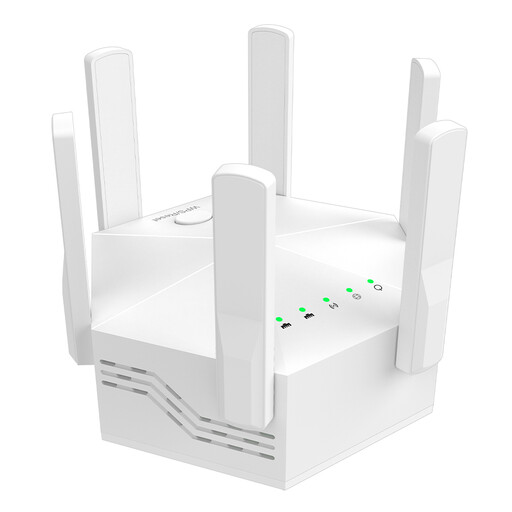
Could be suitable as an indoor wireless repeater if there’s still a usable signal from your router where you plan to place it.
The product description lists dual-band support, 1200 Mbit/s, six adjustable aerials and an EU plug.
 No image available
Worth considering as a wired access point for your garden office, if it’s suitable for your setup; the product description identifies it as an indoor/outdoor access point.
The product description lists WiFi 6, 6 spatial streams and a PoE adapter included in the box. For outdoor installation, the LED side must face upwards; the device is designed for wall or pole mounting.
 No image available
Worth considering for a midway position indoors. If you’re planning a wired connection, check that the specific device supports the operating mode you need before buying.
The product description lists 5 GHz Wi-Fi and 1200 Mbit/s. The product is specified for indoor use.
 No image available
Could be suitable for extending an existing Wi-Fi network wirelessly, provided there’s still a usable connection to your router where you plan to place it.
The product description identifies the device as a compact Wi-Fi booster.
 No image available
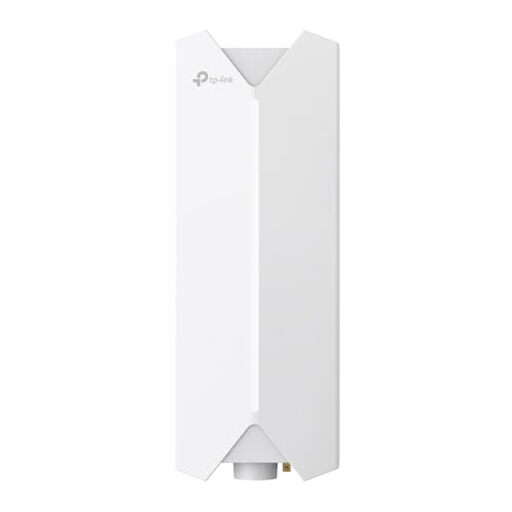
Worth considering for an outdoor location with a wired connection. According to the model specifications, outdoor installation must be carried out by a qualified professional in accordance with local regulations, and cable entries must be sealed.
The product description identifies the device as an outdoor Wi-Fi access point.
For a wireless connection, choose a sheltered spot where the repeater can still pick up a usable signal from your router and reach your workspace. Check the connection in both locations and make sure you can actually access your learning portal.
Yes, as long as the specific device has the right operating mode and the cable provides a working connection to your home network. AVM documents a LAN bridge, while TP-Link lists an Ethernet access point mode for the RE705X. Check the instructions for the model you’re considering.
Test the adapters in the exact sockets you plan to use. devolo recommends plugging them directly into wall sockets and warns that power supplies and dimmer switches, for example, can interfere with the connection. The manufacturer’s garden building option is subject to a condition relating to the electrical connection.
Depending on the connection method you choose, you may need a network cable, a suitable power supply or an additional device. For outdoor installation, you may also need to factor in professional installation.
You can’t tell from the frequency band alone. In Germany, you need to follow the applicable general frequency allocations set by the Federal Network Agency and check the wireless configuration of the specific device. Before installing it outdoors, make sure the frequency band, operating mode and location are all suitable.