A wireless repeater is a good option if there is still a usable connection to your home router at the planned location. If distance or the building structure makes the wireless link unreliable, a wired access point is a more targeted alternative. Mesh features and suitability for an outdoor location depend on the specific router, device and installation site.
Which solution is right for you?
Learners with weak Wi-Fi in a garden office
If you want to download course materials at your desk, the connection needs to work along the entire route. A repeater still needs to receive a signal from your home router at its location, so check the signal there, not just next to your laptop.
Learners with the option of a wired connection
If there is a network socket in your garden office, or you can run a cable to it, a wired access point can bypass the weak wireless link between the buildings.
Learners who need to install a device outdoors
If the device needs to be installed outside your home or garden office, check that the specific model is designed for that location and find out how its power supply and network connection will be provided.
What should you look for when buying?
Wireless repeater
Suitable if: There is still a usable signal from your home router at the planned location and you do not want to run an Ethernet cable.
Consider: The wireless link to the router may still be a bottleneck. A stated Wi-Fi data rate does not tell you how fast downloads will be at your study space.
Wired access point
Suitable if: There is a network socket in your garden office or you can run a cable to it.
Consider: This removes the wireless link to the house, but you will need to plan the cable route and set up the correct access point or LAN bridge mode.
Outdoor device designed for your installation site
Suitable if: The access point really does need to be installed outside the building.
Consider: An outdoor model does not automatically solve the connection to your router. The installation environment, power supply and operating mode depend on the model.
| Buying priority |
What to check before buying |
Who is this particularly important to? |
| Signal on the way to the garden office |
Test potential intermediate locations for a signal from the router, then try downloading something at your actual study space. |
If I want to download course materials at my desk, the connection needs to work all the way there. Around 36% of consumers prioritise reliable reception. |
| Wired alternative |
Check whether there is a LAN connection and whether the model has an access point or LAN bridge mode. |
If the wireless link between the house and garden office is too weak, I want to bypass it if possible. Around 29% of consumers prioritise a LAN connection. |
| Router and mesh compatibility |
Check the router and repeater models, and confirm that the mesh feature you want is explicitly supported. |
If I want to manage my existing network as one, the mesh feature I need must be compatible with my router. Around 21% of consumers prioritise integration with their existing mesh network. |
| Outdoor installation |
Check that the specific model is approved for your installation site, and confirm its power supply and connection requirements. |
If the device needs to be outdoors, I want to know whether it is designed for that exact location. Around 14% of consumers prioritise suitability for outdoor installation. |
Avoid common misconceptions
-
Putting the repeater where the router’s Wi-Fi signal has already dropped out
A wireless repeater needs a usable connection to the router itself. If there is no reception at its location, it cannot reliably extend the connection to your garden office.
Test the intermediate location before you buy. If the wireless link does not work there, consider a wired access point.
A wired solution may require an additional cable run or another suitable installation location.
-
Assuming mesh compatibility with every router
EasyMesh on the TP-Link RE700X requires a compatible router. Basic Wi-Fi extension and the mesh feature you want are not the same thing.
Check the router and repeater models, and confirm that the mesh feature you want is explicitly supported.
-
Assuming “outdoor” means unrestricted weather protection
FRITZ! specifies that the Repeater 1610 Outdoor is for a sheltered outdoor area. The intended environment depends on the specific model.
Check the installation site, documented protection and power supply for the exact device version.
Additional protection may be needed for installation and power connections.
Brands to consider
FRITZ!
The FRITZ!Repeater 1200 AX is an indoor option with Gigabit LAN. According to the manufacturer, the 1610 Outdoor is designed for indoor use and sheltered outdoor areas.
- According to the manufacturer, both models support FRITZ! Mesh.
- The 1610 Outdoor is designed for a sheltered outdoor area. Neither model alone guarantees a usable wireless link to your garden office.
TP-Link
The RE700X offers repeater and wired access point modes; the EAP610-Outdoor V1 is a dedicated outdoor access point.
- The RE700X’s access point mode may be useful for a LAN connection.
- According to TP-Link, EasyMesh on the RE700X requires a compatible router. You will need to plan the connection and access point setup for the EAP610-Outdoor.
devolo
The WiFi 6 Repeater 3000 is designed to extend a Wi-Fi network and also offers an access point mode.
- According to the manufacturer, basic network extension works with Wi-Fi routers from various brands.
- Access point mode requires a cable connection. The manufacturer’s information does not confirm that the device is suitable for outdoor installation.
Telekom
Speed Home WLAN is worth considering if you want to check mesh compatibility with a suitable Speedport router.
- Telekom provides compatibility information for specific models.
- Check the exact Speedport and Speed Home versions. This does not mean you will get a particularly long range to a separate garden office.
Joybuy product selection
This selection includes wireless repeaters for indoor use and an access point described as an indoor/outdoor model. Check whether a wireless connection will be enough for your garden office or if a wired connection is possible.
 No image available
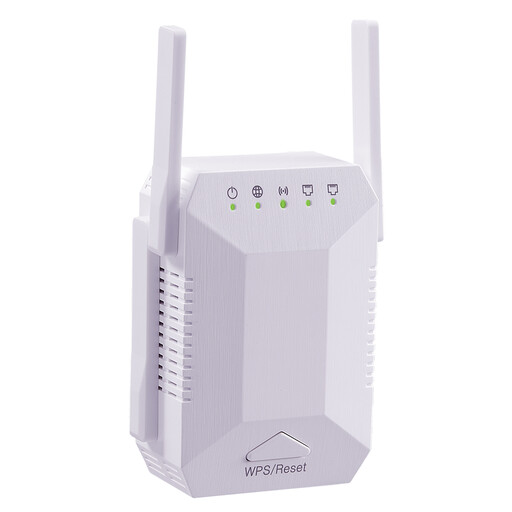
Dual-band Wi-Fi repeater, 1200 Mbit/s, 4 adjustable antennas
For a dry indoor location where your router’s Wi-Fi signal is still available; the product details specify indoor use.
Features include dual-band operation, four adjustable antennas and two LAN ports. EU plug.
View at Joybuy
 No image available
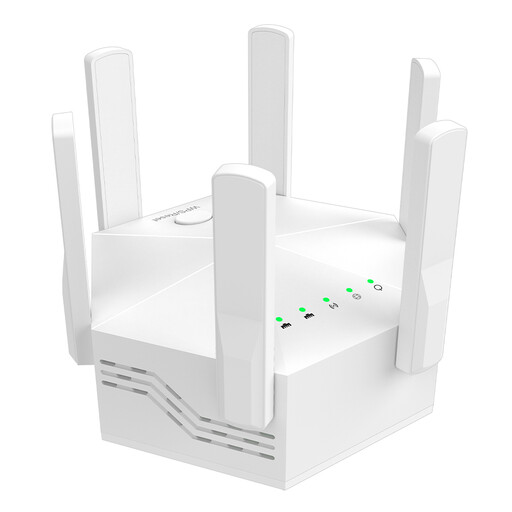
Dual-band Wi-Fi repeater, 1200 Mbit/s, 6 adjustable antennas
For extending your Wi-Fi in an indoor location that is still within range of the router.
Features include dual-band operation, six adjustable antennas and two LAN ports. EU plug; described as suitable for indoor use.
View at Joybuy
 No image available
Ubiquiti UniFi U6 Mesh WiFi 6 indoor/outdoor access point
For a planned access point installation with a wired Ethernet uplink and PoE power.
The product details specify an IPX5-rated enclosure, Gigabit Ethernet uplink and a PoE adapter included in the box. For outdoor installation, take note of the specified orientation, mounting and PoE power requirements.
View at Joybuy
 No image available
Wi-Fi repeater, 1200 Mbit/s, 5 GHz
For an indoor location where your router’s Wi-Fi signal is still available. Alternatively, you can use the stated access point mode with a LAN cable.
Dual-band operation and two RJ45 ports are listed. According to the product description, it is designed for indoor use.
View at Joybuy
 No image available
Compact Wi-Fi repeater
For flexible placement around a room, provided the repeater can still connect to your router from there.
The product description specifies a compact, portable device with a plug-and-play setup.
View at Joybuy
Frequently asked questions
Where should I put a wireless repeater for my garden office?
Place it somewhere dry and suitable for the device, where your router’s Wi-Fi signal is still usable. Then test the connection at your actual workspace. If there is no suitable intermediate location, consider a LAN connection instead of adding another wireless repeater.
Can a repeater work with an Ethernet cable?
Yes, if the specific model supports the right operating mode. TP-Link specifies an access point mode via the Gigabit Ethernet port for the RE700X; FRITZ! describes wired networking for the 1200 AX.
What should I check after setting it up?
If you run into problems, first check the connection to your router and the selected operating mode. Also check the firmware and support information for your exact model. A stated maximum Wi-Fi speed does not tell you how fast a course download will be.
What should I bear in mind when choosing a Wi-Fi device for Germany?
Germany’s Federal Network Agency classifies devices with Wi-Fi as radio equipment. For the specific product, check the CE marking, device identification, German-language instructions and warnings, and the EU declaration of conformity. The permitted 5 GHz settings for a particular outdoor installation need to be checked against the applicable frequency conditions and device configuration; the word “outdoor” alone does not mean that all channels are automatically permitted.


