If your home internet connection is working, check the connection all the way to your garden office before replacing your main router. A LAN cable connected to a Wi-Fi access point avoids a wireless backhaul. If running a cable isn’t an option, consider a mesh node that gets a decent signal where you plan to place it, or powerline, which should be tested using the sockets you intend to use. For outdoor installation, the specific device must be rated for outdoor use and have a suitable power supply and network connection.
Who needs a reliable connection?
People who regularly join video lessons
If you regularly join video lessons from your garden office, check your internet connection and Wi-Fi at your actual workspace rather than relying on advertised top speeds. Zoom Support and TP-Link outline requirements and set-up conditions for their respective scenarios.
Garden office users without a route for a LAN cable
If you can’t run a network cable, consider a mesh node in a location with a sufficiently strong signal, or powerline using suitable sockets. FRITZ! and devolo highlight local conditions that can affect these connection methods.
People considering outdoor installation
For outdoor installation, it’s important to choose a device rated for outdoor use, with suitable mounting, power and network connections. TP-Link, FRITZ! and Ubiquiti list different requirements for their respective outdoor models.
What should you look for?
First, compare the connection next to your router with the one at your garden office workspace. This will help you decide whether a LAN access point, a mesh node or powerline is right for your particular signal path.
| What matters |
What to check before buying |
Who is it important to? |
| A stable connection for lessons |
Check your internet connection and access point, then test the teaching platform at your workspace. |
If I need to reliably transmit picture and sound during a lesson, testing the connection at my desk is what matters. Around 33% of consumers rank a stable connection for lessons as their top priority. |
| Signal path to the garden office |
Check reception at the planned location and compatibility with your existing mesh system. |
If you need to bridge the distance or get through an exterior wall, check the uplink where you intend to use it. Around 27% of consumers put the signal path to the garden office first. |
| A connection without a LAN cable |
For powerline, check which adapter pair you need and test it using the sockets at the intended location. |
If I can’t run a network cable, I want to compare Wi-Fi and powerline under local conditions. Around 20% of consumers prioritise a connection that doesn’t require a new LAN cable. |
| Easy to extend |
Check compatibility, the installation location and the power supply required by the specific model. |
If you want to keep using your existing home network and extend it in a way that suits your needs, consider set-up and uplink requirements too. Around 20% of consumers put ease of extension first. |
Common buying and planning mistakes
-
Replacing the main router when only the connection to the garden office is weak
A new router won’t automatically solve problems caused by distance and obstacles. If your connection works inside the house, the real issue may be extending it to your workspace further away.
Compare the connection inside your home with the one at your desk before choosing a router or range extender.
Replacing your router may be unnecessary if you’ll still need to extend your network as well.
-
Assuming advertised Wi-Fi data rates mean a good video connection
A device’s Wi-Fi data rate doesn’t measure the upload and download speeds available to a teaching app on the other side of your particular exterior wall.
Check your internet connection, backhaul and the app you’ll be using at your planned workspace.
-
Assuming powerline will work just because there’s a socket available
devolo notes that some sockets may deliver low transfer rates, and electrical devices such as power supplies or dimmer switches can cause interference.
Test the adapters using the sockets you intend to use, then try the teaching app in your garden office.
-
Assuming a product name or mesh feature means it’s suitable for outdoor use
Ingress protection, power supply and network connectivity vary from model to model. An indoor repeater isn’t suitable for outdoor installation just because it can pick up a signal.
Check the specific model’s outdoor rating, installation conditions, power supply and available backhaul.
Depending on where you install it, you may need suitable fixings or a suitable power supply.
Key brands at a glance
FRITZ!
If you already have a FRITZ! home network, there are indoor and outdoor options. Make sure the connection type and installation location are right for your garden office.
- FRITZ! describes the Repeater 1200 AX as featuring FRITZ! Mesh and Gigabit LAN.
- At its 2025 launch, FRITZ! described the 1610 Outdoor as a LAN bridge. Check the current operating mode in the firmware documentation before buying rather than assuming it offers a fully wireless outdoor uplink.
TP-Link
The Deco X50-Outdoor may be an option for a designated outdoor location if you have a compatible Deco system or plan to use Ethernet backhaul.
- TP-Link lists an IP65 rating, PoE or AC power and compatibility with other Deco models.
- With a wireless connection, placement and performance depend on distance and obstacles. Advertised data rates aren’t a measurement of performance in your garden office.
devolo
Magic-2-WiFi-6-next sets combine powerline with Wi-Fi from the remote adapter. They’re an option if you can’t run a LAN cable and the sockets at the location are suitable.
- According to devolo, the Starter Kit includes two adapters, and the Wi-Fi adapter has two Gigabit ports.
- devolo notes that some sockets may deliver low transfer rates and that power supplies or dimmer switches can cause interference. Test the connection where you intend to use it.
Ubiquiti
The UniFi U6 Mesh is an indoor and outdoor access point designed for set-ups with a suitable cable route and UniFi management.
- The official data sheet lists IPX5, PoE and a Gigabit Ethernet connection.
- These specifications don’t guarantee a particular range through building walls or suitability for every installation position. Remember to consider the management requirements too.
Telekom
Speed Home WLAN is an extension option to consider if you already have a compatible Telekom mesh system.
- Telekom provides documentation on mesh set-up and firmware updates.
- The set-up guide lists requirements for a WPS connection. Being part of the same product family doesn’t in itself mean a device is weatherproof or guarantee a connection all the way to your garden office.
Joybuy products for extending your Wi-Fi
This selection includes Wi-Fi range extenders for locations that already receive a signal, as well as wired access points, including models designed for suitable outdoor installation.
 No image available
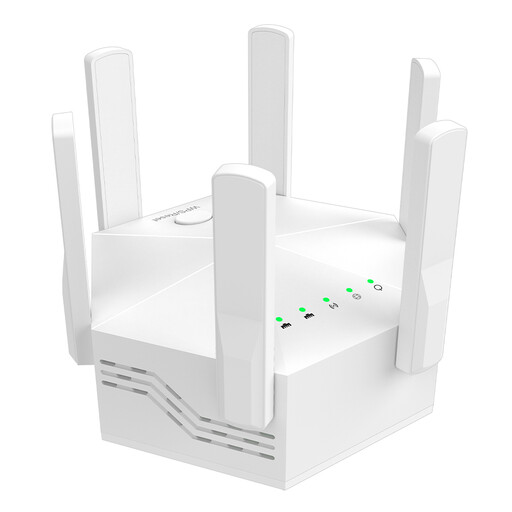
Dual-band Wi-Fi signal booster, 1,200 Mbit/s
This device is only suitable for a garden office if the Wi-Fi signal already reaches the indoor location where you plan to place it.
The product name lists six adjustable antennas and an EU plug.
View at Joybuy
 No image available
Ubiquiti UniFi U6 Mesh Wi-Fi 6 Access Point
An option for an access point at your garden office if you have an Ethernet uplink and a suitable power supply.
It’s listed as having 6 spatial streams and a PoE adapter included. For outdoor installation, the product description specifies that the LED side should face upwards. Ethernet ports and cable entries must be protected from water.
View at Joybuy
 No image available
Wi-Fi repeater, 1,200 Mbit/s, 5 GHz
For extending your Wi-Fi indoors, provided a signal already reaches the location where you plan to place it.
The product name lists 1,200 Mbit/s and 5 GHz.
View at Joybuy
 No image available
Compact Wi-Fi booster
For extending Wi-Fi in living or working spaces where a signal from your existing network still reaches the installation location.
View at Joybuy
 No image available
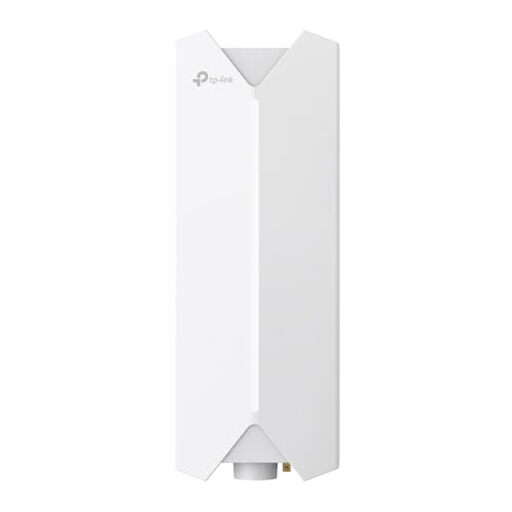
TP-Link Festa F61 Outdoor Wi-Fi Access Point
For a wired Wi-Fi access point in a suitable outdoor location.
The set-up described requires an Ethernet cable to the network and a suitable PoE power supply.
View at Joybuy
Frequently asked questions
What internet speed do I need for an online lesson?
It depends on the platform, picture quality and your role in the lesson. For group video at 720p in its web app, Zoom lists around 2.6 Mbit/s upload and 1.8 Mbit/s download. This applies to the Zoom scenario described and isn’t a general minimum requirement for routers in a garden office. Test the connection at your actual workspace.
Can I simply put a repeater outside between the house and garden office?
Only if the specific device is rated for the intended outdoor location and has a suitable power supply and backhaul there. TP-Link describes the Deco X50-Outdoor as IP65-rated, while FRITZ! lists the Repeater 1610 Outdoor as IP54-rated. These ratings don’t apply to standard indoor repeaters.
How should I test powerline before an online lesson?
Test the adapter pair using the exact wall sockets you plan to use, then try the teaching app in your garden office. devolo recommends plugging adapters directly into wall sockets and lists power supplies and dimmer switches as possible sources of interference. Testing nearby sockets doesn’t prove that the connection will work all the way to your garden office.
What should I check about installation before buying?
Check whether your set-up requires extra devices, PoE power, a suitable cable route or installation work, and find out which accessories are included. Also check the warranty and update information for the specific model. Telekom warns that a lack of firmware updates can contribute to malfunctions and security vulnerabilities.


