What should you look for when buying?
For a live stream, the repeater itself needs to get a usable connection to your router. A strong Wi-Fi signal on your playback device alone doesn’t confirm that the connection back to your home is reliable.
| What matters |
What to check before buying |
Who will find this most important? |
| A stable connection where you’ll be watching |
Check the router signal where you plan to place the repeater and the connection on your playback device. Bear in mind the streaming service’s requirements for your chosen resolution. |
If I want to watch the concert stream from my seat with as few interruptions as possible, I’ll check the connection in both places. Around 36% of consumers prioritise a stable connection where they’ll be watching. |
| Connection between your home and garden office |
Check whether the device supports LAN bridge or access point mode, and whether the cable route and power supply will work. |
If the walls or distance make a wireless link unreliable, I’d rather connect back to the router using an existing Ethernet cable or one that can be installed. Around 29% of consumers prioritise the connection between their home and garden office. |
| Installation location and weather protection |
Check that the specific model is approved for the installation location. Even with outdoor devices, follow the recommended operating conditions. |
If the device really needs to be outdoors, I want to know whether it’s designed for that exact location and how it will be powered. Around 21% of consumers focus on outdoor installation and weather protection. |
| Router and mesh compatibility |
Check your router model against the compatibility information, and distinguish mesh features from a standard Wi-Fi connection. |
If I want setup with my existing router to be as straightforward as possible, I’ll check the stated compatibility. Around 14% of consumers prioritise router and mesh compatibility. |
Joybuy products for Wi-Fi in your garden office
This selection includes indoor repeaters for extending your Wi-Fi wirelessly, as well as access points for a wired connection or protected installation. Make sure the operating mode, router, cable route and installation location suit your needs.
 No image available
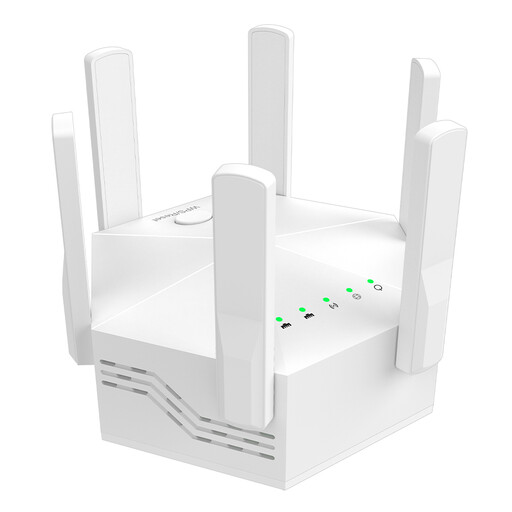
Dual-band Wi-Fi signal booster, 1200 Mbps, 6 antennas
For extending Wi-Fi wirelessly indoors, if you’re looking for a device with multiple antennas and LAN ports.
The product title lists dual-band operation, 1200 Mbps and six adjustable antennas. The description lists two 10/100-Mbps LAN ports and WPS setup.
Described for indoor and home use.
View at Joybuy
 No image available
Ubiquiti UniFi U6 Mesh WiFi 6 Indoor/Outdoor Access Point
For an access point installation if PoE operation and a model designed for your installation location are suitable.
The description lists IPX5, a Gigabit Ethernet uplink and a PoE adapter included in the box.
For outdoor installation, the description specifies positioning it with the LED side facing upwards, using a wall or pole mount. UniFi Network is listed as the management platform.
View at Joybuy
 No image available
Wi-Fi repeater, 1200 MBit/s, 5 GHz
For extending Wi-Fi wirelessly indoors, if you also need an access point mode as well as repeater operation.
The description lists dual-band operation, repeater, access point and router modes, plus two RJ45 ports.
Described for indoor use.
View at Joybuy
 No image available
Compact Wi-Fi booster
For extending an existing Wi-Fi network with a compact device, if easy setup is important to you.
The description lists plug-and-play setup and streaming as an intended use.
View at Joybuy
 No image available
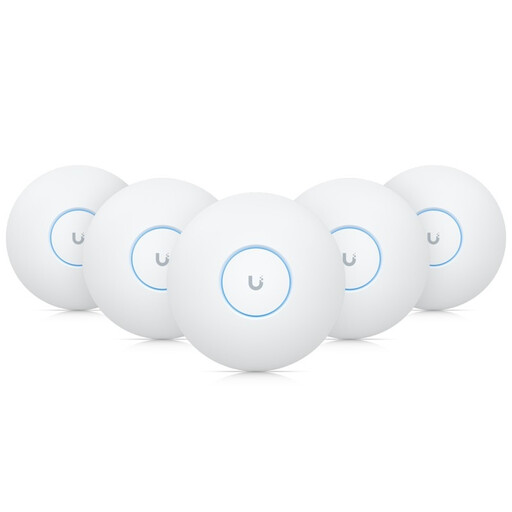
Ubiquiti UniFi U7-Pro Tri-Band WiFi 7 Access Point
For indoor access point use if you’re planning ceiling mounting and PoE+ power.
The description lists three frequency bands, a 2.5-GbE uplink and PoE+ according to IEEE 802.3at.
Described as designed for indoor installation.
View at Joybuy
Frequently asked questions
How can I check the connection is good enough before the concert?
Test the speed and the stream you plan to watch on the actual playback device, from the place you’ll be watching. Netflix recommends at least 5 Mbit/s for Full HD and 15 Mbit/s for 4K for its content and live events; other streaming services may have different requirements. A single speed test isn’t a substitute for a full trial run.
Can I put a repeater directly in my garden office?
Yes, as long as the location meets the device’s operating requirements and there’s still a usable connection to the router. Alternatively, you can connect a device with LAN bridge or access point mode using an Ethernet cable. A strong Wi-Fi symbol on your playback device alone doesn’t confirm a good connection back to your home.
What extra costs should I allow for with a LAN or outdoor setup?
For a LAN setup, you’ll need to plan the cable route and suitable connections. An outdoor installation may also require mounting equipment and mains or PoE power. FRITZ! lists a five-year manufacturer’s warranty for the models considered here. Check the terms for the specific device, and keep this information separate from the seller’s statutory consumer rights information.
Can I use any 5-GHz Wi-Fi device outdoors without restriction?
No. The “5 GHz” specification alone doesn’t mean a device is approved for unrestricted outdoor use. For Germany, the Federal Network Agency refers to the current general allocation, which sets usage conditions according to frequency. The specific device must also be suitable and correctly configured for the intended outdoor use. This doesn’t support a blanket statement about every channel and every installation.
What should I check for product compliance?
Radio equipment is subject to the EU legal framework for products placed on the market. The European Union explains that the CE mark is the manufacturer’s declaration that the product meets the relevant EU requirements; it isn’t an independent performance rating. For a specific device, check the marking and the manufacturer’s documentation.


