A Wi-Fi repeater is a sensible choice for a garden office only if it can still get a usable connection to your router from its intended position – having Wi-Fi at your desk alone doesn’t prove that it can. If the wireless link back to the router is too weak, consider an access point connected via Ethernet instead. Powerline is another option worth looking into if your home and garden office share a suitable electrical connection. For devices installed outdoors, you’ll also need to check that the specific model is suitable for the installation location, power supply and applicable German wireless regulations.
Who needs a reliable connection?
Regular video calls from a garden office
A reliable connection in both directions matters when you have a dedicated workspace. Bitkom e. V. points out that the internet speed you pay for is shared among everyone in your household. For group calls with 720p HD, Zoom gives application-specific guidance of 2.6 Mbit/s for downloads and 1.8 Mbit/s for uploads.
Homes with a weak connection between the house and garden office
If distance or building materials make it difficult for the wireless signal to reach your garden office, compare a repeater with an Ethernet connection or a Powerline option. devolo recommends Powerline for garden sheds where there’s a suitable shared electrical connection; FRITZ.com documents how to use the FRITZ!Repeater 1200 AX as a LAN bridge.
Buyers planning to install a device outdoors
The key considerations are the actual installation location, the device’s protection rating and its power supply. FRITZ.com describes the FRITZ!Repeater 1610 Outdoor as suitable for sheltered outdoor areas. You’ll also need to observe the Bundesnetzagentur’s rules for wireless operation.
What should you look for when buying?
First check the wireless link back to the router at the intended location. Then consider the connection between your house and garden office, followed by the installation location and router compatibility.
| What you need |
What to check before buying |
Who is this important to? |
| Connection during calls |
Test the signal where you plan to place the repeater, then check upload and download speeds at your desk during an actual call. |
If I want to join video calls from my garden office without interruptions, the whole connection matters – not just the stated Wi-Fi data rate. Around 36% of consumers would put connection stability first. |
| Connection between the buildings |
Check whether you can run an Ethernet cable. For Powerline, check the electrical connection itself; for the device, check for access point or LAN bridge mode. |
If your main challenge is bridging the weak connection between the house and garden office, compare wireless, Ethernet and, where suitable, Powerline options. Around 29% of consumers would prioritise this need. |
| Outdoor installation |
Check that the specific model is approved for the installation location, and confirm its protection rating, power supply and intended wireless operation. |
If you need a device outside the building to get coverage, you’ll want to know whether it’s suitable for the specific location. Around 21% of consumers would make outdoor suitability their main consideration. |
| Router compatibility |
Check your router model and the mesh features you need. FRITZ! Mesh, EasyMesh and Omada Mesh each have specific requirements. |
If you want to connect the solution to your existing router, check compatibility in advance. Around 14% of consumers would put this first. |
Avoiding buying and planning mistakes
-
Assuming the stated Wi-Fi speed in Mbit/s is the same as your video call speed
The advertised wireless data rate doesn’t guarantee a reliable connection between the house and garden office, or enough upload speed at your desk. As Bitkom e. V. explains, everyone in your household also shares the internet connection.
Test upload and download speeds at your intended desk and make an actual call there before deciding whether the connection is good enough.
-
Planning to install a standard indoor repeater on an exterior wall
Outdoor models differ in their protection ratings and operating limits. According to FRITZ.com, the FRITZ!Repeater 1610 Outdoor is intended for sheltered outdoor areas. This doesn’t mean it’s approved for every exposed installation location.
Decide where you’ll install the device, then check that the exact model is approved for that location and confirm its protection rating and power supply requirements.
Depending on the solution, you may need PoE power or suitable mounting accessories.
-
Assuming compatibility based on the brand name alone
Powerline and mesh systems have specific requirements. According to the manufacturer, devolo Magic 2 WiFi next doesn’t support dLAN adapters. EasyMesh, Omada Mesh and FRITZ! Mesh also require compatible devices or setups.
Make a note of the full model names of your router and any existing adapters, and check that they support the mode you want before buying.
Relevant brands and product ranges
The information below relates to specific product ranges. Before choosing, check that the model, installation location and router you already have are suitable for your needs.
FRITZ!
According to FRITZ.com, the FRITZ!Repeater 1610 Outdoor is intended for a sheltered outdoor installation location. For a wired solution at the end of an Ethernet cable, the FRITZ!Repeater 1200 AX is documented as supporting LAN bridge mode.
- FRITZ.com lists IP54 and PoE+ for the 1610 Outdoor; the 1200 AX is described as supporting LAN bridge mode.
- Its protection rating doesn’t mean it’s approved for every exposed location. The mesh integration described requires a compatible FRITZ!Box; this doesn’t automatically make the 1200 AX suitable for outdoor use.
TP-Link
According to TP-Link, the EAP225-Outdoor is a weather-resistant access point, while the RE705X is an indoor repeater with access point mode.
- TP-Link lists IP65 and PoE for the EAP225-Outdoor. The RE705X’s Gigabit Ethernet port can be used in access point mode.
- The EAP225-Outdoor’s Omada Mesh features are designed for Omada access points. EasyMesh on the RE705X requires a compatible router; these are different types of device.
devolo
Magic 2 WiFi next combines Powerline with Wi-Fi and could be an alternative if the electrical connection to your garden office is suitable for this use.
- devolo lists two Gigabit LAN ports for this model.
- According to the manufacturer, adapters from the devolo dLAN range aren’t supported. Using it in a garden shed also depends on a suitable shared electrical connection; this doesn’t guarantee performance with every electrical installation.
Telekom
Speed Home WLAN is worth considering if you have a compatible Speedport and want to connect it to this mesh system.
- Deutsche Telekom lists Wi-Fi 6, with Ethernet and Wi-Fi as connection options.
- The product page doesn’t describe Speed Home WLAN as an outdoor model. Check the installation location and connection type before planning to use it in a garden office.
Related products at Joybuy
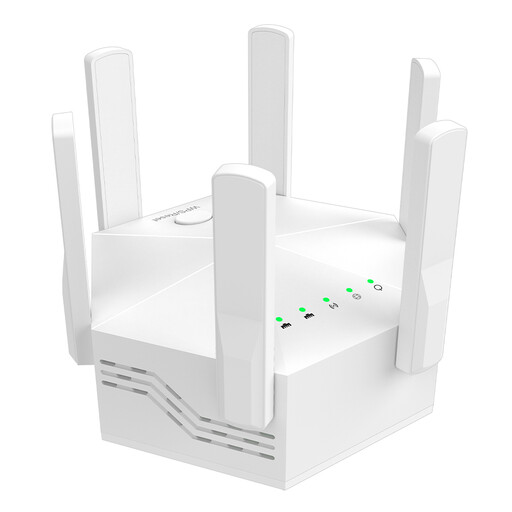
The following Joybuy products are indoor Wi-Fi boosters and repeaters. Before choosing one, check that it’ll have a strong enough wireless link back to the router where you plan to place it, or that a wired connection is possible.
 No image available
Dual-band Wi-Fi signal booster, 1200 Mbit/s
For extending an existing Wi-Fi network indoors; not listed as a weather-resistant outdoor device.
Stated Wi-Fi data rate: 1200 Mbit/s; six adjustable antennas.
Two 10/100 Mbit/s LAN ports.
View at Joybuy
 No image available
5 GHz Wi-Fi repeater, 1200 Mbit/s
For extending a Wi-Fi network indoors; the product description also lists an access point mode for a wired connection.
Two 10/100 Mbit/s Ethernet ports.
Listed modes: repeater, access point and router.
View at Joybuy
 No image available
Dual-band Wi-Fi booster, up to 1200 Mbit/s
For extending a home Wi-Fi network indoors; not listed as a weather-resistant outdoor device.
Stated Wi-Fi data rate: up to 1200 Mbit/s.
Two 10/100 Mbit/s LAN ports.
View at Joybuy
 No image available
MERCUSYS ME80X Wi-Fi 6 Range Extender, AX3000 Dual Band
Can be used in access point mode if you have an Ethernet connection to your garden office; the product information states that it’s designed for indoor use.
Wi-Fi 6; AX3000 dual band: 574 Mbit/s at 2.4 GHz and 2402 Mbit/s at 5 GHz.
Gigabit Ethernet port and access point mode; the description also lists EasyMesh compatibility.
View at Joybuy
 No image available
TP-Link RE235BE BE3600 Dual-Band Wi-Fi 7 Range Extender
For extending an existing Wi-Fi network within the router’s range; the product description lists EasyMesh compatibility.
Wi-Fi 7, Multi-Link Operation and 2.5 Gbit/s Ethernet port.
View at Joybuy
Frequently asked questions
What internet speed should I check for a video call?
Measure upload and download speeds at your intended workspace, not just by the router. For group calls with 720p HD, Zoom recommends 2.6 Mbit/s for downloads and 1.8 Mbit/s for uploads as application-specific guidance. These figures aren’t a guaranteed Wi-Fi speed or a general minimum requirement for all video conferencing services.
Can I plug the repeater in right by my desk in the garden office?
Only if it can still get a usable connection to your router from there. If that link is weak, choose a better-connected intermediate location or an access point with an Ethernet connection, then test it with a call.
Will Powerline work with the adapter I already have?
Not necessarily. devolo explicitly states that Magic 2 WiFi next doesn’t support adapters from the dLAN range. Also check the electrical connection to your garden office and test how it works with your specific installation.
Can I use 5 GHz Wi-Fi and an outdoor device anywhere in Germany without checking anything else?
No. The label “Outdoor” doesn’t mean that every frequency and installation setting is automatically approved. The Bundesnetzagentur lists a general allocation for 5 GHz frequencies (Vfg. 136/2022, amended by Vfg. 49/2023), with conditions for the 5150–5250 MHz, 5250–5350 MHz and 5470–5725 MHz bands. Check the German country setting and the relevant conditions for your specific device and installation location.
What should I consider for maintenance and extra accessories?
Before buying, check whether your solution needs an Ethernet cable, PoE power or a Powerline starter kit. Deutsche Telekom warns that missed firmware updates for Speed Home WLAN can lead to malfunctions and security vulnerabilities.


