What should you look for when buying?
Start by measuring your broadband connection, then check the route to your garden office. Only then decide between LAN, wireless, Powerline and a separate mobile broadband connection.
| What matters |
What to check before buying |
Who is this important for? |
| Actual upload speed |
Check your broadband speed and the connection in the garden office separately. Don’t confuse advertised Wi-Fi speeds with your broadband upload speed. |
If I’m uploading photo albums, I want to know whether the broadband connection itself is slow before replacing my Wi-Fi equipment. That’s why around 33% of consumers prioritise their broadband upload speed. |
| Connection between the house and office |
Check whether a cable can be run and how good the wireless reception is at the planned location for the access point. For a LAN setup, check that the connection and operating mode are suitable. |
If I want to keep my router in the house, I need a reliable connection to the garden office. Around 33% of consumers make this link between the buildings their main concern. |
| Outdoor installation |
Check the intended environment, protection rating, power supply and installation instructions for the specific model. If using wireless outdoors, check the requirements for the frequency band. |
If the device is going to be installed outdoors, I want to know whether its casing and installation location are suitable. Around 20% of consumers prioritise suitability for outdoor installation. |
| Connection without a cable from the house |
Test Powerline using the intended sockets, or check mobile reception and tariff terms at the office location. |
If neither LAN nor a reliable wireless link to the house is possible, I’m looking for an independent connection and want to know what it takes to use it in practice. Around 14% of consumers prioritise a connection that doesn’t rely on a suitable link to the house. |
Joybuy products for garden offices
The products below cover wired access points, wireless range extension, a standalone LTE connection and outdoor installation. The right choice depends on the connection available and conditions in your garden office.
 No image available
Ubiquiti UniFi U6+ WiFi 6 Access Point
An option if you can run a network cable to your garden office and need an additional access point there.
Wi-Fi 6, dual-band, Gigabit Ethernet and PoE. Ethernet and PoE are required for the wired setup described.
View at Joybuy
 No image available
Ubiquiti UniFi U6 Mesh WiFi 6 Access Point
For a suitable wireless or UniFi mesh connection. Before buying, decide how you’ll connect the access point to your home network.
Wi-Fi 6, mesh, Gigabit Ethernet and PoE adapter included. For outdoor use, Ubiquiti specifies an IPX5 rating and requires installation with the LED side facing upwards, using the supplied wall or pole mounting accessories.
View at Joybuy
 No image available
AVM FRITZ!Box 6825 4G LTE Router
An option if you want to connect your garden office to mobile broadband independently of your home network. Reception and performance depend on conditions at your location.
4G LTE, Nano-SIM, Wi-Fi 6 AX 600 Mbit/s, Gigabit LAN and USB-C power supply. The product specifications list Cat 6 with speeds of up to 300 Mbit/s and LTE upload speeds of up to 50 Mbit/s. A Nano-SIM with a suitable data plan is required for access.
View at Joybuy
 No image available
MERCUSYS ME80X Wi-Fi 6 Range Extender
For extending your wireless network if there’s still a connection to your existing Wi-Fi at the planned location. According to the product specifications, this device is designed for indoor use as a repeater.
Dual-band, with stated data rates of 574 Mbit/s at 2.4 GHz and 2,402 Mbit/s at 5 GHz, a Gigabit connection and access point mode. These stated wireless speeds don’t guarantee a particular upload speed in your garden office.
View at Joybuy
 No image available
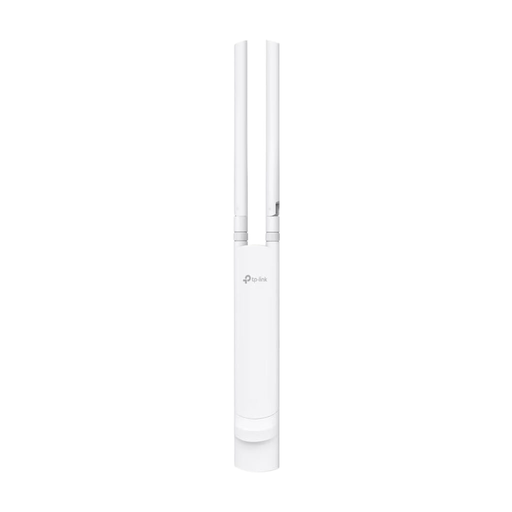
TP-Link Festa F52 Outdoor Access Point AC1200
For an outdoor installation location, if you can run an Ethernet cable to the access point.
IP65, PoE in line with 802.3af or passive PoE, and wall or pole mounting. Ethernet is required for the network connection described. When installing outdoors, seal the cable connections using the specified waterproof accessories.
View at Joybuy
Frequently asked questions
Will a router with faster Wi-Fi upload photo albums more quickly?
Not necessarily. First, check the actual performance of your broadband connection, then check the connection in your garden office. The Bundesnetzagentur broadband speed test can help you assess your connection speed. Advertised Wi-Fi data rates don’t guarantee a particular upload speed from your broadband connection.
Can an additional access point replace my existing router?
An access point connected via LAN extends your existing home network; it doesn’t automatically replace your router. For the FRITZ!Repeater 1200 AX, FRITZ! describes connecting it to a FRITZ!Box via LAN as a way to set up an additional Wi-Fi access point.
What should I consider when installing and maintaining a Wi-Fi device outdoors?
Follow the instructions for the specific model and the environment it’s designed for. Don’t rely on the word “outdoor” alone. FRITZ! specifies that the 1610 Outdoor is designed for sheltered outdoor areas, while Ubiquiti makes the U6 Mesh’s weather resistance dependent on a particular orientation and the supplied accessories. Keep the firmware and login details up to date, following the manufacturer’s instructions.
What extra costs or equipment might I need for different types of connection?
Depending on the solution, you may need to run a network cable, buy suitable PoE components or a Powerline kit, or take out an additional mobile data plan. Check in advance which connections, power supply and tariff terms you’ll need at your specific location.
Can I use a Wi-Fi device in my garden in Germany, and do I need a radio licence?
The Bundesnetzagentur makes Wi-Fi frequencies available under general assignments. Subject to the relevant conditions, individual users don’t need a separate frequency allocation. This doesn’t mean that every channel, transmission power or operating mode is automatically permitted outdoors. The requirements for the frequency band and device configuration you use will apply: for 5 GHz Wi-Fi, see regulation 136/2022, as amended by regulation 49/2023; for 6 GHz, see regulation 76/2025 from the Bundesnetzagentur.


