Viewers with a weak signal in the garden office
If you want to watch the concert at a fixed spot without interruptions, check your internet speed and Wi-Fi connection to that spot separately.


First, check your download speed and connection at the exact spot where you’ll be watching. Netflix recommends 5 Mbit/s for FHD and 15 Mbit/s for 4K for its own live events; these figures aren’t a general guide for other services. If you can run a network cable, a wired access point or mesh node can provide the connection back to your home. Without a cable, test Wi-Fi or Powerline at the actual location. If a device will be installed outside the garden office, you’ll also need to check that it’s suitable for the mounting location and that its wireless configuration is permitted.
If you want to watch the concert at a fixed spot without interruptions, check your internet speed and Wi-Fi connection to that spot separately.
If you can run a network cable to the garden office, you can connect an access point or wired mesh node without rushing to replace your main router.
Without a cable, you could use a wireless node positioned where it has a good connection to the house, or try a Powerline connection on site. If you’re installing a device outdoors, you’ll also need to make sure it’s suitable for the location.
Suitable if: you can run a cable to the garden office and your current internet connection is fast enough.
What to consider: You won’t need a wireless connection back to the router, but the cable route, ports and power supply all need to be suitable.
Suitable if: you can’t run a cable, but the extra node can get a usable connection to the house from its intended location.
What to consider: An extra node won’t improve an already weak connection back to the router; the system you choose must also work with your existing network.
Suitable if: you don’t want to run a network cable and can test the electrical connection between the house and garden office.
What to consider: A Wi-Fi speed rating won’t tell you whether your particular electrical installation is suitable or how well the video will play.
Suitable if: the required mounting location is actually outside the enclosed garden office.
What to consider: An outdoor model won’t provide the connection back to the house or automatically ensure that the installation is suitable for the location and wireless operation.
Suitable if: you need to replace your current router anyway, or it lacks a connection or expansion feature you need.
What to consider: Check your connection type and how additional devices will work with it; a mesh system isn’t automatically a suitable internet source for every connection.
Netflix recommends at least 5 Mbit/s for FHD and 15 Mbit/s for 4K when watching its own live events. These service-specific guidelines aren’t general minimum requirements for other concert platforms.
| What you’re looking for | What to check before buying | Who is it most relevant to? |
|---|---|---|
| Reliable playback where you’ll be watching | Test download speed and Wi-Fi at the exact viewing spot; if needed, check whether your viewing device has a LAN port. | If you want to watch the concert in one place without interruptions, signal strength there matters more than the router’s advertised speed. Around 31% of consumers prioritise reliable playback at the point of use. |
| Connection back to the house | Check the available network ports and cable route; with mesh, make sure there’s a suitable connection between the node and router. | If you want a dependable connection between the house and garden office and can run a cable, pay particular attention to the link back to the house. Around 25% of consumers put this connection first. |
| Extending your network without a new cable | For Wi-Fi, test the signal at the node’s intended location; try Powerline using the sockets you plan to use. | If you can’t run a network cable, the key question is whether Wi-Fi or your existing electrical connection can bridge the gap to the garden office. Around 19% of consumers prioritise a solution that doesn’t require new cabling. |
| Outdoor installation | Check the mounting location, whether the device is designed for outdoor use, its ingress protection rating, power supply and permitted wireless configuration. | If you need to install a device outside the enclosed garden office, you’ll need a suitable model and must take the specific location into account. Around 13% of consumers prioritise weather-resistant outdoor installation. |
| Compatibility and set-up | Check your existing router, mesh compatibility, any adapters you’ll need and the set-up process. | If you want to extend your existing network in a way that works well and keep set-up straightforward, remember to factor in accessories and ongoing costs. Around 12% of consumers prioritise easy integration and suitable additional costs. |
Your internet connection, the link between the house and garden office, and the Wi-Fi signal where you’ll be watching can each be a separate bottleneck. A new main router won’t automatically fix a weak connection to the garden office.
Check the connection at the router and at your viewing spot before deciding which part of the network needs extending.
If you still need an access point or mesh node, you’ll also need to plan where it will go and how it will connect.
Obstacles and the location of the node it connects through can affect your signal. For wireless use, TP-Link provides positioning guidance for the Deco X50-Outdoor; this doesn’t amount to a general range guarantee.
Test the intended node location and video playback before permanently installing the device.
An outdoor solution may need a suitable PoE power supply; the devolo Magic 2 WiFi 6 next Starter Kit contains one LAN adapter and one Wi-Fi adapter.
Before buying, map out the complete connection and power route, including all the components you’ll need.
Depending on the set-up, you may need a network cable, a suitable PoE power supply or an extra Powerline adapter.
Worth considering if you want to extend your FRITZ! home network. The Mesh Set 2700 and FRITZ!Repeater 1610 Outdoor are different solutions for different locations.
Deco models may be worth considering for extending a home network; the X50, X50-Outdoor and BE25-Outdoor each have their own features.
Magic Powerline with Wi-Fi is one option if you don’t want to run a network cable.
The ZenWiFi BD4 Outdoor is a model-specific option for planned outdoor installation and PoE power.
This selection includes mesh devices and indoor range extenders, as well as access points designed for planned outdoor installation. Before choosing, check that the device is suitable for its intended location and how it will connect to your home network and receive power.
 No image available
May be worth considering if you’re planning to add an access point to extend Wi-Fi to the garden office; you’ll need to plan a suitable connection back to your home network.
Wi-Fi 6; PoE adapter listed as included in the product name. For outdoor installation, follow the specified mounting orientation and protect cable connections. Also check that the wireless configuration is permitted at your chosen location.
 No image available
May be suitable for extending Wi-Fi to a garden office if you’re planning to use a Deco network or a compatible access point set-up.
AC1200; dual-band; Gigabit ports. According to the product description, it’s designed for indoor use and should be protected from rain and moisture.
 No image available
May be a good fit if you’re planning to use several mesh units to extend your Wi-Fi; check that the intended location can get a usable connection to your home network.
AX1500; dual-band; two units; Gigabit ports.
 No image available
May be worth considering if you want to extend an existing indoor Wi-Fi network; according to the product description, it’s designed for indoor use.
AX3000 dual-band; 574 Mbps at 2.4GHz and 2402 Mbps at 5GHz; Gigabit port; access point mode.
 No image available
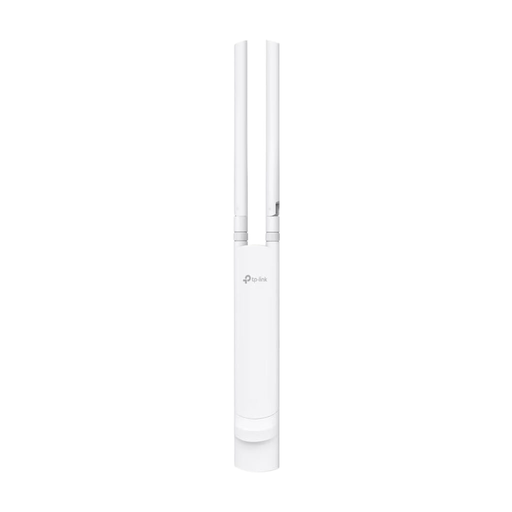
May be suitable if you’re planning to provide Wi-Fi outdoors near the garden office, provided you also plan for the Ethernet connection and power supply.
AC1200; 802.3af PoE or Passive PoE; IP65. Before installation, check that the wireless configuration is permitted at your chosen outdoor location.
It depends on the streaming service and the quality you choose. Netflix recommends at least 5 Mbit/s for FHD and 15 Mbit/s for 4K for its live events. Check the download speed on your viewing device; these Netflix figures aren’t general minimum requirements for other concert platforms.
No, not as your sole internet source. TP-Link explains that a Deco system needs a modem or a suitable direct network connection to provide internet access. So before replacing your router, check your connection type and the operating mode you plan to use.
TP-Link says you’ll need a mobile app and a TP-Link ID to manage a Deco system. The German Federal Office for Information Security recommends changing default login details and keeping your router’s firmware up to date.
No. You can’t assume this is permitted just because a device is described as “outdoor” or has a particular ingress protection rating. Germany’s Federal Network Agency regulates the use of 5-GHz and 6-GHz Wi-Fi through general frequency allocations; Notice 76/2025 repealed the earlier Notice 12/2025. Check the current requirements and the device instructions for the specific model, wireless mode and location.
Your upload connection becomes important too. YouTube recommends testing your upload bitrate and matching your stream quality to the connection speed you can reliably achieve. Download recommendations for watching don’t apply to upload speeds.