If you already have a computer and want to take up as little desk space as possible, a compact graphics tablet without a screen is a good place to start: your drawing appears on your computer monitor. If you want to see your lines directly beneath the pen tip, consider a pen display, which needs more space and the right connections. For sketching without a computer, a standalone tablet is a better choice. Accurate garden plans also depend on the features of your software, not just the pen.
Who are the different devices suitable for?
Sketchers with limited desk space
If you already have a computer and want to start by sketching ideas for beds and paths, a small graphics tablet can give you an extra drawing surface. With the One by Wacom Small, your input appears on your computer monitor, as Wacom explains.
Planners working with precise measurements
For reliable distances and angles, it’s important to check whether your software includes the measurement, grid or guide features you need. Krita documents its grid and guide features, while SketchUp describes the measurement tools in its iPad app.
Those who want to draw directly or on the go
If you want to see the line beneath the pen tip, consider a pen display. To draw without a computer, you’ll need a standalone tablet. XPPen describes the Artist 12 as requiring a computer, while Samsung says the Galaxy Tab S10 FE comes with an S Pen.
What should you look for when buying?
| Buying priority |
What to look for |
Who is it important for? |
| Space at your computer |
Compare the overall dimensions and active area separately; allow for the connections and cable route too. |
If I want to sketch on my existing computer and keep as much desk space free as possible, the space taken up by the whole device matters. Around 33% of consumers put this first. |
| Measurements and plan changes |
Check whether the software supports the measurements, angles, grids or guides you need. |
If I want the distances between beds and paths to remain clear, I need the right features in my software. Around 27% of consumers prioritise planning with accurate measurements. |
| Drawing directly on the display |
Check the total space required, computer connections, power supply and which cables are included. |
If I want to see outlines directly beneath the pen tip, I’ll need room on my small desk for the display and its cables too. Around 20% of consumers prioritise drawing directly on screen. |
| Sketching without a computer |
Check the pen and the exact tablet model; also make sure the app you plan to use has the features you need. |
If I want to create designs without a computer connected, I need a standalone device with a suitable app. Around 20% of consumers prioritise this mobile way of working. |
Avoid common buying mistakes
-
Comparing only the drawing area with the desk space available
The active area is smaller than the overall device. For the XPPen Deco mini7 V2, the manufacturer gives the device dimensions as 260,2 × 162,2 mm and the active area as 177,8 × 111,1 mm.
Measure the space available next to your keyboard and mouse, and allow for the connection and cable route too.
-
Assuming a pen display is a standalone tablet
The XPPen Artist 12 (2nd Generation) connects to a computer. The connection and power supply need to be compatible with your device.
First decide whether you want to draw on a computer or independently, then check the connections and what’s included with the exact model.
The manual lists a separately available cable for the alternative USB-C connection; the supplied 3-in-1 cable is another connection option.
-
Assuming similar model names mean it’s the same version
A product name alone isn’t always enough to identify the exact tablet version. Samsung lists the model code SM-X210NDBAEUB for the Galaxy Tab A9+.
Before you buy, check the full model code and included pen against the manufacturer’s details and the specific listing.
Useful brands to consider
Wacom
The One by Wacom Small CTL-472 is a screenless input device for sketching on a computer you already own.
- Wacom says it comes with a pressure-sensitive pen, with your drawing displayed on the computer monitor.
- A driver needs to be installed for Mac or PC; your drawing won’t appear directly on the tablet.
Huion
The Inspiroy 2 S is designed for use with a computer and has a small active drawing area.
- For the S version, Huion lists an active area of 160 × 100 mm in PC mode, as well as a scroller and a battery-free pen.
- These dimensions apply to the S version and don’t apply to the M or L versions. The scroller doesn’t replace measurement features in your drawing or planning software.
XPPen
The Deco mini7 V2 is a compact graphics tablet, while the Artist 12 (2nd Generation) is a pen display that connects to a computer.
- XPPen publishes the overall and active area dimensions for the Deco mini7 V2; for the Artist 12, the manufacturer lists an 11,9-inch diagonal drawing area.
- The two models have different designs. With the Artist 12, check the connection, cable requirements and specific connection option.
Samsung
The 10,9-inch Galaxy Tab S10 FE is an option for sketching with a pen on a standalone tablet.
- Samsung says this version comes with an S Pen.
- Check separately whether a particular garden-planning app has the drawing and measurement features you need.
Apple
The iPad (A16) is worth considering if suitable iPad apps support the way you want to work.
- Apple says it supports Apple Pencil (USB-C) and Apple Pencil (1st generation). SketchUp documents Pencil input and measurement tools for its iPad app.
- Apple doesn’t list a Pencil in the stated contents of the iPad box. Check that the pen is compatible with the exact iPad version.
Joybuy products at a glance
The products featured here include an Android tablet for designs on the go and a reusable LCD drawing tablet for simple sketches.
 No image available
TECLAST ArtPad Pro, 12,7-inch, 2K, 256 GB
For creating designs on the go without a connected computer, provided the drawing app you want is available on the tablet.
Android 15; 12,7-inch 2K display; 256 GB storage; T-Pen with 4096 pressure levels. According to the product details, the box includes a pen, a protective case and an English-language Bluetooth keyboard.
View at Joybuy
 No image available
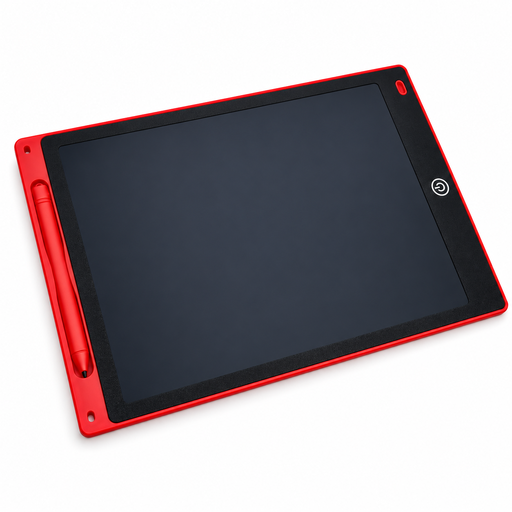
12-inch red LCD drawing tablet
A reusable surface for simple design sketches when you don’t need advanced planning features.
The drawing area measures 230 × 165 mm; the tablet is 5 mm thin and comes with a pen and a lock function. The erase button clears the whole drawing area, not individual sections.
View at Joybuy
Frequently asked questions
Can pen pressure automatically create a garden plan to scale?
No. In suitable software, pen pressure can affect things such as line thickness, but it doesn’t set real-world dimensions. For distances and angles, you need to enter starting measurements and use the right tools. SketchUp documents a tape measure and protractor in its iPad app.
What should I check when connecting a pen display?
For the XPPen Artist 12 (2nd Generation), the manual describes connecting it with the supplied 3-in-1 cable or a separately available USB-C cable. Check which video connection is compatible with your computer, whether it can supply enough power and which cable comes with the version on offer.
What can I do if pen pressure doesn’t work in my drawing software?
First check that you have the right driver for your tablet, then check the input settings in the software you’re using. According to Krita’s documentation, the operating system, driver and, on Windows, selected input protocol all need to work together.
Which device is suitable for sketching without a computer?
You’ll need a standalone tablet with an app that supports the way you want to draw and plan. Samsung says the Galaxy Tab S10 FE comes with an S Pen; with the iPad (A16), you should also check the compatibility and what’s included with the right Apple Pencil.


