Sketching at a small desk
You already have a computer and want a drawing surface for your first garden ideas that you can put away after drawing.


If you already work on a computer in a small student bedroom and want to put your drawing surface away after sketching, a drawing tablet without a screen is a good place to start. If you want to draw directly onto the design on screen, consider a pen display that connects to your computer. And if you want to sketch without a computer, look at a standalone tablet with a stylus. The key factors are space, connections and software: Krita documents grids and guides, while SketchUp for iPad describes a 3D modelling environment. A stylus alone won’t make a sketch accurately scaled.
You already have a computer and want a drawing surface for your first garden ideas that you can put away after drawing.
You want to add beds, paths and labels straight onto the sketch on screen, and have room for a connected display.
You want to sketch without a connected computer, so you’re checking that the tablet, stylus and app you want will all work together.
A good fit if: You already use a suitable computer and screen, and want to put a separate drawing surface away after each session.
The trade-off: You draw on the tablet, but see the result on your computer screen.
A good fit if: You want to draw directly onto the design on screen and have room for the display and its cables.
The trade-off: The display needs a compatible computer and connection. Huion notes that the full-featured USB-C cable for the Kamvas 13 (Gen 3) isn’t included in the standard package.
A good fit if: You want to sketch without a connected computer and the app you need runs on the tablet.
The trade-off: Check the exact tablet and stylus models, the app you want and what’s included. Samsung lists an S Pen with the Galaxy Tab S10 FE, but no charging adapter.
| What you need | What to check before buying | Who is it important to? |
|---|---|---|
| Planning to scale | Check that the software you plan to use has the alignment and measurement features you need. Krita documents grids and guides; SketchUp for iPad describes 3D modelling. | If I want to plan paths and areas in relation to measurements, I’ll check the software workflow first. Around 29% of consumers say planning accuracy is their main concern. |
| Desk space | Measure your desk and storage space, then compare the overall dimensions. Wacom lists the Intuos Pro Medium PTK670K0B as measuring 291 × 206 mm overall, with an active area of 263 × 148 mm; XPPen gives the Deco 01 V3 a thickness of 8 mm. | If I need room on my desk for study materials too, the overall space the tablet takes up matters more than the active drawing area alone. Around 29% of consumers say limited desk space is their main concern. |
| Drawing directly on screen | For a pen display, check that your computer’s video, data and power connections are compatible. Huion describes the Kamvas 13 (Gen 3) as having a 3-in-1 connection; Huion says the full-featured USB-C cable isn’t included in the standard package. | If I want to draw directly onto the design on screen, I’ll plan for a connected workstation. Around 24% of consumers say drawing directly on screen matters most to them. |
| Sketching without a computer | Check that the tablet supports the app you want, that your stylus is compatible and what’s included with the specific version. Samsung lists an S Pen as included with the Galaxy Tab S10 FE; Apple lists Pencil compatibility by model. | If I want to capture ideas away from my room without a connected computer, the tablet needs to support the workflow I want on its own. Around 18% of consumers say portability is their main concern. |
A connected pen display such as the Huion Kamvas 13 (Gen 3) isn’t a standalone computer and needs a compatible connection setup.
First decide whether you need to draw without a computer. If you choose a display, check your computer’s connections before you buy.
An easy-to-use stylus doesn’t replace features for aligning or editing paths and areas to scale.
Before choosing a device, create a test drawing in your intended software using a known measurement.
What’s included can vary by device and version. Samsung lists an S Pen with the Galaxy Tab S10 FE, but no charging adapter; Huion says the full-featured USB-C cable for the Kamvas 13 (Gen 3) isn’t included in the standard package.
Compare the specific version you’re considering with its list of included items, and check which connections you plan to use.
Apple matches Pencil models to specific iPad models and, in some cases, particular iPadOS versions.
Identify the exact iPad model before buying a stylus, then check it against Apple’s compatibility information.
One by Wacom is an option for pen input on a computer you already own; the Intuos Pro Medium PTK670K0B is another drawing tablet.
The Deco 01 V3 is a drawing tablet without a display; the Artist-12-3rd product range has a connected display.
The Kamvas 13 (Gen 3) is designed for drawing on a display connected to a computer.
The Galaxy Tab S10 FE is a tablet option for sketching without a connected computer.
An iPad with a compatible Apple Pencil is a standalone drawing option, provided the app you want is available for it.
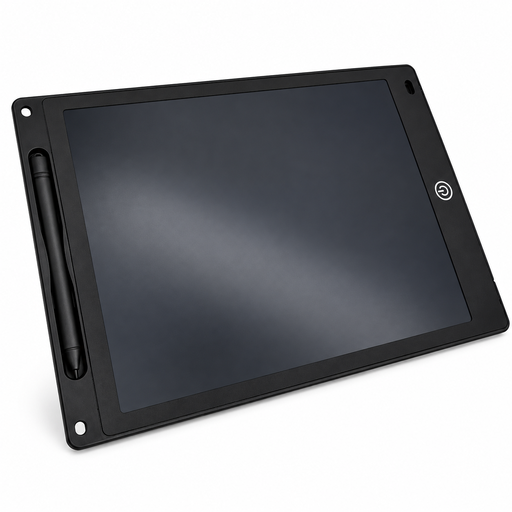
Joybuy product selection for simple, freehand garden sketches.
 No image available
The reusable LCD drawing surface is handy for rough, freehand garden sketches.
12 inches; 5 mm thick; supplied with a stylus, erase button and lock function. The erase button clears the entire drawing surface at once.
No, not with the drawing tablet alone. Check whether your chosen software has the alignment and measurement features you need. Krita documents grids and guides, while SketchUp for iPad offers a 3D modelling environment.
Check that the connection you want to use is compatible with your computer’s video, data and power connections. Huion documents a 3-in-1 connection and notes that the full-featured USB-C cable isn’t included in the standard package.
Set aside a safe place for the device, stylus and cables, and follow the instructions for the specific model you buy. When choosing a device, consider its overall dimensions, not just the active drawing area.
Check what’s actually included: Samsung lists an S Pen with the Galaxy Tab S10 FE, but no charging adapter; Huion says the full-featured USB-C cable for the Kamvas 13 (Gen 3) isn’t included. The Verbraucherzentrale distinguishes voluntary manufacturer warranties from statutory rights when goods are faulty. For distance sales, you can withdraw from a contract in many cases, subject to the specific conditions that apply to your purchase.