Sketchers with limited desk space
If you already use a computer and need to free up the shared desk after drawing, look for a suitable active area and easy storage. Xencelabs and Huion specify these features for particular models.


If you already use a screen and need to clear the drawing space after each session, a pen tablet without a display is a natural place to start. If you want to draw directly on your garden plan, consider a pen display, provided you have enough space and your computer supports the required video connection, power supply and drivers. A standalone pen computer is another option if you can’t rely on having access to a shared computer. For plans to scale, the software’s drawing and output features matter too.
If you already use a computer and need to free up the shared desk after drawing, look for a suitable active area and easy storage. Xencelabs and Huion specify these features for particular models.
If your garden plan needs to show verifiable measurements or be printed to scale, check the drawing units, paper size and output scale in your chosen software. The QCAD manual explains these settings for its application.
If you want to draw directly on the garden sketch in front of you, you’ll need a pen display and room to set it up. Huion and XPPen offer specific display models; you’ll need to check the computer connections required for each one separately.
A good fit if: You draw on a screen you already own and want to put the device away after each session.
The trade-off: You draw on the tablet’s surface but look at a separate screen; a more compact device leaves less room for hand movements.
A good fit if: You want to draw directly on the garden plan on screen and have a suitable computer and space to set it up.
The trade-off: As well as making room for it, you’ll need to check video output, power and which cables are compatible with the model.
A good fit if: You want to run drawing software on the device itself because you can’t rely on having access to a shared computer.
The trade-off: Unlike a connected pen display, this type includes computer hardware and an operating system. Check the software, file formats and space requirements.
When choosing a device for garden sketches at a shared desk, your priorities will depend mainly on space, scale, access to a computer and the type of drawing surface you want.
| Buying consideration | What to check before buying | Who should pay particular attention? |
|---|---|---|
| Space and storage | Compare the overall dimensions and active area separately. Xencelabs lists an active area of 6.93 × 3.89 inches for the Pen Tablet Small; Huion gives 8.7 × 5.4 inches for the Inspiroy 2 M. | If I need to clear the desk after drawing, I want a device that’s easy to put away. Around 31% of consumers put space and storage first. |
| Plans to scale | Create a sample plan in your chosen application and check the drawing units, paper size and print or PDF scale. The QCAD manual explains these settings for QCAD. | If measurements in my garden plan need to be verifiable, I focus on the software and its output settings rather than pen features alone. Around 25% of consumers say planning to scale is their top priority. |
| Setting up on a computer | Check the operating system, connections and installation permissions at each workstation. Xencelabs says basic navigation is available without a driver; the manufacturer says Quick Keys require one. The XPPen Artist 15.6 Pro V2 manual specifies an additional power connection if the display doesn’t turn on over USB-C. | If I need to switch between shared computers, I want to know whether the connections and setup will work at each workstation. Around 25% of consumers prioritise compatibility with the computers available to them. |
| Drawing on screen | Compare the display size with the space available and the garden plan, including its key and toolbars. Huion lists a 13.3-inch display for the Kamvas 13 (Gen 3); XPPen gives 15.4 inches for the Artist 15.6 Pro V2. | If I want to draw directly on the sketch in front of me, the screen size matters, even though the display takes up extra space. Around 19% of consumers want to draw directly on screen. |
Pressure sensitivity affects the pen stroke; drawing units and the scale of a printout are set in the software.
Try out your intended drawing and printing workflow in the software you plan to use before choosing a device based on its pressure-level count.
The XPPen Artist 15.6 Pro V2 manual describes an additional power connection if the display doesn’t turn on over the USB-C connection described.
Check video output, power, connection type and what’s actually included for both the display and the computer.
Depending on the device and computer, you may need an additional power cable or a suitable port.
According to the manufacturer, the Xencelabs Pen Tablet offers only basic navigation without a driver; Quick Keys require driver installation. This applies to this specific model.
Before buying, check whether you’re allowed to install the driver required for your chosen model on every workstation you plan to use.
Huion says pen compatibility depends on the tablet model and the pen technology used.
Before buying a replacement, check the exact model names of both the tablet and the compatible pen.
An incompatible pen or nibs may mean you need to buy another replacement.
The Intuos Pro Medium is a pen tablet without a display, designed for use with a screen you already own.
The models listed range from pen tablets without displays to connected pen displays and standalone pen computers.
The Deco 01 V2 is a pen tablet without a display, while the Artist range includes connected pen displays.
The Pen Tablet Small is a compact pen tablet without a display.
The M908 is a pen tablet without a display, with a larger active area and a scroll wheel.
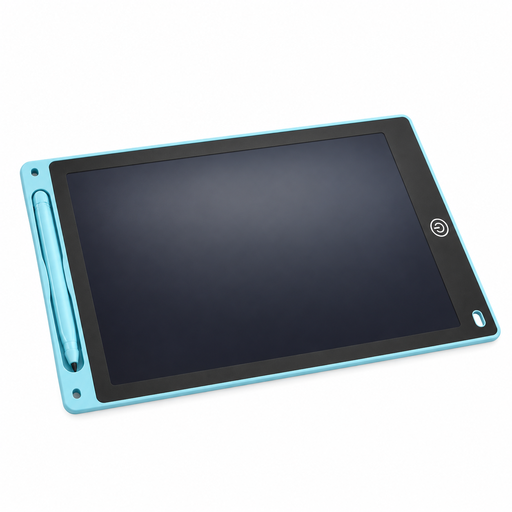
The Joybuy option listed here provides a reusable surface for freehand garden sketches, which you can put away after use. For plans to scale, you should also check the drawing and output features in your chosen software.
 No product image available
The reusable 230 × 165 mm drawing surface is designed for freehand sketches and can be put away after use.
According to the product information, the tablet is 5 mm thick and has a lock to prevent accidental erasure.
The erase function requires a button cell, but the exact type may vary. Before buying, check which cell the specific version needs.
No. The hardware alone doesn’t determine the output scale. Set the drawing units, paper size and print scale in suitable software, then check the preview. The QCAD manual explains these steps for QCAD.
You can’t assume so. The XPPen Artist 15.6 Pro V2 manual describes an additional power connection if the display doesn’t turn on over USB-C. For the specific model, also check video output and the cables required.
Check the operating system, connections and installation permissions at every workstation you plan to use. Xencelabs says its Pen Tablet offers only basic navigation without a driver, while Quick Keys require driver installation; this information applies to that specific model.
Not in every case. Huion says compatibility depends on the tablet model and pen technology. So before buying a replacement, check the exact model name.
According to consumer information from the European Union, faulty goods are generally covered by a legal guarantee of at least two years from the date you receive them. For qualifying online distance sales, you generally have 14 days from delivery to withdraw from the purchase. Exceptions and conditions, such as return postage costs, may apply. This is separate from any voluntary manufacturer’s warranty.