For a longer gardening handbook with nested headings, an adjustable 27-inch QHD monitor is a sensible starting point if you want to view text, the document structure and your sources side by side. A compact Full HD screen saves space, while 4K is worth considering mainly if you also review images or fine layout details. What matters most is whether your windows are easy to read in your chosen arrangement, and whether the monitor has the right connections and positioning options.
Which monitor options are right for different writers?
Writers who work with reference materials
If you want to keep your document structure, draft and research material in view at the same time while writing chapters with nested headings, look for plenty of usable screen space and text that's easy to read. idealo's workspace advice highlights 27-inch WQHD displays as one possible solution for working with multiple windows.
Writers who move between workspaces
If you connect a laptop or share a desk, make sure the monitor has a suitable video connection and adjustment options so you can position it to suit your workspace. Germany's Federal Institute for Occupational Safety and Health covers screen-based work in ASR A6 within its scope of application.
Writers who work with images
If you regularly review plant photos or illustrations as well as text, weigh up resolution and, where relevant, colour reproduction against what you actually need. Manufacturer specifications for resolution and colour modes describe the monitor's features, but don't guarantee an accurate print colour preview.
What should you consider when choosing?
Compact Full HD monitor
A good fit if: You mainly work in one text window and desk space matters more to you than viewing several windows side by side.
Consider: Compared with the 27-inch QHD models featured here, there are fewer pixels available for displaying your document structure, manuscript and sources side by side.
27-inch QHD
A good fit if: You often have your manuscript, heading structure and research open at the same time, and have enough desk space.
Consider: Check that the screen size and window layout work for your workspace and usual text size.
27-inch 4K
A good fit if: You regularly review illustrations or fine layout details in your handbook as well as the text.
Consider: Check that text is easy to read at your preferred scaling. Colour gamut specifications alone don't guarantee an accurate print preview.
For your handbook, the main things to consider are how you want to arrange your windows, where you can position the screen and which connections your laptop has.
| Criteria |
What to check before buying |
Who it matters most to |
| Space for text and sources |
Arrange your usual windows side by side at your preferred text size, then compare the screen size and native resolution. |
If I want to view my manuscript, document structure and sources side by side, the usable screen space needs to be right for me. Around 36% of consumers prioritise space for viewing text and sources side by side. |
| Screen positioning |
Check the height adjustment, tilt and, if relevant, pivot options, as well as the stand's footprint in your workspace. |
If I'm writing my handbook for long periods, I want to be able to adjust the screen to suit my workspace. Around 29% of consumers prioritise an adjustable stand. |
| Laptop connection |
Check that the video output, charging power, cables and any USB or network connections you need are compatible with your laptop. |
If I want to connect my laptop to the monitor, the connections and charging power need to meet its requirements. Around 21% of consumers prioritise laptop docking. |
| Image and layout details |
Check illustrations and interface elements at your usual scaling. Don't rely on colour gamut specifications alone for print colours. |
If I want to review illustrations or fine layout details as well as text, how they appear on screen is a key consideration for me. Around 14% of consumers prioritise image and layout details. |
Which buying mistakes should you avoid?
-
Choosing based on screen size or pixel count alone
Screen size and native resolution don't tell you whether your preferred layout of text, document structure and sources will be easy to read.
Try arranging your windows at your usual text size and measure the space available on your desk.
-
Assuming USB-C guarantees a one-cable connection
The video signal, data connection and stated charging power all need to be compatible with your laptop, cable and monitor.
Check your laptop's connections and charging requirements against the specifications for the exact monitor variant.
Depending on the connections you already have, you may need a suitable cable or a different connection solution.
-
Assuming 4K and colour gamut specifications guarantee a print preview
Resolution and colour modes don't tell you what the results of your entire printing workflow will be.
Choose extra image features to suit your actual needs, and check text scaling and your print workflow separately.
Monitor brands to consider
Dell
The Dell P2725DE is one example of a 27-inch QHD monitor with a USB-C hub.
- Dell lists a resolution of 2560 × 1440 pixels and USB-C power delivery for this model.
- Whether video and charging work with your laptop depends on its connections and charging requirements.
BenQ
According to the manufacturer, the BenQ GW2790QT combines a 27-inch QHD screen with an adjustable stand and USB-C.
- BenQ lists pivot, 110 mm of height adjustment and 65 W USB-C Power Delivery for this model.
- Check that 65 W is suitable for your laptop. Eye-Care branding doesn't prove an individual health benefit.
EIZO
The FlexScan EV2490 is a more compact office option, with a 23.8-inch Full HD screen and USB-C docking.
- EIZO lists a resolution of 1920 × 1080 pixels, 70 W through the USB-C upstream port and an RJ-45 port.
- It has fewer native pixels for viewing multiple windows side by side than the QHD and 4K models featured here.
ASUS
The ProArt PA279CRV is a 27-inch 4K option for writers who also review images or layout details.
- ASUS lists a resolution of 3840 × 2160 pixels, colour modes, pivot and 96 W USB-C Power Delivery for this model.
- Manufacturer specifications don't guarantee an accurate print colour preview. Extra features may not be a priority if most of your work is text-based.
Lenovo
The ThinkVision T27h-30 is a 27-inch QHD monitor with USB-C docking and Ethernet.
- For variant 63A3GAT1EU, Lenovo lists a resolution of 2560 × 1440 pixels, USB-C, Ethernet and 155 mm of height adjustment.
- These specifications apply to the variant named; they don't prove that the advertised eye comfort technology will have a general effect.
Monitor options at Joybuy
The monitors below cover compact Full HD, 27-inch QHD and 27-inch 4K options for writing and editing.
 No image available
KTC H27T27, 27-inch QHD monitor
If you want to work with your manuscript, document structure and research side by side, the stated 27-inch QHD resolution is worth considering.
2560 × 1440 pixels, IPS panel, tiltable stand and 100 × 100 mm VESA mount.
View at Joybuy
 No image available
TCL 27P2A, 27-inch QHD monitor
The 27-inch QHD specification is an option if you want to arrange several views side by side while editing.
2560 × 1440 pixels, Mini LED backlight and HFS (IPS) panel; the description lists an adjustable stand.
View at Joybuy
 No image available
INNOCN CB27U1, 27-inch 4K monitor
If you want to review illustrations or layout details as well as text, you can assess the 4K resolution at your preferred scaling.
3840 × 2160 pixels, IPS panel, USB-C with 90 W Power Delivery, 150 mm of height adjustment and pivot; check that the charging power is compatible with your laptop.
View at Joybuy
 No image available
Dell Pro 27 E2726DS, 27-inch QHD monitor
If you want your manuscript and other views to fit side by side, the 27-inch QHD specification is one option to consider.
2560 × 1440 pixels, IPS panel, HDMI and DisplayPort; according to the description, the stand is height-adjustable, swivels, tilts and rotates.
View at Joybuy
 No image available
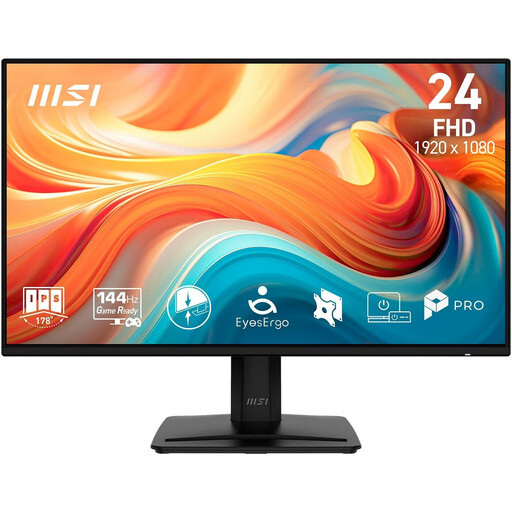
MSI PRO MP242DE E14A, 23.8-inch Full HD monitor
If you mainly work in one text window and have limited desk space, the more compact screen size could suit you.
1920 × 1080 pixels, IPS panel, anti-glare surface and tiltable stand; HDMI, DisplayPort and VGA are listed. Full HD has fewer native pixels than QHD for viewing multiple windows side by side.
View at Joybuy
Frequently asked questions
Do I need 4K for nested headings?
No. The key is whether your text, document structure and sources are all easy to read at your usual text size. 27-inch QHD models and a compact Full HD option are alternatives; consider 4K if you also review images or layout details.
How can I clean the monitor?
BenQ recommends using a slightly damp microfibre cloth for its monitors. Also follow the instructions for your specific device.
How can I check potential electricity costs, and what are my rights if something is faulty?
To compare energy efficiency, you can refer to the EU energy label and the model information in EPREL; the European Commission rates electronic displays on a scale from A to G. According to Your Europe, consumer purchases from a trader are covered by a legal guarantee of at least two years. This is separate from any voluntary manufacturer's warranty.
Are there legal requirements for my screen-based workstation in Germany?
The Workplace Ordinance and the more detailed ASR A6 cover screen-based work within their respective scopes, particularly in workplaces and when working from home. They don't set a blanket legal minimum screen size or pixel count for every personal monitor purchase. For workplaces covered by these rules, discuss the specific setup with your employer.


