
Lieferung heute & morgen

Qualitätsgarantie

Willkommens-Angebote freischalten: KOSTENLOSE Lieferung | Bis zu 80 % RABATT | Kostenlose 30-Tage-JoyPlus-Testphase
App herunterladen
The search for the right mechanical keyboard can quickly become overwhelming. The term "Gasket Mount" is often promoted as a feature of high-end models, but not every implementation delivers on its promise. Many users invest in a supposed premium product, only to find that the hoped-for typing experience falls flat. This guide highlights the pitfalls to avoid and the technical features you should look for to make an informed decision.
Marketing terms can be misleading. Before you make a purchase, be aware of these three common problems:
To avoid these pitfalls, you should closely examine two key areas: the mechanical construction and the technical specifications for connectivity and customisation.
A true gasket mount design aims to isolate the circuit board (PCB) and mounting plate from the case. This is achieved with flexible gaskets placed between these components. The result is a cushioned, softer, and often deeper-sounding typing experience.
Look for the following features:
Modern keyboards are more than just simple input devices. They are customisable tools that should adapt to your workflow.
Based on the criteria above, we have identified a few models suitable for different needs and preferences.
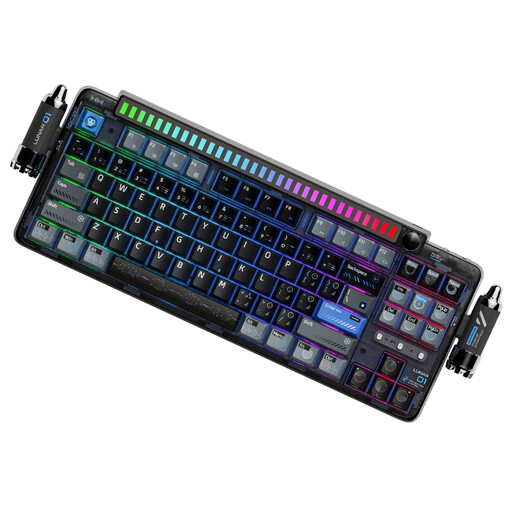
Why This Fits Their Persona: Ideal for users seeking a unique desk aesthetic and a premium sound experience. The detachable rhythm light bar and magnetic rocket spinners make it a visual centrepiece, while the thoughtful construction ensures deep acoustics.
The keyboard features a true gasket-mount structure with dual silicone dampeners and a flexible PC plate, creating a soft, resonant typing feel—far from being just a marketing claim.
Full 5-pin hot-swap support for maximum customisation and reliable tri-mode connectivity with a 4000 mAh battery for long wireless usage.

Why This Fits Their Persona: Perfect for programmers, creatives, and gamers who need a feature-rich layout. The 98% format offers a number pad in a compact frame, while the TFT display and rotary knob boost productivity.
With a 10,000 mAh battery, the worry of short battery life in wireless mode is eliminated. The hot-swap PCB is compatible with both 3-pin and 5-pin switches, offering full flexibility.
The integrated TFT colour display for status updates and custom GIFs is a standout feature. The gasket structure with five dampening layers provides excellent acoustics.
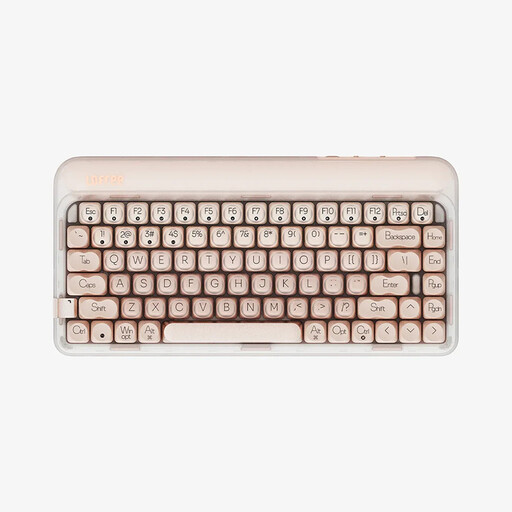
Why This Fits Their Persona: The compact 75% layout (84 keys) saves valuable desk space without sacrificing essential function keys. Ideal for a clean, tidy setup with a focus on performance and feel.
This model proves that compactness doesn't have to come at the expense of quality. Its gasket structure with PORON and IXPE padding delivers a soft, quiet typing feel typically found only in larger keyboards.
Offers the full premium package in a small form factor: gasket mount, tri-mode connectivity (including Bluetooth 5.3), and full hot-swap capability for all keys.
We have compiled a complete, real-time list of products that fully satisfy these strict selection criteria and UK safety regulations.
What is the advantage of a gasket mount keyboard over a traditional one? The main advantage lies in the typing feel and acoustics. By isolating the key assembly from the case, vibrations are absorbed, resulting in a softer bottom-out and a more muted, often "thocky," sound. Traditional mounting styles (e.g., tray mount) screw the PCB directly to the case, which leads to a harsher feel and more resonance.
How difficult is it to swap switches on a hot-swap keyboard? The process is straightforward and requires no specialised technical knowledge. You only need two tools: a keycap puller and a switch puller, which are often included in the box. First, you remove the keycap, then you use the puller to gently lift the underlying switch from its socket. The new switch is then simply pressed into the socket until it clicks into place.
Does RGB lighting significantly affect the battery life of a wireless keyboard? Yes, RGB lighting is one of the biggest power consumers on a wireless keyboard. At full brightness, it can reduce battery life by 50% or more. However, many models offer the option to dim the brightness or turn off the lighting completely to significantly extend runtime. A keyboard with a large battery (e.g., 4000 mAh or more) will offer practical usage time even with the lighting enabled.