
Lieferung heute & morgen

Qualitätsgarantie

Willkommens-Angebote freischalten: KOSTENLOSE Lieferung | Bis zu 80 % RABATT | Kostenlose 30-Tage-JoyPlus-Testphase
App herunterladen
Your printer is reporting "Toner Low"—a situation that often leads to hasty and ill-considered purchases, whether in a home office or a corporate setting. The selection of toner cartridges is vast, and the price differences are significant. But be careful: not every budget-friendly toner cartridge is a good choice. Certain pitfalls can lead not only to poor print results but also to unexpected additional costs or even problems with your printer.
As your Joybuy Product Recommendation Officer, I'll help you understand the key criteria so you can make an informed and cost-effective decision.
Before you add a new toner cartridge to your shopping cart, you should be aware of these three common problems that often lead to frustration and unnecessary expenses.
To avoid these traps, focus on the following objective criteria. This will ensure you buy a toner that works reliably and fits your budget.
The most important step is to identify the correct cartridge designation for your printer model. You can find this in the printer's manual, on the old cartridge, or often inside the device itself. Search specifically for this number (e.g., "HP 207A" or "Brother TN247") to avoid incorrect purchases. For compatible toners, the note "with chip" is a key feature that ensures smooth recognition by the printer.
To purchase an affordable toner that is also economical, calculate the cost per page. To do this, divide the price of the cartridge by the specified page yield.
Although Cartridge B is more expensive to purchase, it offers lower running costs. This is particularly relevant for users with high printing volumes.
Here are some recommendations tailored to different user groups and their specific requirements.
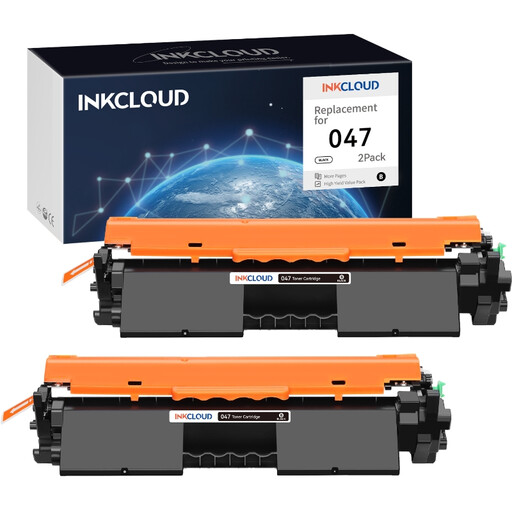
Why This Fits Their Persona: Ideal for users who regularly print documents in black and white and are looking for a cost-effective solution. The twin pack for black toner significantly lowers the cost per page and ensures a ready supply, minimising office downtime.
These cartridges are designed to be compatible with the specified Canon models, bypassing the problem of printer rejection. The focus is on high value through the twin pack, not just a low single-unit price.
Cost-effective twin pack for high print volumes; sharp, smudge-proof text for professional documents.
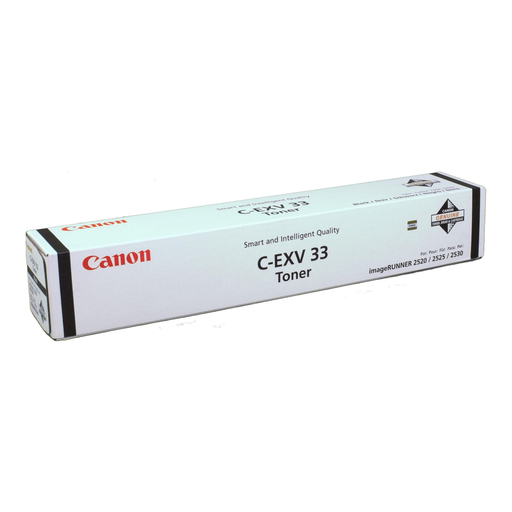
Why This Fits Their Persona: Designed for businesses that use Canon imageRUNNER systems and depend on maximum performance, reliability, and the preservation of their manufacturer's warranty. Perfect for high-volume printing environments.
As an Original Toner from Canon, 100% compatibility and chip functionality are guaranteed. The specified page yield is reliable and tailored to the printer's performance, which eliminates the risk of voiding the warranty.
Seamless integration with Canon imageRUNNER printers; consistent, high-quality print results and preservation of the device warranty.
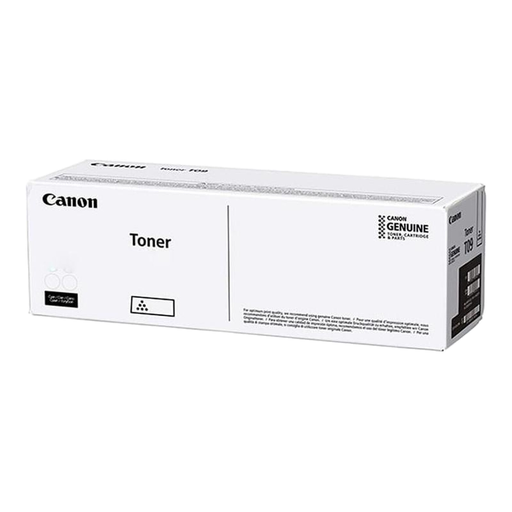
Why This Fits Their Persona: For departments and businesses that regularly print large volumes of colour marketing materials, reports, or presentations. The very high page yield minimises maintenance and the total cost of ownership.
The high page yield of 25,500 pages ensures a low cost per colour page and avoids the trap of having to frequently repurchase cheap, low-capacity cartridges. As an original product, quality is consistent.
Extremely high page yield for maximum efficiency; original toner for vibrant, precise colour reproduction in professional quality.
We have compiled a complete, up-to-date list of products that fully meet these strict selection criteria and UK regulations.
A high-quality compatible toner from a reputable manufacturer is designed to work safely with your printer. The risk of damage is low. Problems usually arise from inferior products that lack quality control. If damage is caused by a third-party cartridge, the printer manufacturer may refuse warranty service. Therefore, choosing a trustworthy supplier for compatible printer cartridges is crucial.
The page yield specification, e.g., "2,000 pages," is based on an international standard (ISO/IEC 19752 for monochrome and 19798 for colour printers). This standard dictates that the yield is measured using a standard test document where about 5% of an A4 page is covered with toner. This roughly corresponds to a standard business letter without images. If you regularly print full-page graphics or photos, the actual page yield of your toner cartridge will be correspondingly lower.
Always store an unused toner cartridge in its original packaging in a cool, dry, and dark place. Do not expose it to direct sunlight or extreme temperatures. The cartridge should be stored horizontally to prevent the toner powder from settling unevenly. Before inserting it into the printer, it is recommended to gently shake the cartridge horizontally a few times to loosen the powder.