
Lieferung heute & morgen

Qualitätsgarantie

Willkommens-Angebote freischalten: KOSTENLOSE Lieferung | Bis zu 80 % RABATT | Kostenlose 30-Tage-JoyPlus-Testphase
App herunterladen
A mechanical keyboard with a German QWERTZ layout needs to meet several requirements at once for gaming, writing and work: compact dimensions, directly accessible function keys, a stable connection and a comfortable typing feel. Many products look similar at first glance, but can differ considerably in layout, switch compatibility and features.
As a Joybuy Product Recommendation Officer, I filter the most important information from product descriptions and assess it according to the intended use. This helps you avoid common purchasing mistakes.
The description “mechanical gaming keyboard for PC and Mac” tells you nothing about the key layout. With a US QWERTY layout, Z and Y, among others, are positioned differently from on a German keyboard. Special characters such as Ä, Ö, Ü and ß may also be missing or only accessible via key combinations.
If you regularly write German texts, you should therefore look specifically for “German QWERTZ”, “German layout” or a clear image of the keycaps. A German operating system alone does not turn a US keyboard into a German keyboard.
Some compact keyboards use a membrane or hybrid construction and advertise a mechanical typing feel. This is not the same as a mechanical keyboard with individual switches. If you plan to replace the switches later, a hot-swappable keyboard must also genuinely have compatible sockets.
Before buying, details such as 3-pin or 5-pin compatibility, switch type and PCB construction are therefore important. Some models only support hot-swapping for 3-pin switches.
An RGB keyboard can offer various lighting modes directly via the function keys, without requiring extensive software. Conversely, a large number of lighting effects does not automatically mean that macros or individual profiles are supported. Check whether the setting you want can be adjusted using a key combination, compatible software or only to a limited extent.
A 75% keyboard, also known as an 82-key keyboard, usually includes a complete row of function keys, arrow keys and selected navigation keys. It takes up less desk space than a full-size model, leaving more room for your mouse. According to the product details, the AJAZZ AK820 features an 82-key QWERTZ layout and measures approximately 327 × 136 × 40 mm.
A 104-key full-size model, on the other hand, makes sense if you frequently use the number pad. For accounting, data entry or large spreadsheets, a compact mechanical keyboard may therefore be impractical.
Linear Red Switches move without a noticeable tactile bump or pronounced clicking sound. This can be appealing for fast gaming inputs and smooth typing. The actual noise level also depends on the keycaps, case, dampening and typing technique.
The AJAZZ AK820 is listed with either Sea-Salt or linear Red Switches, depending on the variant. As the features can differ between listings, you should check the specific product page before ordering.
A USB-C keyboard with a detachable cable requires neither a battery nor wireless pairing. For a fixed PC workstation, a wired connection offers straightforward set-up. An integrated volume control lets you manage media without leaving a game or application.
The term gasket-mount keyboard describes the way the positioning plate is secured using elastic elements. This can affect the typing characteristics. Multi-layer foam or silicone pads can alter resonance inside the case, but they are not a standardised measure of quality. The specific construction and your personal typing preference remain the deciding factors.
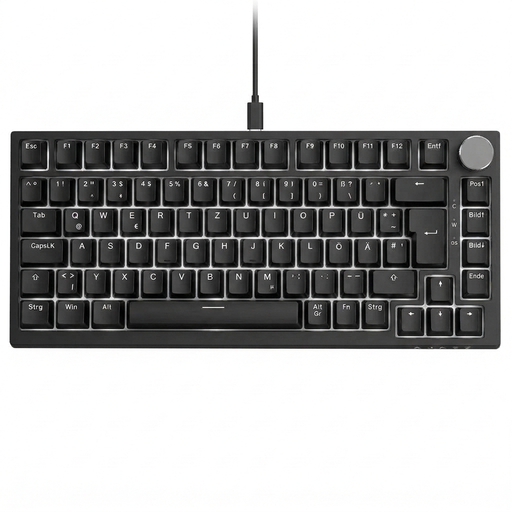
Why this product suits this profile: Its compact design combines German labelling with function keys, arrow keys and a volume control. Linear Red Switches are suitable for users who prefer a consistent typing feel without clicky switches.
The German QWERTZ layout is clearly specified. Hot-swapping for compatible 3-pin switches allows you to replace the switches without soldering.
Wired USB-C connection, 82 keys, gasket-mount construction and integrated rotary knob.
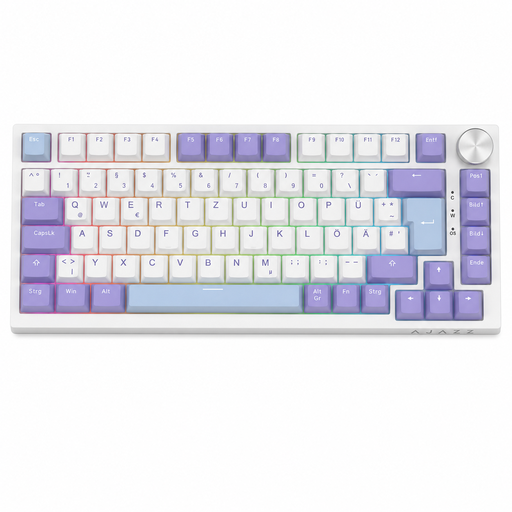
Why this product suits this profile: According to the product description, this variant combines a German 82-key layout with Sea-Salt Switches, RGB lighting and multi-layer sound dampening.
The product specification states German QWERTZ, a complete row of function keys, arrow keys and navigation keys instead of an unclear imported layout.
RGB modes with adjustable brightness and speed, plus a USB-C cable and rotary volume control.
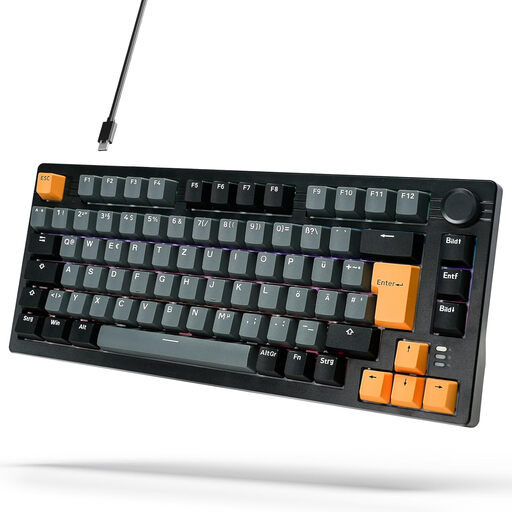
Why this product suits this profile: For prolific typists and students, this model offers a German 75% layout, linear Red Switches, RGB backlighting and a volume control.
The layout, USB-C connection and hot-swap function are clearly specified in the product details. Before buying, you should check the compatibility of your preferred replacement switches.
Gasket-mount construction, multiple sound-absorbing layers and 18 stated lighting modes.
We have put together a complete, regularly updated list of products that fully meet these strict selection criteria and the safety regulations applicable in the EU.
Connect the keyboard via USB, then select the German keyboard layout under the language settings in Windows. Next, check the positions of Z, Y, Ä, Ö, Ü and ß. With genuinely German labelling, the keycaps and system setting should match.
Manufacturers often state the lifespan in keystrokes. These figures are model specifications, not a guarantee for every usage situation. Wear can also affect keycaps, stabilisers, cables or hot-swap sockets. Replaceable switches can make maintenance easier, but they do not replace careful handling.
A USB keyboard is powered directly by the computer. Consumption depends on factors including lighting brightness, the number of LEDs and the electronics. If you want to save energy, you can reduce the brightness or switch off the RGB lighting. Unlike wireless models, a wired version does not require a battery to be charged.