
Lieferung heute & morgen

Qualitätsgarantie

Willkommens-Angebote freischalten: KOSTENLOSE Lieferung | Bis zu 80 % RABATT | Kostenlose 30-Tage-JoyPlus-Testphase
App herunterladen
Choosing a high-end gaming monitor can quickly become overwhelming. Manufacturers promote a flood of technical specs and certifications that often create more confusion than clarity. Especially with premium models like the Gigabyte MO27Q2A ICE Gaming Monitor, it's crucial to cut through the noise. Many buyers invest in overkill specifications they'll never use or fall for marketing buzzwords that offer little practical value.
As your Joybuy Product Recommendation Officer, I'm here to help you navigate these pitfalls. We'll focus on the objective parameters that truly matter for discerning gamers and creative professionals.
Common Pitfalls When Buying a Monitor:
To make an informed decision, you should closely examine three core parameters. These are the primary determinants of your setup's visual quality and performance.
The choice of panel technology is the most critical decision. While IPS panels are known for their good colour reproduction and VA panels for high contrast, QD-OLED technology sets a new standard.
Stuttering and screen tearing can ruin any gaming experience. Adaptive sync technologies prevent this by matching the monitor's refresh rate to the frames per second (FPS) output by the graphics card.
A 27-inch white gaming monitor can be an aesthetic statement, but ergonomics are crucial for long sessions. Look for a fully adjustable stand. A monitor with a pivot function (the ability to rotate 90 degrees into portrait mode) is especially useful for programmers, streamers, and content creators who need extra vertical space for chats, code, or timelines.
Instead of a one-size-fits-all recommendation, we've selected models for three typical user profiles.
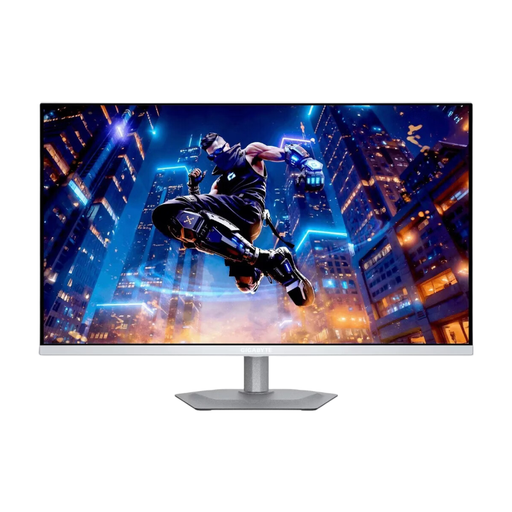
Why This Fits Their Persona: Ideal for esports enthusiasts who demand maximum performance without compromise. The combination of QHD resolution, an extreme 280Hz refresh rate, and QD-OLED technology provides a tangible advantage in fast-paced FPS games. The stylish white design fits perfectly into modern setups.
It delivers measurable, superior performance with DisplayHDR True Black 400 and a true 0.03ms (GtG) response time, instead of empty marketing promises about HDR or misleading MPRT specs.
QD-OLED technology combines the colour vibrancy and contrast of OLED with the speed of an esports display. Full ergonomics, including a pivot function.
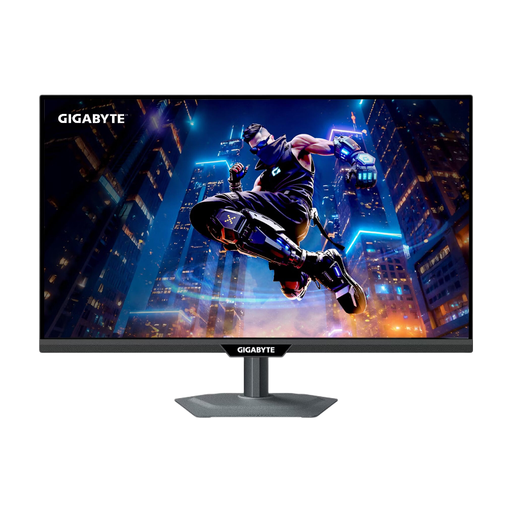
Why This Fits Their Persona: Perfect for users who both edit high-resolution content and play competitively. The unique dual-mode allows switching between crisp 4K at 160Hz for work and ultra-smooth Full HD at 320Hz for esports titles.
It resolves the classic conflict between high resolution for productivity and maximum refresh rate for gaming. Instead of buying two monitors, this model offers a flexible all-in-one solution.
The dual-mode functionality is a unique selling point. The integrated KVM switch allows you to control two devices with one mouse and keyboard, significantly streamlining workflows.
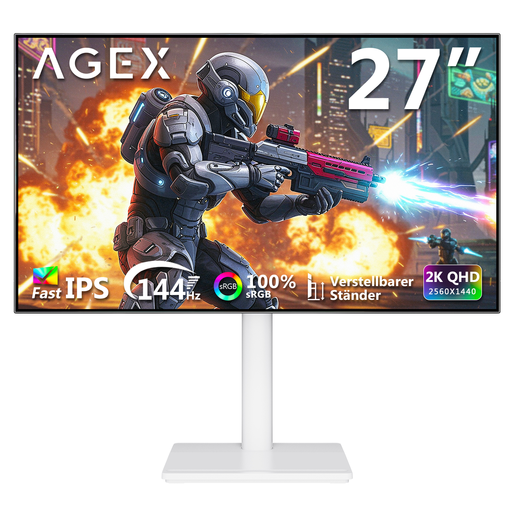
Why This Fits Their Persona: For gamers who want an aesthetically pleasing white setup but don't have the budget for a high-end OLED model. It offers a solid foundation for smooth, high-resolution gaming with its 27-inch QHD display and 144Hz refresh rate.
It offers a balanced package of design and performance without demanding the premium price for specs like 280Hz or OLED, which are not essential for entry-level or casual gamers.
An attractive price-to-performance ratio for a fully ergonomic white gaming monitor with QHD resolution and a 144Hz refresh rate. The Fast IPS panel ensures good colours and viewing angles.
We have compiled a complete, real-time updated list of products that fully meet these strict selection criteria and safety regulations.
For competitive players in genres like first-person shooters (FPS) or racing sims, an extremely low Gray-to-Gray (GtG) response time is crucial. It minimises motion blur and ghosting, resulting in a clearer image of opponents during fast movements. For slower-paced games like RPGs or strategy titles, the difference compared to a good 1ms (GtG) IPS panel is less noticeable.
Unlike conventional DisplayHDR certifications for LCDs, DisplayHDR True Black 400 guarantees pixel-level brightness control. Because OLED pixels can be turned off individually and completely, it achieves true, deep blacks. This results in dramatically higher contrast and more detailed representation in dark scenes, which is essential for an immersive HDR experience.
No, the pivot function is a mechanical feature of the stand that allows the screen to be physically rotated by 90 degrees. The screen orientation adjustment (from landscape to portrait) is handled directly within the operating system (e.g., in the display settings of Windows or macOS). No additional software from the monitor manufacturer is required.