Who could benefit from a remote shutter release?

Craft sellers taking product photos regularly

If you’re photographing several knitted gloves with a similar composition, a tripod and touch-free shutter release can help you keep your setup consistent. Canon UK notes that a tripod can help maintain the same composition and background when taking product photos.

Hobby photographers shooting by a window

If you’re photographing individual gloves in the available window light, first try using a tripod, the self-timer or a suitable app to see if they fit your workflow. This helps you decide whether you really need a separate shutter release before buying any accessories.

Photographers who regularly change their arrangement

If you often reposition your gloves, a remote can make it easier to take the photo from a little distance. However, you’ll need a compatible camera app to check the composition; a basic shutter button won’t automatically show you the image.

What should you look for when buying?

Self-timer or camera app

Best for: Taking photos from a tripod and making use of your camera’s existing features first.

Things to consider: The self-timer delays the shot; app features depend on your camera and how it’s set up.

Wired shutter release

Best for: Staying close to the tripod when your camera has a compatible connection.

Things to consider: Cable length and connection type limit where you can stand; a matching plug alone doesn’t guarantee compatibility.

Wireless remote

Best for: Keeping your distance from the tripod while rearranging your setup.

Things to consider: Check camera compatibility and pairing instructions. The range of up to 5 m quoted by Canon applies to this model.

What matters What to look for when buying Who is this particularly important to?
Camera compatibility Check the exact camera model, connection or wireless support, and the manufacturer’s compatibility list. Some models require an adapter. When choosing a shutter release, I want to be sure it works with my camera and its connection. Around 36% of consumers put compatibility first.
Touch-free shutter release Try your camera’s existing features first; if buying an accessory, check that it can actually trigger your camera. When my camera is on a tripod, I don’t want to touch the body to take a photo. Around 29% of consumers particularly value touch-free shutter release.
Image preview Before buying, decide whether a shutter button is enough or whether you want to check the composition and settings from a distance. When I rearrange the gloves, I want to check the composition easily. Around 21% of consumers prioritise this kind of image preview.
Freedom to move around Check the compatibility list, connection type and operating distance specified for the particular model. If I want to stand beside the subject rather than right by the tripod, a wireless shutter release appeals to me. Around 14% of consumers prioritise freedom to move around.

Avoiding common buying mistakes

  • Buying based only on the plug or camera brand

    A plug that fits doesn’t automatically mean the shutter release will work with your camera. Fujifilm specifically states that an additional adapter is required for certain RR-100 camera models.

    Before ordering, compare the full camera model name with the compatibility list for the specific shutter release and check for any adapter exceptions.

  • Assuming a shutter button also lets you check the image

    A remote won’t automatically display a live image or camera settings on your smartphone. These features depend on your camera and the app it supports.

    Before buying, decide whether you only need to take the photo or also want to check the composition and other settings from away from the camera.

  • Buying a wireless shutter release when your current setup is enough

    For a stationary subject on a tripod, the self-timer or a compatible app may already let you take photos without touching the camera.

    Try the whole process with your tripod and the camera features you already have before choosing a wired or wireless option.

Compatible camera brands at a glance

Canon

For compatible Canon cameras, the wired RS-80E3 or Bluetooth BR-E1 remote may be suitable, depending on the connection.

  • Canon specifies a range of 80 cm for the RS-80E3 and lists tripod and macro photography as suitable uses. For the BR-E1, Canon specifies a range of up to 5 m.
  • Check compatibility against your specific camera model; these details don’t apply to every Canon camera.

Nikon

Nikon lists the wired MC-DC3 for compatible Z cameras and the Bluetooth ML-L7 remote for compatible cameras.

  • Nikon specifies a two-stage shutter release and a lock function for the MC-DC3. The ML-L7 includes buttons for photos and videos, among other features.
  • The right remote for you depends on compatibility with your particular camera model.

Sony

The RMT-P1BT is a Bluetooth remote for compatible Sony cameras. For supported models, Imaging Edge Mobile may also be an alternative.

  • Sony states that the RMT-P1BT uses the camera’s built-in Bluetooth receiver, so no additional receiver module is needed. It also has a status indicator.
  • These details apply to this specific accessory and don’t confirm compatibility with every Sony camera.

Fujifilm

The wired RR-100 is an option for the X and GFX cameras listed by Fujifilm.

  • Fujifilm specifies an extension cable with a right-angled 2.5 mm plug.
  • Some of the cameras listed specifically also require a third-party 2.5 mm to 3.5 mm adapter.

Joybuy products for smartphone photography

The products below combine smartphone holders or tripods with a remote control. They’re described for smartphone photography and aren’t listed as compatible remote shutter releases for dedicated cameras.

Verbex K60 selfie stick with floor tripod and remote control

Verbex K60 selfie stick with floor tripod and remote control

For smartphone photography with a freestanding setup and wireless shutter release.

The description specifies iOS and Android support, a remote range of around 10 m and a smartphone holder for devices up to 6.0 inches.

View on Joybuy
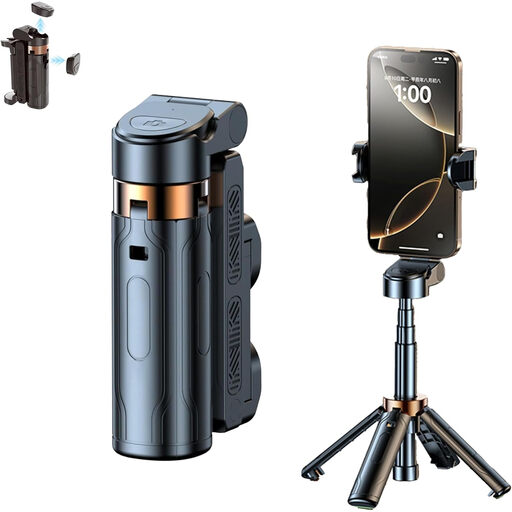
3-in-1 Bluetooth selfie stick with tripod and rotating smartphone holder

3-in-1 Bluetooth selfie stick with tripod

For taking smartphone photos from a distance and changing your shooting angle.

The product title specifies a holder that rotates 360°. The description lists a telescopic arm and a detachable Bluetooth remote for photos and videos.

Set it up on a stable surface and secure your smartphone firmly.

View on Joybuy

Magnetic smartphone grip with remote control and fill light

Magnetic smartphone grip with remote control and fill light

For smartphone photography where you need a detachable remote or a way to attach your phone to a tripod.

The title specifies a 1/4-inch tripod thread and a fill light. The description lists a detachable Bluetooth remote for taking photos from a distance.

View on Joybuy

KINSI smartphone tripod with Bluetooth remote control

KINSI smartphone tripod with Bluetooth remote control

For smartphone photography when you want a foldable tripod setup with a remote control.

The product title specifies a foldable, height-adjustable tripod. The description lists wireless control of a compatible smartphone.

View on Joybuy

Ulanzi JJ02 smartphone tripod stand with Bluetooth remote control

Ulanzi JJ02 smartphone tripod stand with Bluetooth remote control

For hands-free smartphone photography with an extendable tripod stand and wireless shutter release.

The description specifies a remote for the smartphone camera and two cold shoes. Set the stand on a stable surface and secure your smartphone firmly.

View on Joybuy

Frequently asked questions

Do I really need to buy a remote shutter release to photograph gloves?

Not necessarily. First, check your camera’s self-timer and, if your model supports it, the manufacturer’s app. A tripod helps you keep the composition consistent between shots, while a remote shutter release means you don’t have to touch the camera to take a photo.

How do I set up a wired or Bluetooth shutter release?

First, compare the full camera model name with the compatibility list for the specific shutter release. For a wired model, check the connection and whether you need an adapter; for Bluetooth, follow the pairing instructions for the camera and remote. Take a test shot before starting your photo session.

What are my rights if a shutter release bought online is faulty or I want to return it?

When you buy from a business seller in the EU, faulty goods are generally covered by a legal guarantee of at least two years from receipt; you should contact the seller. For ordinary distance purchases, you generally have 14 days from delivery to cancel. The European Union’s Your Europe website notes that exceptions and conditions may apply to return costs, so check the seller’s status and the terms of your contract.

What should I look for in a wireless remote in Germany?

Check the markings and manufacturer’s details, as well as compatibility with your camera. The German Federal Network Agency lists correct CE marking and identifiable product and manufacturer information among the aspects it checks when monitoring the market. CE marking is the manufacturer’s declaration that the product meets applicable requirements; it isn’t an independent quality mark or proof that the remote is compatible with your camera.