Tripod photographers unsure about connections
You want to photograph stitches and seams without touching the camera when you take the shot. Canon and Fujifilm list different model and connection requirements for their respective releases.


For a fixed tripod setup, a cable release that matches your camera model is often all you need. If you’re repeatedly rearranging the gloves, a compatible wireless remote or camera app may be more convenient. Before buying, check your exact camera model and its connection type, or confirm that the wireless control is explicitly supported. A remote release won’t prevent banding or colour shifts caused by flickering artificial light.
You want to photograph stitches and seams without touching the camera when you take the shot. Canon and Fujifilm list different model and connection requirements for their respective releases.
You move the gloves around between shots and want to take the picture from beside your subject, rather than going back to the camera each time. With Bluetooth remotes, the key is whether your specific camera model is supported.
You’d like to see whether a camera app or self-timer will do the job for your fixed setup. Canon describes Camera Connect for supported cameras.
A good fit if: you’re shooting from a short distance at a fixed tripod position and don’t want to set up a wireless connection. For example, Canon distinguishes between E3 and N3 connections.
Things to consider: The cable length limits how far away you can stand. Some Fujifilm cameras may also require an adapter for the RR-100.
A good fit if: you rearrange the gloves several times and want to take the picture from beside your subject. Choose only a system designed for your specific camera model.
Things to consider: Bluetooth requires a supported camera and may need to be paired. Even with a wireless radio trigger set, you may still need a separate cable to connect it to the camera.
A good fit if: you’d like to try taking photos without buying extra accessories and your camera has a suitable remote-control function.
Things to consider: An app requires a supported camera and a compatible smartphone or tablet. With the self-timer, you’ll need to factor the delay into your workflow.
| What you need | What to look for when buying | Who will find this especially important? |
|---|---|---|
| Camera compatibility | Check the full camera model and the manufacturer’s compatibility list. For cable releases, make sure the connection and any required adapter are right. | If I want to make sure the connection or wireless control works with my camera, I check the exact model name. Around 40% of consumers say compatibility is their most important buying consideration. |
| Taking pictures without touching the camera | Check whether a basic cable release will do the job at your fixed tripod position; consider the cable length if needed. | When I’m taking a photo on a tripod, I want to take the shot without knocking the camera. Around 33% of consumers prioritise taking pictures without touching the camera. |
| Freedom to move around | Check that Bluetooth is supported by your specific model, or that the radio receiver has a suitable camera cable. | If I’m rearranging the gloves several times, I want to take the picture from beside my subject instead of going back to the tripod. Around 17% of consumers put freedom of movement first. |
| Avoiding extra accessories | Before ordering, check whether your camera supports an app and has a self-timer. | For my fixed setup, I want to make use of the camera features I already have before buying accessories. Around 10% of consumers prioritise avoiding an extra release. |
Connections and supported remote controls can vary even within the same brand. Fujifilm also specifies a suitable adapter for certain combinations with the RR-100.
Before ordering, check the full camera model name, the manufacturer’s compatibility list, the connection type and whether you need an adapter.
According to Rollei, the Wireless Remote Release 28146 requires a cable that matches your camera. By contrast, the Sony RMT-P1BT uses the built-in Bluetooth receiver with supported cameras.
For the specific model, check how the receiver connects to the camera and whether a cable is included or needs to be bought separately.
A remote release means you don’t have to touch the camera, but it won’t eliminate banding or colour shifts caused by flickering artificial light.
Tackle camera shake and lighting artefacts separately: use a tripod and a hands-free release for your shooting setup. If you see banding, check the light source and any available anti-flicker features.
Cable releases with E3 or N3 connections, plus Camera Connect for supported cameras.
The MC-DC2 is a cable option for certain cameras, while the ML-L7 is a Bluetooth remote for supported models.
The RMT-P1BT is a Bluetooth remote for Sony cameras explicitly listed as compatible.
The RR-100 is a cable release for the X and GFX models listed on Fujifilm’s accessories page.
The Wireless Remote Release 28146 is an option for a more flexible shooting setup.
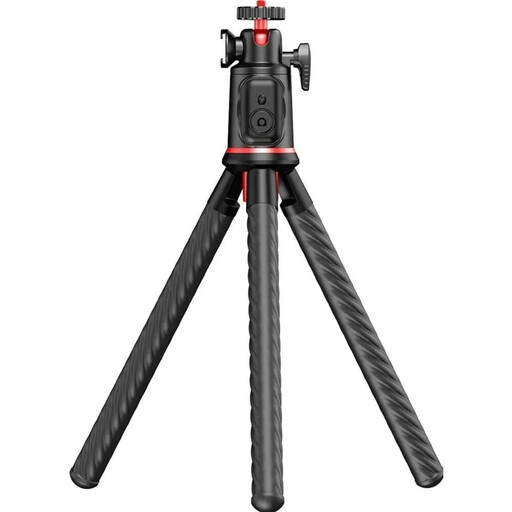
This selection is intended for a smartphone setup on a table with remote control; it does not confirm compatibility with a camera body.
 No image available
For a fixed smartphone setup when you want to take pictures from a distance. The product name specifies a flexible mini tripod, a 360° ball head and a Bluetooth remote. Check that your smartphone’s weight is within the stated load capacity, and set up the tripod securely.
No. A remote release means you don’t have to touch the camera when taking a picture, but it won’t fix lighting artefacts. Canon warns that artificial light, such as fluorescent lamps, can cause banding or colour shifts; compatible EOS cameras may offer anti-flicker features to help.
First, check whether your specific camera model supports Sony’s Bluetooth remote control. Sony’s instructions then explain how to enable Bluetooth and Bluetooth remote control in the camera menu, and how to pair the devices. The instructions apply to the products specified by Sony.
It depends on the system. According to Rollei, the Wireless Remote Release 28146 requires a cable that matches your camera. By contrast, the Sony RMT-P1BT uses the built-in Bluetooth receiver with compatible cameras.
For a consumer purchase made by distance selling, you generally have a right to cancel under section 312g of the German Civil Code (BGB), subject to statutory exceptions. The Verbraucherzentrale says that, for goods ordered online, you generally have 14 days from receipt to give notice of cancellation. Check the retailer’s returns information before ordering.
For market surveillance of radio equipment, the Bundesnetzagentur lists criteria including CE marking, product and manufacturer identification, German-language instructions and a declaration of conformity. Check the details for the specific product; this does not amount to a general statement about the conformity of any particular model.