
Lieferung heute & morgen

Qualitätsgarantie

Willkommens-Angebote freischalten: KOSTENLOSE Lieferung | Bis zu 80 % RABATT | Kostenlose 30-Tage-JoyPlus-Testphase
App herunterladen
A dynamic TV backlight can fundamentally transform your viewing experience. Instead of a static wall colour, it extends the picture beyond the screen's edge, creating an immersive home cinema atmosphere. This effect is especially pronounced on large televisions of 75 inches or more. However, the market for retrofit solutions is crowded, and not every product lives up to its promises.
Many users look for a flexible way to retrofit an Ambilight-style system, but often encounter common problems: inaccurate colour reproduction, complicated installations, or poor compatibility. This guide highlights which technical features truly matter and how you can make an informed decision for your Govee 75-inch TV backlight or larger without falling for marketing hype.
Before you invest, you should be aware of three common flaws that often only become apparent after purchase, spoiling the enjoyment of the product.
To avoid the issues mentioned above, you should check two or three core technical features before buying. These largely determine the quality and longevity of your setup.
The method by which the lighting captures the screen's colours is fundamental.
For most users seeking a universal solution, a camera-based system is the more flexible choice.
The type of LEDs used has a direct impact on the quality of the lighting effects.
Pay close attention to the manufacturer's recommended TV size. A lighting kit for 55-65 inch TVs will be inadequate on a 75-inch screen, as the light distribution will be incorrect and the corners will remain dark. Models like the Govee H6099 are specifically designed for the dimensions of TVs in the 75-85 inch class to ensure complete and uniform illumination.
Here are some product recommendations tailored to different user profiles and their requirements.
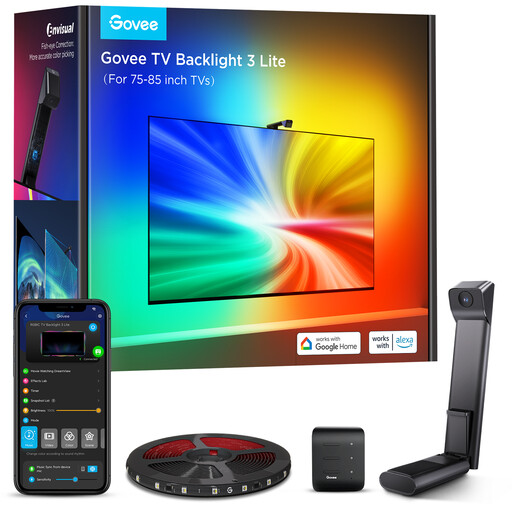
Why This Fits Their Persona: This model is specifically designed for owners of large TVs who want immersive and screen-accurate ambient lighting. It is the ideal solution for upgrading the home cinema experience without compromise.
The improved fisheye camera captures colours more accurately, avoiding imprecise synchronisation. The special gravity-based mounting bracket is optimised for ultra-thin TVs, solving the problem of cumbersome installation.
RGBICW technology for segmented, multi-colour effects. The Govee DreamView feature allows synchronisation with other Govee lights in the room. Full control via app, Alexa, and Google Assistant.
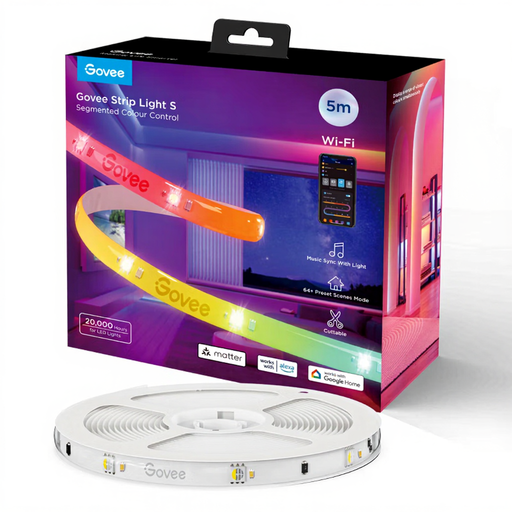
Why This Fits Their Persona: Ideal for users who want to explore the world of smart lighting without immediately investing in a camera system. Perfect for creating atmospheric accents in a room, behind a desk, or along furniture.
This product avoids the pitfall of inaccurate screen synchronisation because it is not designed for it. Instead, it focuses on reliable app control, music sync, and broad smart home compatibility thanks to Matter support.
Offers advanced RGBIC technology for dynamic, multi-colour scenes. Support for the Matter standard ensures future-proof integration into various smart home ecosystems (Apple Home, Google Home, Alexa).
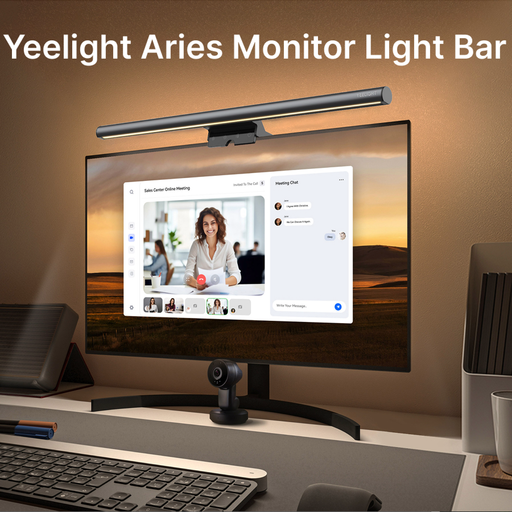
Why This Fits Their Persona: This lamp is not a TV backlight but a specialised solution for the desk. It is perfect for gamers and home office users who want to reduce glare on their monitor and protect their eyes during long sessions.
It solves a specific problem—glare and eye strain at the workstation—instead of being an inadequate all-in-one solution. The simple mounting on the monitor avoids any compatibility issues with TV sizes.
The asymmetrical light beam illuminates the desk without reflecting off the screen. Brightness and colour temperature are adjustable to adapt the lighting to the time of day and the task at hand.
We have compiled a complete, real-time list of products that fully satisfy these strict selection criteria and UK safety regulations.
The accuracy depends on the correct positioning and calibration of the camera via the Govee Home App. Models with a fisheye camera, like the H6099, are designed to capture a wide area of the screen for better colour matching. Ambient light in the room can affect detection, so calibration is recommended under the typical lighting conditions in which you watch TV.
Yes, this is one of the main advantages of camera-based systems. Since the camera reads the content directly from the screen, the lighting is compatible with any source being displayed. This includes streaming services like Netflix, Disney+, or YouTube running directly on the smart TV, as well as regular television programming or connected game consoles.
No, cutting the LED strips is not recommended. The systems are designed as a complete kit for specific screen sizes (e.g., 75-85 inches). The strips are connected in a specific length and sequence to allow the software to correctly map colours to the corresponding screen areas. Cutting the strip would interrupt the circuit and impair the product's functionality. It is therefore crucial to choose the correct size for your TV from the outset.