If you often move between workspaces, a laptop that’s easy to carry is an obvious choice. But if you spend long periods reviewing application text, guidance and spreadsheets side by side, give greater weight to a larger screen or a suitable external monitor. Check the keyboard, the ports you need and whether your team’s software is compatible with the specific model. If you’re working with sensitive documents, you’ll also need to follow your organisation’s requirements. A manufacturer’s battery-life claim doesn’t tell you how long a device will last with your actual usage.
Who is this guide for?
Applicants who write a lot
If you’re writing lengthy application documents and comparing guidance, budget spreadsheets and supporting evidence, focus on a clear, easy-to-read display and a comfortable setup for writing. The Federal Institute for Occupational Safety and Health (BAuA) also looks at how workspaces can be set up for extended periods of work.
People who move between coworking spaces
If you often carry your laptop between workspaces, consider the weight of the accessories you need and whether monitors, adapters or network access are available on site. The BAuA notes that the total weight of work equipment becomes more important when you frequently change location.
Teams handling sensitive documents
If application documents contain confidential or personal information, check your organisation’s rules on access, storage and communication. The Federal Office for Information Security (BSI) and the Federal Commissioner for Data Protection and Freedom of Information (BfDI) outline protective measures based on the specific risks and processes involved.
What should you consider when buying?
For people working in different locations, the Federal Institute for Occupational Safety and Health (BAuA) says the total weight of work equipment is also a factor. So decide whether you’ll mainly write while on the move or review several documents side by side at a workspace you use for longer periods.
Compact Windows laptop
A good fit if: you move between workspaces and use Windows programmes or an existing Windows setup.
The trade-off: A 14-inch screen gives you less room to view documents side by side than a larger display. Check the keyboard, ports and service cover for the specific configuration too.
Larger laptop or external monitor
A good fit if: you usually work in one place and want to keep application text, guidance and spreadsheets in view at the same time.
The trade-off: A larger device is less convenient if you move around frequently. If you use an external monitor, check that one is available and that your laptop has the right ports.
Compact MacBook Air
A good fit if: your templates, team software and organisation’s requirements are compatible with macOS, and you prefer a compact device.
The trade-off: Apple lists Thunderbolt 4/USB-C ports for the 13-inch M5 model, but no built-in HDMI or USB-A ports. You may need adapters for existing equipment. The stated web-browsing time isn’t a battery-life measurement for writing applications and taking part in video calls.
| Priority |
What to check when buying |
Who is it most important to? |
| Writing and reviewing documents |
Keyboard layout and typing feel, screen size and finish, and whether you can connect a compatible external monitor at your workspace. |
If I’m reviewing longer application documents alongside guidance and budget spreadsheets, I need a clear, easy-to-read display and a suitable keyboard. Around 33% of consumers put writing and comparing documents first. |
| Portability and changing workspaces |
The weight of the specific device and the accessories you need, charging requirements, and ports for the equipment you already have. The BAuA highlights total weight when you frequently change location. |
If I often move between workspaces, I look for a device that’s easy to carry and check whether power and the ports I need are available on site. Around 25% of consumers give the greatest weight to moving between locations. |
| Protecting sensitive documents |
Your organisation’s rules on storage and communication, as well as its access controls and protective measures. One device feature alone cannot replace a security plan. |
If my documents contain personal or confidential information, I first check which storage and communication methods my organisation allows. Around 25% of consumers put protecting sensitive documents first. |
| Team collaboration and meetings |
Camera, microphone, whether you need a headset, network access and how the team software you actually use appears on screen. |
If I’m working on an application with others or holding meetings, I want to see the documents clearly and check that the camera, microphone and network access suit the way I work. Around 17% of consumers prioritise team collaboration and meetings. |
Buying and usage pitfalls
-
Assuming the manufacturer’s battery-life claim means a full working day
Apple says the 13-inch MacBook Air with M5 offers up to 15 hours of wireless web browsing. That manufacturer claim relates to browsing, not a measured battery life while working on applications and taking part in video calls.
Compare battery-life claims only when they’re based on the same test conditions, and check your charging needs and what’s included with the specific configuration.
-
Planning for the laptop, but not the whole workspace
Different coworking spaces won’t necessarily have the same equipment. The BAuA includes coworking spaces among possible places for extended work, but you’ll need to check on site which monitors, ports and network connections are actually available.
Check what equipment you can usually expect to find and whether it’s compatible with the ports on your chosen device.
-
Assuming biometric sign-in means complete data protection
When you’re handling personal data, the right protective measures depend on the specific risks and processes involved. A single laptop feature doesn’t determine which data can be processed outside your organisation.
If you’re working with sensitive documents, check your organisation’s rules on storage, access and communication. The BfDI and BSI cover risk-appropriate measures and secure processes for mobile working.
Key brands at a glance
Lenovo
Lenovo describes the ThinkPad E14 Gen 6 as a mobile business configuration. The features below apply to model 21M3002BGE.
- For 21M3002BGE, Lenovo lists a matte 14-inch display, a German keyboard, 16 GB RAM and a 512-GB SSD.
- The listed service cover is for one year. Check what it includes before buying. These details don’t necessarily apply to other ThinkPad configurations.
Apple
The 13-inch MacBook Air with M5 is a compact macOS option, provided your templates, team software and organisation’s requirements are compatible.
- For the base configuration, Apple lists 16 GB of memory, a 512-GB SSD and up to 15 hours of wireless web browsing.
- The battery-life claim is for wireless web browsing, not a measurement for writing applications and taking part in video calls. Apple doesn’t list built-in HDMI or USB-A ports.
HP
The HP details here apply to the specific ProBook 4 G1a 14 CB4M5EA#ABD configuration, not to other ProBook models generally.
- For this version, HP lists a 14-inch WUXGA display, 16 GB RAM, a 1-TB SSD, a camera privacy shutter and a power adapter in the box.
- Check the exact model number and what’s included before assuming these features apply to another HP configuration.
Dell
According to Dell, the Pro 14 PC14250 configuration described here is designed for everyday business use.
- For this configuration, Dell lists Windows 11 Pro, 16 GB RAM and a 512-GB SSD.
- Dell says a power adapter isn’t included. When ordering, check the exact configuration and whether you’ll need a compatible power supply.
Joybuy products for extended writing
This selection includes larger laptops for extended writing and reviewing multiple documents side by side, as well as more compact devices for moving between workspaces.
 Image unavailable
HP ProBook 4 16 G1i, Core Ultra 7 255U, 32 GB RAM, 1 TB SSD
The 16-inch format is worth considering if you mainly review application text and spreadsheets side by side in one place, and only need to carry the larger device occasionally.
16-inch, IPS display with 1920 × 1200 pixels, Windows 11 Pro, 32 GB RAM and 1 TB SSD NVMe.
View at Joybuy
 Image unavailable
HP ZBook X G1i 16, Core Ultra 7 255H, 32 GB RAM, 1 TB SSD
The 16-inch format may suit extended writing and spreadsheet work in one place. If you change locations frequently, bear in mind the listed weight of 2.04 kg too.
16-inch, WUXGA display in 16:10 format, 32 GB RAM and 1 TB SSD.
View at Joybuy
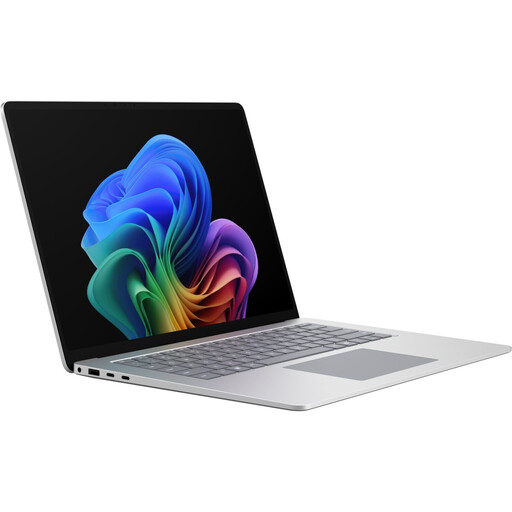 Image unavailable
Microsoft Surface Laptop 8 for Business, 15-inch, Core Ultra X7, 16 GB RAM, 512 GB SSD
The 15-inch format is an option if you want more screen space built into your laptop for working with documents, and Windows 11 Professional is compatible with your software. The listed weight is 1.67 kg, which is worth bearing in mind if you’ll be carrying it frequently.
15-inch, Core Ultra X7, 16 GB RAM, 512 GB SSD and Windows 11 Professional.
View at Joybuy
 Image unavailable
HP OmniBook Ultra 14-kd0072ngx, 3K, Core Ultra 7 356H, 16 GB RAM, 1 TB SSD
The 14-inch format is worth considering if you’re looking for a more compact device to move between workspaces. Its listed weight is 1.27 kg.
14-inch, 3K display, Core Ultra 7 356H, 16 GB RAM, 1 TB SSD and Windows 11 Home.
View at Joybuy
 Image unavailable
HP ZBook 8 G1i 14, Ultra 9 285H, 64 GB RAM, 1 TB SSD
The 14-inch format may suit frequent travel between workspaces. Factor in the listed weight of 1.43 kg and the included 140-W power adapter when packing your kit.
14-inch, Windows 11 Professional, 64 GB RAM and 1 TB SSD.
View at Joybuy
Frequently asked questions
Is a 14-inch laptop big enough for extended work on a grant application?
A 14-inch device may suit you if you mainly work through documents one at a time. If you want to keep text, guidance and spreadsheets in view side by side, consider a larger display or a compatible external monitor. The BAuA recommends considering the task and the workspace together.
What should I check at a coworking space before I start work?
Check whether network access and power are available, and whether any monitor or adapter you need is actually there and compatible with your device. For longer periods of work, also consider whether you can set up the workspace to suit your task.
Can I work on personal application data in a coworking space?
The location alone doesn’t determine this. When personal data is being processed, those responsible must put suitable technical and organisational measures in place based on the specific risks. You should also check your organisation’s rules on storage, access and communication. The BfDI and BSI cover these requirements for data protection and mobile working.
Are a guarantee and statutory consumer rights the same thing?
No. The Verbraucherzentrale distinguishes between statutory consumer rights and a voluntary guarantee with its own terms and conditions. Which consumer rights apply in a particular case depends, among other things, on who buys the laptop.


