For a script whose sections are frequently rearranged, easily accessible navigation keys and suitable software shortcuts matter more than a specialist keyboard label. Writing software provides outlining views and page or panel numbering, as Literature & Latte and Superscript explain. For long writing sessions, the keyboard’s shape and feel should also suit your workspace; then check the German layout, operating system, connection and requirements for programmable keys.
Who should think carefully about their keyboard choice?
Scriptwriters who rely on outlining
If you often rearrange sections, pages or panels, check how easily you can access your writing software’s commands from the keyboard. For example, Literature & Latte describes a Scrivener command for its outlining view, while Superscript mentions automatic page and panel numbering.
Frequent writers at a fixed desk
For long stretches of dialogue and description, the keyboard’s shape and feel should suit your workspace and preferences. Logitech describes the ERGO K860 as having a split design; F.A.Z. Kaufkompass included this model in a test of ergonomic keyboards.
Writers who switch between devices
If you continue working on your script across several devices, the connection and operating system layout need to work with each one. Logitech lists Bluetooth and a USB receiver for the ERGO K860; also check that the software features you need are available on your systems.
What should you look for when buying?
Start by checking your writing software’s commands and how you access them from the keyboard. Then choose a shape and feel that suit your workspace, and finally check the layout, connection and operating system requirements for any extra features.
| What matters |
What to look for when buying |
Who it matters most to |
| Rearranging sections |
Check your writing software’s shortcuts and how easily you can reach the navigation and function keys you need. |
If I often switch between text and the outline, I want to access the relevant software commands directly. Around 36 % of consumers put outlining first. |
| Long writing sessions |
Try the keyboard’s shape and feel at your own workspace if possible; make sure you have room for both the keyboard and mouse. |
For long stretches of dialogue and description, I want a shape and feel that suit my workspace. Around 29 % of consumers prioritise typing comfort. |
| Layout and noise |
Check that the product is listed as a DE or QWERTZ variant. For mechanical models, check the specific switch type. |
If I write in German or work in a shared room, familiar keys and the sound they make matter to me. Around 21 % of consumers focus primarily on layout and noise. |
| Switching between devices |
Check Bluetooth or receiver support, as well as the operating system requirements for any extra features you want. |
If I edit the same script on several devices, I need a suitable connection and key layout for each one. Around 14 % of consumers put switching between devices first. |
Common pitfalls
-
Confusing macro keys with automatic outlining
Outlining views and automatic page and panel numbering are features of writing software. Custom key mappings may also require software and setup.
First, try the outlining workflow in your application. Set up custom mappings only for commands you use regularly and that your keyboard software supports.
Setting up and testing custom mappings takes time and does not replace an outlining feature in your writing software.
-
Assuming “ergonomic” means you won’t experience discomfort
A split design needs to suit your hands and workspace. Manufacturers’ claims about physical benefits do not guarantee the same results for everyone.
Check that the shape and positioning work for the way you use the keyboard, and treat claims about its effects as manufacturer claims rather than guaranteed results.
-
Overlooking the layout, switches and software requirements
Different product variants may have different language layouts or switches; configuration software may only work with a particular operating system.
Before buying, check the DE variant you’ve selected, the switch type, the connection and the operating system requirements for any software features you need.
Choosing the wrong variant could mean extra setup or having to exchange it.
Key brands at a glance
Logitech
For this selection, the split ERGO K860 and the slim, programmable MX Keys S offer different approaches for writers.
- Logitech lists Bluetooth or an included USB receiver for the ERGO K860. According to the manufacturer, the MX Keys S can be configured with Smart Actions through Options+.
- F.A.Z. Kaufkompass notes that the ERGO K860 has no wired mode or key backlighting. Logitech says Options+ is required for Smart Actions on the MX Keys S.
CHERRY
The KC 6000 SLIM is an option for writers looking for a slim, full-size wired keyboard.
- CHERRY lists scissor switches, USB-A, a DE product variant and six extra keys for the KC 6000 SLIM.
- Check that a full-size keyboard and a wired USB-A connection suit your workspace.
Perixx
The PERIBOARD-335 is worth considering if you want a split design with a choice of mechanical switches.
- Perixx offers a German QWERTZ option and several switch types.
- According to Perixx, its downloadable configuration software is only available for Windows. The manufacturer also describes on-the-fly macros for other operating systems.
Keychron
The German ISO collection includes models in different sizes, with a range of configuration options.
- The Keychron collection features ISO-DE models, as well as products with QMK/VIA for custom key mappings.
- The size and configuration options vary by model, so check the details for the specific variant you’re considering.
Joybuy keyboards for writing
The Joybuy products below are aimed at writers who want to consider a German layout, extended typing sessions or working across several devices. The features listed for each model are shown in its product description.
 No image available
Logitech 920-012404 Ergonomic Wave, German QWERTZ
An option if you want to work across several Apple devices with a German layout.
Bluetooth; German QWERTZ layout; optimised for macOS. The product description lists a memory foam palm rest and quiet membrane keys.
View at Joybuy
 No image available
Logitech ERGO K860, QWERTZ
An option if you’re considering a split key layout and a palm rest.
Bluetooth and USB receiver; QWERTZ layout. The product description lists concave keys, a palm rest and adjustable feet.
View at Joybuy
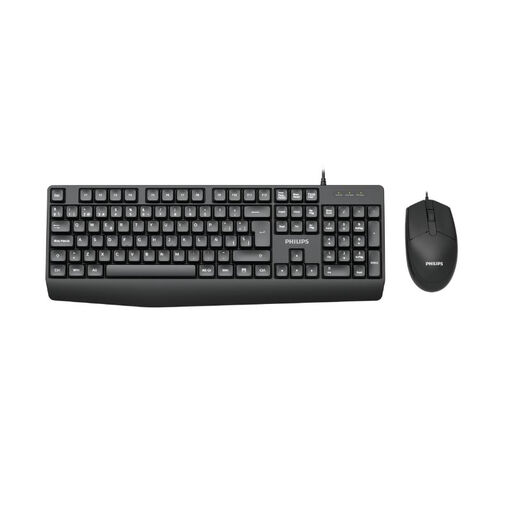 No image available
Philips 2000 Series SPT6237B/26 keyboard and mouse set
An option if you’re looking for a full-size keyboard with a mouse included.
German version; USB plug and play. The product description lists low-profile keys described as quiet.
View at Joybuy
 No image available
Logitech MX Mechanical, Tactile Quiet, German QWERTZ
An option if you’re considering mechanical keys and switching between several devices.
German QWERTZ layout; Bluetooth and Logi Bolt receiver. The product description lists Tactile Quiet switches, smart backlighting and switching between up to three devices.
View at Joybuy
 No image available
ARZOPA 80% keyboard, German layout
An option if you want to consider a mechanical keyboard with hot-swappable switches and several connection options.
The product title lists an 80% layout and a German layout. The product description lists wired and wireless connections, Bluetooth, hot-swappable switches, PBT keycaps and a gasket-mount design.
View at Joybuy
Frequently asked questions
Do I need a special comic keyboard for outlining pages and panels?
No. Outlining and numbering features are provided by the writing software you use. Superscript lists automatic page and panel numbering, while Literature & Latte documents Scrivener shortcuts for the outlining view. Choose a keyboard based on how easily you can use the commands you need.
How do I set up a keyboard for working with sections?
First, check the shortcuts for the specific application you use. Literature & Latte documents Scrivener commands for creating documents and switching to the outlining view; the key combinations differ between macOS and Windows. Custom mappings only work if your keyboard software and operating system support them.
What should I maintain or replace on a wireless keyboard?
Check the power supply for your specific model. Logitech says the ERGO K860 comes with AAA batteries; its stated battery life of up to two years depends explicitly on usage and environment.
What are my rights if the keyboard doesn’t suit me or is faulty after an online purchase?
When you buy online as a consumer from a trader, you generally have 14 days from delivery to cancel your purchase; exceptions and possible return costs apply. Your Europe, the European Union’s consumer portal, also states that new faulty goods are covered by a minimum legal guarantee of two years. Retailer guarantees are separate from this.


