Which approach suits you?

Writers who work with two text panes

If you want to see scenes, panel notes or references at the same time, check that both areas are easy to read at your usual font size. Scrivener supports a horizontally or vertically split editor, as described by Literature & Latte; Microsoft Support also explains how to snap windows into place.

Writers with an established software setup

If your projects rely on a particular writing programme, its operating system requirements and how it handles your project files matter more than choosing a brand by default. Literature & Latte lists different requirements for Scrivener on Windows and macOS.

Writers on the move

If you carry your laptop around often, weigh screen space against portability, connectivity and battery life in your own conditions. Apple quotes battery life of up to 18 hours for certain MacBook Air configurations. That’s a manufacturer’s figure, not a prediction of how long it will last during your writing sessions.

What should you look for when buying?

Windows laptop with a larger display

A good fit if: you often work with two texts or windows side by side directly on your laptop.

Consider: A large display doesn’t guarantee that both panes will be comfortable to read at your preferred font size. Check the exact device configuration too.

MacBook for a macOS workflow

A good fit if: your preferred programmes and projects run on macOS and you want a 15-inch format.

Consider: Check the software version and layout you want. The manufacturer’s battery life figures won’t necessarily reflect how long it lasts while you’re writing.

A writing setup you configure yourself

A good fit if: you already have a suitable operating system licence or external monitor and want to choose the rest of the setup yourself.

Consider: The Lenovo IdeaPad Slim 5 82XG003MGE doesn’t include an operating system, so you’ll need to plan for installation and a supported system.

Priority What to check before buying Who is it most relevant to?
Readability in a split workspace Open your script and notes side by side in your application, using your preferred font size and display scaling. If I want to read two text areas without constantly switching windows, I’ll test the layout on the actual display. Around 36 % of consumers prioritise two readable columns.
Software and project compatibility Check the requirements for your preferred software version and how it handles your project files. If my writing software and existing projects determine how I work, I’ll check compatibility before choosing a device. Around 29 % of consumers put software and projects first.
Writing on the move Compare the device’s size and weight, the charging accessories you’ll need, its ports and battery life tests for the exact model. If I often write in different places, the laptop needs to suit my day-to-day travel. Around 21 % of consumers prioritise portability.
Total cost of your writing setup Check the operating system and keyboard layout for the exact model, and factor in any licences and monitors you already have. If I’m putting together a ready-to-use writing setup, the features I need matter more than an eye-catching performance figure. Around 14 % of consumers focus first on the total cost.

Avoiding common buying mistakes

  • Assuming a particular screen size will make split editing comfortable

    Editor toolbars, display scaling and font size all affect how much room is left for your text.

    Before you buy, open a typical script page alongside your notes in your preferred application and check that everything is easy to read.

    If the layout doesn’t work at your preferred font size, you may need an additional screen.

  • Assuming a laptop without an operating system is ready to use

    The Lenovo 82XG003MGE variant is sold without an operating system, and Scrivener requires a supported system.

    Before buying, check whether you already have a suitable licence and how you’ll install the operating system.

    As well as the device, allow time for installation and setup.

  • Automatically choosing a dedicated graphics card for scriptwriting alone

    There’s no evidence that the text work described here requires a dedicated graphics card; illustration or rendering would be a different requirement.

    First decide which programmes and tasks you’ll actually use, then compare the features that matter for them.

Brands to consider

Dell

The Dell 16 configuration DC16250 is one example of a Windows laptop with a 16-inch display.

  • For the selected configuration, Dell lists Windows 11 Home, 16 GB RAM, a 512 GB SSD and a resolution of 1920 × 1200.
  • Dell notes that other configurations may have different specifications.

Apple

The MacBook Air 15 with M5 could suit writers whose apps and projects work with macOS.

  • Apple lists 15-inch configurations and quotes battery life of up to 18 hours for the MacBook Air.
  • That battery life figure is from the manufacturer, not a writing test. Check the software, specification and exact configuration too.

Lenovo

The IdeaPad Slim 5 82XG003MGE is a specific 16-inch configuration for a writing setup you can customise.

  • This variant is listed with a matte 16-inch WUXGA display and a backlit German keyboard.
  • This variant is sold without an operating system; its specification won’t necessarily apply to every model in the range.

HP

The ProBook and OmniBook 16 ranges include various Windows configurations, so the exact model matters.

  • For the ProBook 4 G1i AD2N7ET#ABD, HP lists Windows 11 Pro, 16 GB RAM and a 16-inch WUXGA display, among other features.
  • These details apply to the configuration listed, not every HP laptop.

Acer

The Aspire 16 NX.KTJEG.006 is one example of a 16-inch Windows laptop with a matte screen.

  • For this variant, Acer lists 16 GB RAM, a 512 GB SSD, a resolution of 1920 × 1200 and a dedicated RTX 2050.
  • There’s no evidence that a dedicated graphics card is beneficial for scriptwriting alone.

Laptops to consider on Joybuy

The laptops below include 16-inch Windows models, as well as a MacBook for a compatible macOS writing workflow.

Lenovo ThinkBook 16 Gen 9 with 16-inch display

Lenovo ThinkBook 16 Gen 9, Core Ultra 5 325, 32 GB RAM, 512 GB SSD, Windows 11 Pro

A Windows configuration with a 16-inch display for writers who want to arrange their text on the built-in screen.

16-inch IPS display with a resolution of 1920 × 1200, 32 GB RAM and a 512 GB SSD.

Windows 11 Pro is pre-installed.

View on Joybuy

HP ProBook 4 G1a 16-inch laptop with anti-glare display

HP ProBook 4 G1a 16, Ryzen 5 230, 16 GB RAM, 512 GB SSD, Windows 11 Pro

A Windows option for writers who want to work with two text areas on a large, anti-glare display.

16-inch IPS display with a resolution of 1920 × 1200, 16 GB RAM and a 512 GB SSD.

The product description lists a German keyboard with backlighting.

View on Joybuy
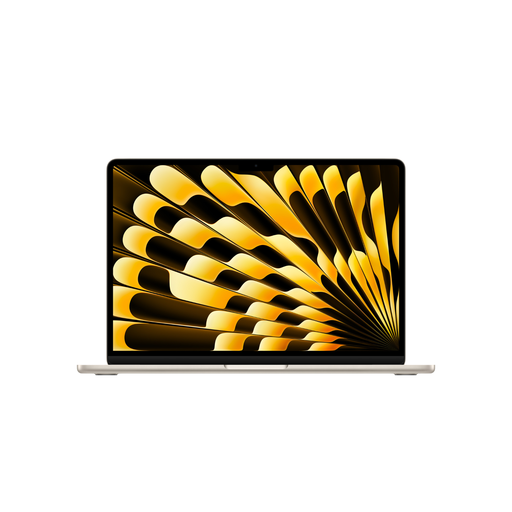
Apple MacBook Air 15-inch with M5, 16 GB and 512 GB SSD

Apple MacBook Air 15-inch with M5, 16 GB, 512 GB SSD, Starlight, German QWERTZ keyboard

A macOS option if your writing software and projects are compatible with Apple’s operating system.

15.3-inch display, 16 GB RAM and a 512 GB SSD.

The product description says that a power adapter isn’t included, so check whether you already have a compatible one.

View on Joybuy

Lenovo IdeaPad Slim 5 16IPH11 with 16-inch OLED display

Lenovo IdeaPad Slim 5 16IPH11, Core Ultra 5 322, 16 GB RAM, 1 TB SSD, Windows 11

A Windows laptop with a 16-inch display for writers who want to arrange their script and notes on the built-in screen.

OLED display with a resolution of 1920 × 1200, 16 GB RAM and a 1 TB SSD.

The product description lists a backlit German keyboard.

View on Joybuy

HP ENVY x360 16-ac0473ng with touchscreen

HP ENVY x360 16-ac0473ng, Core Ultra 7 155U, 16 GB RAM, 512 GB SSD, Windows 11

A Windows 2-in-1 for writers who want to use it as a laptop and in the tablet mode described.

16-inch IPS touchscreen with a resolution of 1920 × 1200, 16 GB RAM and a 512 GB SSD.

The product description lists a German QWERTZ keyboard and a 360-degree hinge.

View on Joybuy

Frequently asked questions

Do I need a special laptop to view two parts of a script side by side?

No. What matters is the software you want to use and a layout that’s easy for you to read. Literature & Latte describes Scrivener’s horizontally or vertically split editor, while Microsoft Support explains how to snap windows into place. Try the font size and window layout you plan to use.

Can I install Scrivener straight away on any laptop?

No, it depends on the operating system and the exact configuration. For Scrivener 3 on Windows, Literature & Latte lists 64-bit Windows 10 or later; the macOS version requires macOS 11 or later. The Lenovo IdeaPad Slim 5 82XG003MGE is sold without an operating system.

How can I back up a long script project?

According to Literature & Latte, Scrivener automatically saves backups to a folder on your computer by default. Check where they’re stored and keep an additional copy of important projects somewhere else, as a local backup alone won’t protect you if you lose your device.

What rights do I have when buying a laptop online from a business seller?

The European Union’s consumer information states that distance purchases generally come with a 14-day withdrawal period from delivery, as well as a minimum two-year legal guarantee from the date you receive the goods. A legal guarantee is not the same as an additional manufacturer’s warranty. These consumer rules don’t apply in the same way to private sales.