
Lieferung heute & morgen

Qualitätsgarantie

Willkommens-Angebote freischalten: KOSTENLOSE Lieferung | Bis zu 80 % RABATT | Kostenlose 30-Tage-JoyPlus-Testphase
App herunterladen
If you want to buy a graphics card, you should look beyond the model number or attention-grabbing terms such as “Gaming”, “OC” and “8K”. What matters is whether the GPU, graphics memory, power supply and case are actually suitable for your system. An expensive card may be unusable in a small case, while a budget model can quickly run out of memory when gaming in 4K.
The term “8K support” initially describes only the possible signal resolution. It does not indicate the frame rate at which modern games will run at that resolution. Different criteria apply to 1440p gaming than to a graphics card for 4K gaming. These include GPU performance, memory bandwidth, VRAM capacity and the graphics settings used.
8 GB of graphics memory may be sufficient for many games in Full HD and 1440p. However, more memory can be useful for high-resolution textures, ray tracing, video editing or extensive 4K projects. An RTX 5070 Ti with 16 GB GDDR7 should therefore be assessed differently from an RTX 5060 Ti with 8 GB GDDR7. Memory capacity alone cannot replace a powerful GPU.
Three fans, a large heatsink and a wide backplate can make a card considerably longer and block several expansion slots. Before buying, you should therefore compare the length, height and slot width with the specifications of your PC case. Power supply capacity and connections are equally important: depending on the model, you may need an 8-pin PCIe connector or a 12V-2x6 connection, for example.
When choosing a gaming graphics card, you should first decide on your preferred resolution:
An AMD graphics card may appeal to users who rely on Radeon technologies. Selected NVIDIA graphics cards offer features including DLSS 4, G-Sync and Studio support. Whether these features provide an advantage depends on the games and software you use.
Pay attention to these three related specifications:
For a graphics card for content creation, you should also check the connections, software support and compatibility with the editing or 3D software you use.
An SFF graphics card is not automatically suitable for every small-form-factor case. Check the following:
The Palit RTX 5070 Infinity 3, for example, is 291.9 mm long, 2 slots wide and designated as NVIDIA SFF-Ready. By contrast, the GIGABYTE RTX 5080 AORUS Master Ice measures 360 × 150 × 75 mm and, according to the product specifications, requires an 850 W power supply. For an RTX 5090, 1000 W is recommended for the Palit model mentioned. These figures should be used as a specific basis for planning your system.
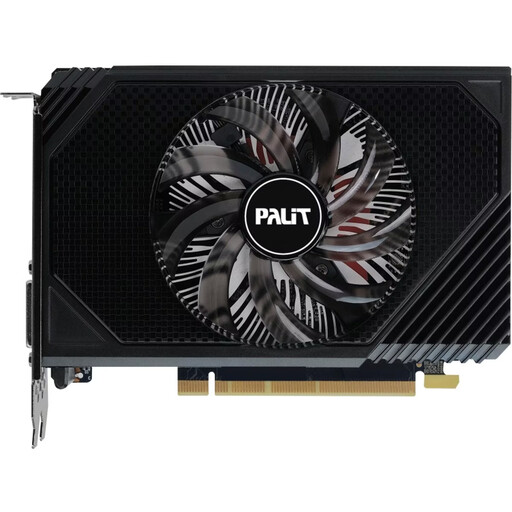
Why this product suits the profile: This compact card is 16.2 cm long and has a stated power consumption of 70 W, with a recommended 300 W power supply. This makes it easier to integrate into existing desktop systems.
The dimensions, power consumption and connections are clearly specified. This allows you to check before buying whether the case and power supply are suitable.
6 GB GDDR6, one fan, PCIe 4.0 and support for up to three monitors.
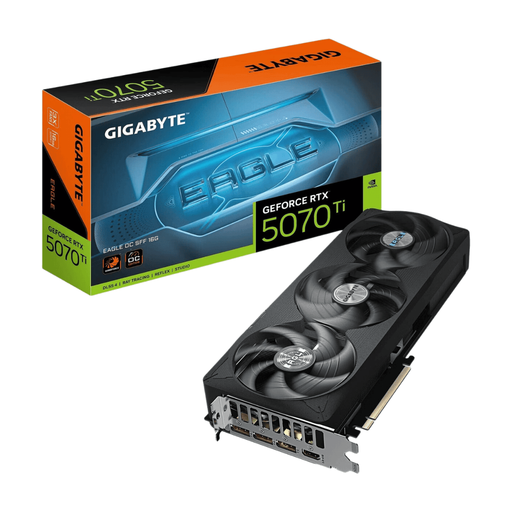
Why this product suits the profile: 16 GB GDDR7, a 256-bit memory interface, PCIe 5.0 and DLSS 4 meet several requirements of modern games and creative workloads.
The SFF-Ready designation is supplemented by precise dimensions of 304 × 126 × 50 mm. However, you must still check that the case allows for 3 slots before installation.
896 GB/s memory bandwidth, four monitor connections and a recommended 750 W power supply.
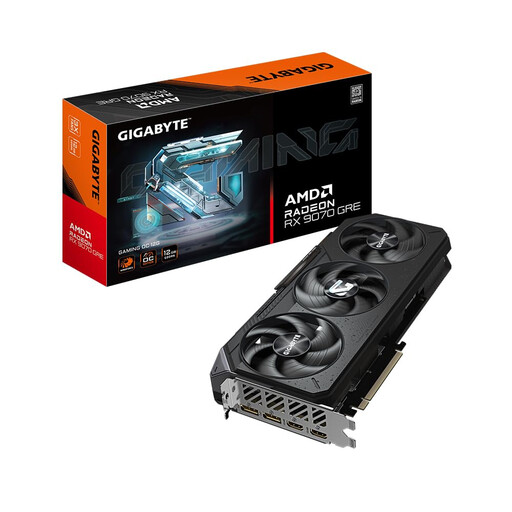
Why this product suits the profile: The AMD Radeon RX 9070 GRE combines 12 GB GDDR6 with PCIe 5.0, three DisplayPort connections and a dual BIOS for performance or silent operation.
The dual BIOS lets you choose between two operating profiles. At 288 × 132 mm, with a recommended power supply capacity of 700 W, system planning remains straightforward.
Three fans, 12 GB GDDR6 and support for a maximum resolution of 7680 × 4320 pixels.
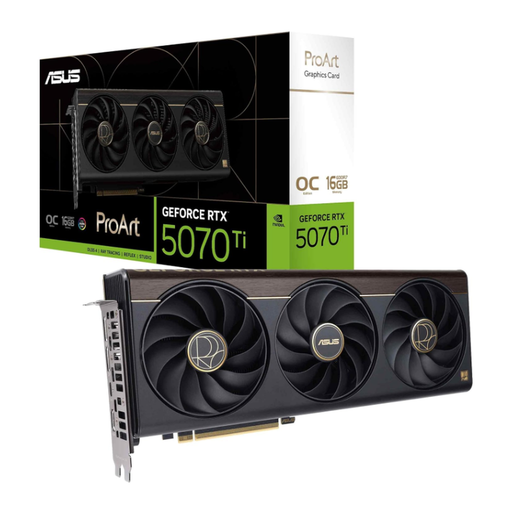
Why this product suits the profile: This card combines 16 GB GDDR7 with a 2.5-slot design and a USB-C connection, which can be practical for suitable content creation workstations.
The card width is specified and the USB-C connection is clearly stated. This allows creators to check in advance whether their monitor and peripheral setup is compatible.
Blackwell architecture, 16 GB GDDR7 and a boost clock speed of up to 2610 MHz in OC mode.
We have put together a complete, regularly updated list of products that fully meet these strict selection criteria and the safety regulations applicable in the EU.
It depends on the game, frame rate and graphics settings. An RTX 5070 with 12 GB GDDR7 or an RTX 5070 Ti with 16 GB GDDR7 is suitably specified for many systems at this resolution. You should also check your monitor’s refresh rate, power supply and available space in the case.
For basic Full HD systems, 6 or 8 GB may be sufficient. For 1440p gaming with high texture detail, 12 GB or more is a sensible guideline. For 4K gaming, content creation and AI applications, 16 GB or more may be relevant. The amount you need always depends on your software and workflow.
A fixed lifespan cannot be guaranteed. Factors include temperature, dust, fan operation, workload and the quality of the rest of the system. Regular cleaning, unobstructed airflow and a suitable power supply help maintain stable operating conditions. Before buying, you should also check the warranty information and the availability of current drivers.