
Lieferung heute & morgen

Qualitätsgarantie

Willkommens-Angebote freischalten: KOSTENLOSE Lieferung | Bis zu 80 % RABATT | Kostenlose 30-Tage-JoyPlus-Testphase
App herunterladen
When you want to buy a graphics card, model names, boost clocks and bold performance claims are often the first things you look at. However, several other factors are essential for making a reliable choice: resolution, video memory, power supply, dimensions and the connections you actually need. An expensive GPU may be unusable in the wrong case, or fail to deliver its full performance because the power supply is too weak.
This buying guide from the Joybuy Product Recommendation Officer explains the most important criteria objectively and presents suitable models for different usage profiles.
Many graphics cards technically support a maximum output of 7,680 × 4,320 pixels, or 8K. That does not automatically mean that current games will run at high frame rates in 8K. Actual performance depends on factors including the game, graphics settings, ray tracing, drivers and upscaling technology.
A 4K gaming graphics card should therefore not be chosen solely because it carries an 8K symbol. The GPU class, video memory and the monitor’s intended refresh rate are what really matter.
High-performance models often have large heatsinks. An ASUS ROG Astral RTX 5080, for example, is 357.6 mm long and requires a 3.8-slot design. The GIGABYTE AORUS RTX 5080 Master Ice is even larger, measuring 360 × 150 × 75 mm.
Before buying, you should therefore check the following dimensions inside your case:
An SFF graphics card may be suitable for compact systems, but it must still be checked against the exact case dimensions. “SFF-Ready” is no substitute for measuring.
A powerful NVIDIA GeForce RTX graphics card requires a suitably rated power supply, depending on the model. According to the product details, 750 W is recommended for the GIGABYTE GeForce RTX 5070 EAGLE OC, while 850 W is recommended for the ASUS and GIGABYTE RTX 5080 models. The Palit RTX 5090 GameRock OC specifies a recommendation of 1,000 W or more.
With cards featuring a 12V-2x6 connector, the plug should be fully inserted and routed without putting it under severe bending stress. If you have an older power supply, check whether a suitable certified cable or the supplied adapter can be used.
VRAM affects how many high-resolution textures, models and working data can be processed at the same time. For 1080p and many 1440p applications, 8 to 12 GB may be sufficient. For 4K, extensive mods, video work or 3D projects, 16 GB or more offers greater flexibility for the long term.
A GDDR7 graphics card offers high memory bandwidth compared with older memory types. Examples from our selection include:
However, memory capacity alone is not the only factor. GPU architecture, memory interface and bandwidth must be considered together. You can find more models in our selection of graphics cards with GDDR7 VRAM.
A PCIe 5.0 graphics card can generally also be used in a compatible older PCIe slot. The specific platform may affect the available bandwidth. For most desktop systems, the mechanical and electrical PCIe x16 slot is the key consideration.
The Palit GeForce RTX 5090 GameRock OC is listed with a PCI Express 4.0 x16 interface, while many RTX 5070, RTX 5070 Ti and RTX 5080 models use PCIe 5.0. This alone does not automatically make a model more or less suitable: the motherboard, CPU, power supply and case must be considered as a complete system.
For multiple monitors, the DisplayPort and HDMI versions are important. Many current models offer DisplayPort 2.1b and HDMI 2.1b. The maximum possible resolution and refresh rate also depend on the monitor, cable and compression used, such as DSC.
When it comes to cooling:
Features such as DLSS 4, G-Sync, Reflex and Studio drivers may be relevant for compatible games and applications. However, they should not be regarded as a substitute for sufficient raw performance and suitable VRAM.
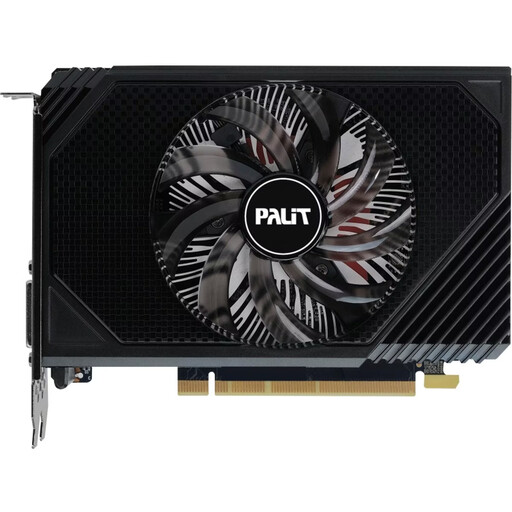
Why this product suits the profile: This compact card is 16.2 cm long, has 6 GB GDDR6 and is specified with a recommended power supply rating of 300 W. It is suitable for upgraders with limited space and moderate gaming requirements.
Its dimensions and low specified power consumption make it easier to assess for older or smaller desktop systems. However, the card should not be compared with a current high-performance 4K card.
Compact 16.2 cm format, 6 GB GDDR6, HDMI 2.1 and DisplayPort 1.4a.
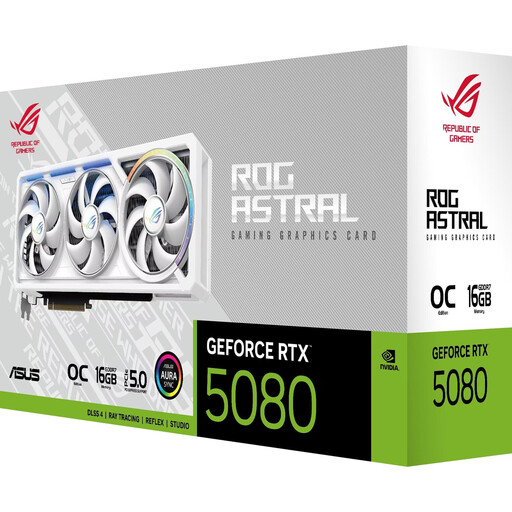
Why this product suits the profile: This card combines 16 GB GDDR7, a PCIe 5.0 interface, five video outputs and a four-fan cooling system. It is designed for performance-focused 4K and multi-monitor systems.
Its 3.8-slot height and recommended 850 W power supply rating make a compatibility check essential before purchase.
16 GB GDDR7, specified memory bandwidth of 960 GB/s, PCIe 5.0 and support for up to four monitors.
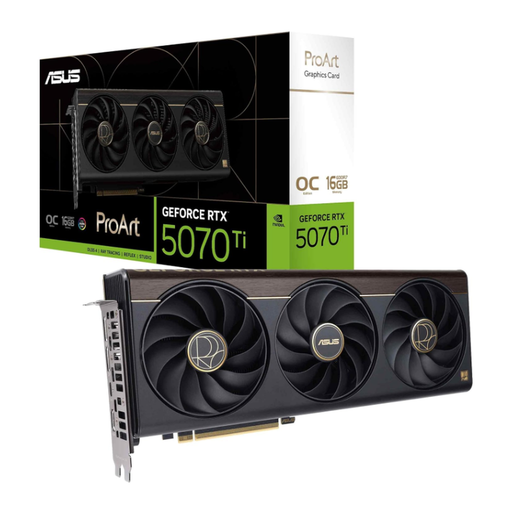
Why this product suits the profile: As a graphics card for content creation, this model offers 16 GB GDDR7, a 2.5-slot design and a USB-C connection. DLSS 4 and Studio support are relevant for compatible applications.
The specified VRAM and additional connection are measurable criteria for workflows involving multiple displays or creative software, rather than relying solely on marketing terms.
16 GB GDDR7, 2.5-slot design, USB-C and a specified boost clock of up to 2,610 MHz in OC mode.
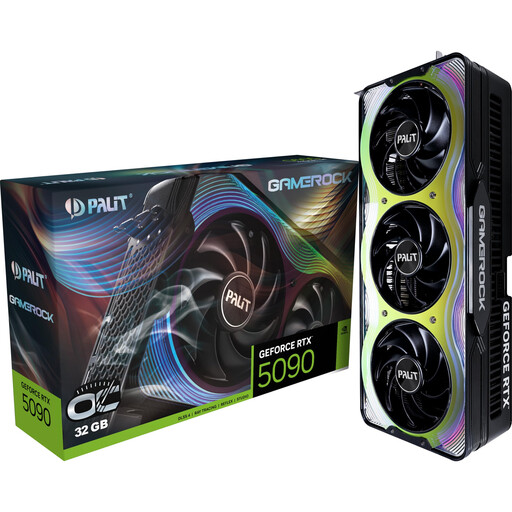
Why this product suits the profile: According to the product details, the RTX 5090 GameRock OC has 32 GB GDDR7, a 512-bit interface and connections for up to four displays. It is designed for systems with correspondingly high power requirements.
The product data specifies clear requirements: a length of 332 mm, a recommended power supply of 1,000 W+ and a 12V-2x6 connector. This allows you to check before buying whether your system is equipped for the card.
32 GB GDDR7, 512-bit memory interface, specified bandwidth of 1,792 GB/s and DisplayPort 2.1b.
We have put together a complete, regularly updated list of products that fully meet these strict selection criteria and the safety regulations applicable in the EU.
Depending on the game, frame rate and detail settings, models such as the RTX 5070, RTX 5060 Ti or an AMD Radeon graphics card from the appropriate performance class may be suitable for 1440p. Make sure you have sufficient VRAM, the connections required by your monitor and the recommended power supply rating for the specific card model.
Power consumption is often specified as TDP or board power. The product details may list, for example, 70 W for the Palit RTX 3050 StormX, 250 W for the GIGABYTE RTX 5070 EAGLE OC and 360 W for various RTX 5080 models. Running costs also depend on gaming time, energy prices, efficiency and the power supply’s efficiency rating.
It is not possible to determine a reliable service life from the model name alone. Factors include operating temperature, exposure to dust, fan operating time, power supply quality and regular driver maintenance. A well-ventilated case, correctly connected power cables and secure mounting can help ensure reliable operation. Heavy cards should be fitted with a support bracket to reduce mechanical strain on the PCIe slot.