
Lieferung heute & morgen

Qualitätsgarantie

Willkommens-Angebote freischalten: KOSTENLOSE Lieferung | Bis zu 80 % RABATT | Kostenlose 30-Tage-JoyPlus-Testphase
App herunterladen
Anyone looking to buy a graphics card in 2026 faces a wide choice of NVIDIA GeForce RTX and AMD Radeon RX models. However, your decision should not be based solely on model numbers, clock speeds or marketing promises. Resolution, video memory, case size, power supply and your system’s connections are all crucial factors.
This buying guide from the Joybuy Product Recommendation Officer explains which technical specifications matter when making your purchase and which graphics cards suit different PC setups.
Specifications such as “8K support” often refer to the maximum output resolution or connection compatibility. This does not necessarily mean that current games will run smoothly in 8K. When choosing a graphics card, it is more important to consider whether it will be used for 1080p gaming, 1440p gaming or 4K gaming.
A 16 GB GDDR7 graphics card offers more memory headroom than an 8 GB model. However, actual performance also depends on the GPU, memory bus, bandwidth, cooling system and game engine. Even a 4 GB graphics card may be suitable for older or less demanding titles, but it offers less flexibility for new games with highly detailed textures.
When installing a graphics card, people often check only its length in millimetres. You should also consider:
A compact graphics card may therefore be a better choice for a small computer than a longer model with greater cooling capacity.
For Full HD at 60 Hz, an entry-level or mid-range card is sufficient in many cases. If you use a 1440p monitor with a high refresh rate, you should choose the GPU and video memory more carefully. A graphics card for 4K gaming will generally require higher memory bandwidth, sufficient VRAM and powerful cooling.
The RTX 5050 and RTX 5060 series are positioned on paper primarily for 1080p and, depending on the game, 1440p scenarios. In the selection covered here, the RTX 5070, RTX 5070 Ti and RTX 5080 feature larger memory interfaces or greater computing resources. Actual frame rates will still depend on the game, settings, processor and driver version.
Pay attention to these three related specifications:
A PCIe 5.0 graphics card can provide high interface bandwidth in a compatible system. It will generally also work in many older PCIe slots, although the platform determines the available transfer rate. Before buying, check that your motherboard, processor and power supply are compatible.
The manufacturer’s recommended power supply rating is an important guide. In this selection, the recommendations range from 400 W for the PowerColor RX 6500 XT to 850 W for various RTX 5080 models. You must also ensure that the appropriate connector is available:
More fans do not automatically mean lower noise levels. Cooler size, fan curve, case ventilation and ambient temperature are all important. A gaming PC case with a mesh front and organised airflow helps dissipate heat.
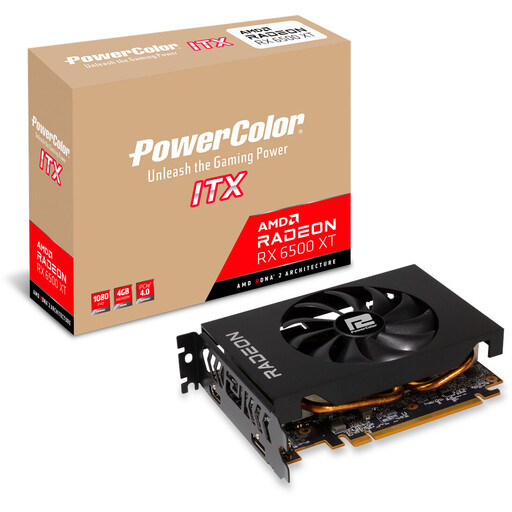
Why it’s suitable: This ITX graphics card is designed for compact 1080p systems and upgrades where space is limited.
At 165 mm long and with a 2-slot design, it is easier to check the space required against your case before buying.
4 GB GDDR6, PCI Express 4.0, 107 W power consumption, 1 × DisplayPort 1.4 and 1 × HDMI 2.1.
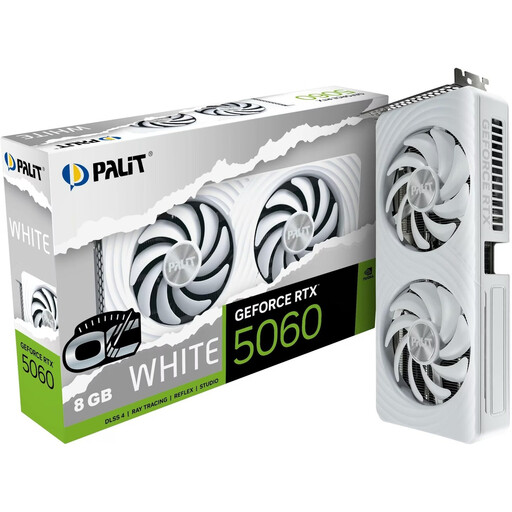
Why it’s suitable: This card combines a 2-slot design with an SFF-Ready designation, making it suitable for desktop systems where space is limited.
The stated length of 262.2 mm and the required 8-pin power connection make it easier to check compatibility.
8 GB GDDR7, PCI Express 5.0, 145 W power consumption, 2 fans and support for up to four monitors.
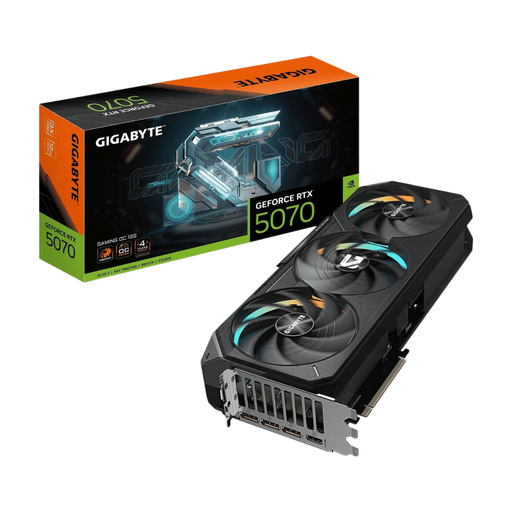
Why it’s suitable: 16 GB GDDR7 and a 256-bit memory interface provide plenty of memory capacity for high resolutions and demanding textures.
The dimensions of 340 × 140 × 70 mm and the 3-slot design make it clear that a spacious case is required.
PCI Express 5.0, 16 GB GDDR7, three fans, 300 W power consumption and a recommended 750 W power supply.
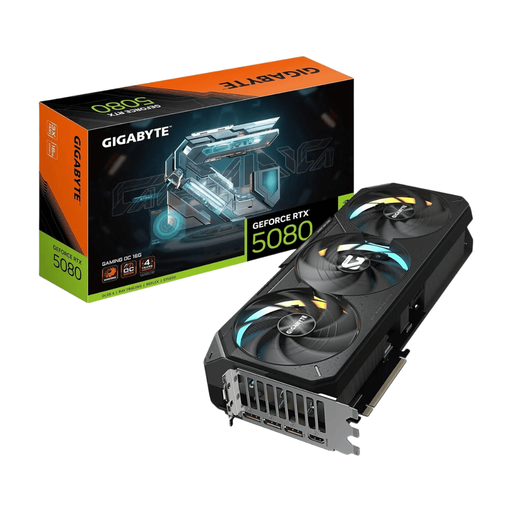
Why it’s suitable: Content creators, 4K gamers and users with several high-resolution monitors benefit from 16 GB GDDR7 and five video outputs.
The 4-slot design, 340 mm length and recommended 850 W power supply rule out many small cases from the outset.
10,752 CUDA cores according to the product specifications, PCI Express 5.0, 360 W power consumption and three fans.
Explore the full selection of graphics cards and compatible components, organised by technical criteria for different PC systems.
A spacious ATX PC case with sufficient GPU clearance and several fan mounting points is ideal for large graphics cards. The NZXT H7 Flow supports graphics cards up to 400 mm long and has room for three 120 mm fans at the bottom. For particularly comprehensive systems, the MSI MEG PROSPECT 700R is designed to support graphics cards up to 400 mm, E-ATX motherboards and up to ten fan mounting positions.
For vertical installation, you must also check the mounting bracket, clearance from the side panel and compatibility of the riser cable. A heavy graphics card should also be supported to prevent unnecessary strain on the PCIe slot.
This depends on the game, level of detail and desired refresh rate. Models such as the RTX 5060 Ti, RTX 5070 and RTX 5070 Ti cover different performance levels. More VRAM may be useful for demanding textures and longer-term use. You should also check that your processor and monitor are a good match for the graphics card.
Use the manufacturer’s recommendation as a guide and take your processor, drives and additional fans into account. In this selection, for example, 550 W is specified for certain RTX 5060 models, 750 W for RTX 5070 Ti cards and 850 W for RTX 5080 variants. The power supply should have suitable, certified power cables.
Its physical service life depends on temperature, dust levels, fan operation and power supply quality. Technically, a graphics card can be used for several years. Whether it remains capable of running new games depends more on VRAM, graphics settings, driver support and the resolution you want to use. Regular cleaning and a well-ventilated case help ensure stable operation.