Photographers using a tripod
If you’re photographing several greeting cards by the window with the same framing, you can take the shot without touching the camera.


For consistent greeting card photos using a tripod, a suitable remote shutter release is all you need if you want to avoid touching the camera when taking the shot. Whether a cable, Bluetooth or infrared is suitable depends on the exact camera model and its connection or receiver capabilities. Canon UK also describes app-based remote control for many Canon cameras, which can replace a separate shutter release for occasional shots, provided your camera and smartphone are supported.
If you’re photographing several greeting cards by the window with the same framing, you can take the shot without touching the camera.
If you’re changing the cards and props between shots, a suitable remote control can let you take the picture from beside your setup.
If you only photograph cards now and then, first check whether your camera offers a compatible app-based remote control.
First, check which types of remote control your camera actually supports. Then decide whether a cable will do for your regular spot by the window, or whether you’d prefer to trigger the shutter wirelessly while rearranging the cards.
| What matters | What to check before buying | Who is this most relevant to? |
|---|---|---|
| Compatibility with your camera | Check the exact camera model, the manufacturer’s compatibility list and, for wired releases, the connection. Also check whether any adapters are needed. | If you’re looking for an accessory for a particular camera, confirmed compatibility is what matters most. Around 33% of shoppers are likely to have this concern. |
| Taking steady shots on a tripod | Check whether a simple shutter button will do. For repeated shots, remember to use a sturdy tripod too. | If you want to position several cards in much the same way in the frame, taking the shot without touching the camera is important. Around 27% of shoppers are likely to prioritise this. |
| Keeping your distance while rearranging cards | Check the supported wireless connection, whether a receiver is needed and where you’ll be operating the remote from. For wireless kits, also check that the camera cable is suitable. | If you don’t want to keep returning to the camera when changing cards, a wireless shutter release can be useful. Around 20% of shoppers are likely to prioritise this. |
| Avoiding extra purchases | Check whether your camera already supports app-based remote control and what’s included, particularly cables, adapters and any batteries required. | If you only photograph cards occasionally, you may want to try an app that’s already supported first. Around 20% of shoppers are likely to want to avoid additional purchases. |
For the Wireless Remote Shutter Release 28146, Rollei explains that a suitable camera cable is required.
Before buying, check that the required cable is compatible with your camera model and included in the box.
Depending on the kit, you may need to buy a camera cable separately.
These shutter-release methods require different features or receivers. A camera’s Bluetooth capability alone doesn’t confirm that it supports a particular remote control.
Check the compatibility list for the specific model. With infrared, also make sure it will work from where you plan to operate it.
Connectors that look similar aren’t necessarily compatible. For certain cameras used with the RR-100, Fujifilm specifies that an additional 2.5 mm to 3.5 mm adapter is required.
Check the exact camera model list, the required connection and any adapter you may need, rather than judging by the shape of the plug alone.
Some Fujifilm camera combinations may need an additional adapter. Fujifilm distinguishes this from the L-shaped extension included in the box.
Canon offers camera-specific wired, Bluetooth and infrared remote shutter releases, as well as Camera Connect as a possible app alternative for supported cameras.
Nikon offers wired remote releases for specific compatible cameras, including the MC-DC2 for certain DSLRs and the MC-DC3 for compatible Z models.
The RMT-P1BT is a Bluetooth remote control for compatible Sony cameras with a built-in receiver.
The RR-100 is a wired option for specific cameras listed in the X and GFX ranges.
The Wireless Remote Shutter Release 28146 is a radio-controlled option for setups where wireless operation or interval functions are useful.
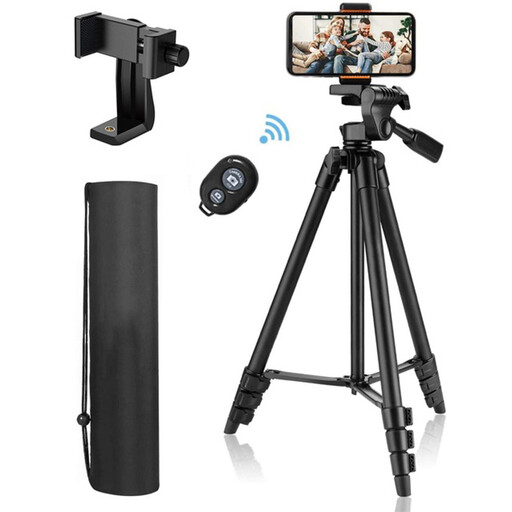
The following Joybuy products are suitable for photographing greeting cards with a smartphone and triggering the shutter wirelessly. They aren’t a selection of remote releases for separate cameras.
 No image available
A good choice if you want to photograph greeting cards with a smartphone, position it on a tripod and take pictures from a distance. It isn’t stated to trigger the shutter on separate cameras.
According to the product description, the Bluetooth remote control takes photos and videos on iOS or Android devices.
The tripod height is adjustable from 44 to 106 cm. The smartphone holder is described as suitable for devices up to 9 cm wide.
Not necessarily. If your camera supports a compatible app-based remote control, you can start by using its shutter-release function. Canon UK describes this option for many Canon cameras, but check that your specific model is supported.
Set up your camera securely and frame your shot before changing the cards. Canon UK recommends using a tripod to keep the framing consistent. A supported remote control also lets you take the picture without touching the camera.
No. Check the compatibility list for your exact camera model, as well as the connection and any adapter you may need. For certain cameras used with the RR-100, Fujifilm explicitly specifies an additional 2.5 mm to 3.5 mm adapter.
Check whether any required camera cable, receiver, adapter or batteries are included. Rollei says the Wireless Remote Shutter Release 28146 requires a suitable camera cable; requirements may vary by model.
For products covered by relevant EU harmonisation legislation and placed on the EU market, the Federal Network Agency describes CE marking as a requirement. This doesn’t confirm that any individual model is compliant. The German Environment Agency recommends taking used batteries and rechargeable batteries to collection points rather than putting them in household waste.